gorazdr27768010
Participant
October 29, 2016
Answered

AUDIO Problem: Premiere CC Does Not Import Audio Track of a Video, and Does Not Import an Audio File

  • October 29, 2016
  • 7 replies
  • 44004 views

Hi, everybody!

So I figured I have an audio problem.

That happened not only with a video file that has sound but also with an audio only file.

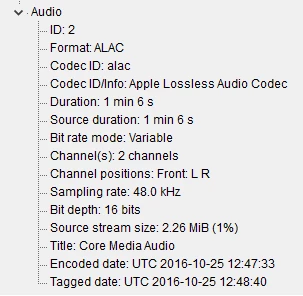
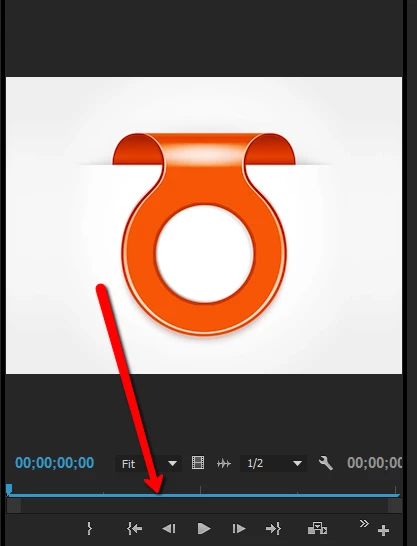
First of all, I tried importing my .mov video, which couldn't be done (file details below in picture 1 & 2). I had to install Quicktime player in order to be able to import the video. But no audio track comes with it, just video. I recently had to re-install my Windows 10, maybe I am missing some codecs?

But what's weird, is that I had a problem with a different (audio) file even before re-installing Windows and all Adobe programs (before re-install I had no problem with the before mentioned video+audio file). So the way it looks is that I import that audio file (file details in picture 3), try to play it, but that little pin doesn't move. I can't move it either.

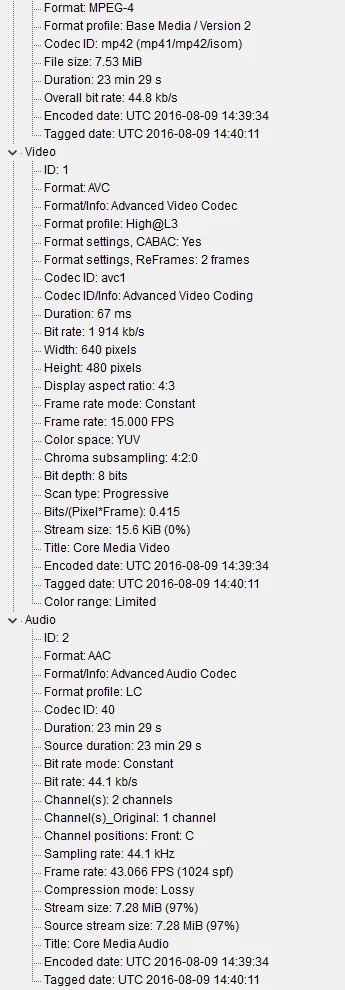
Screenshot can be seen on picture 4, with the arrow pointing at the blue line that shouldn't be blue. Another fact: when the audio file is imported, it says it has 15fps and a resolution of 640X480. That doesn't make sense because it's audio only.

Things I already tried and did not work:

- importing both kind of files through Media Browser, but that doesn't do the trick

- installing and using ASIO codec

- reinstalling Premiere Pro CC latest version
- updating my audio drivers in Device Manager

- logging out and signing into Premiere

- restarting computer

- deleting media cache files

Just for the record, so far I am not having problems with other files, and they get imported fully and correctly.

Do you guys have any ideas on how to solve this?

IMAGE 1 & 2: The Video File
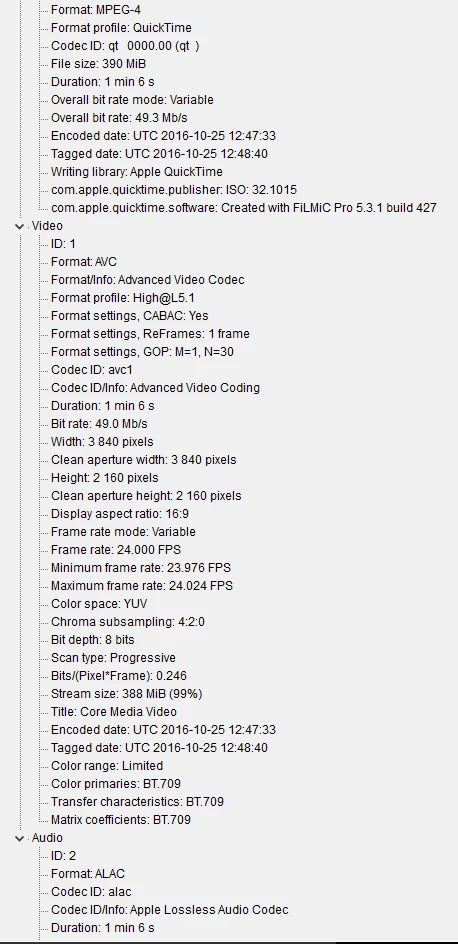

IMAGE 3: Audio only file
    This topic has been closed for replies.
    Correct answer Jsantacroce

    I got around this (which I had big problems with) if it is the same problem, after reading two tricks (which is stupid that I had to do it) in other posts.

    1: You can download MPEG_StreamClip (Free) which you just run it through that and it fixes the audio so PrPro recognizes it. This worked most of the time. I then replaced the clip with the new output from Streamclip.

    2: The other fix, more stupid but worked 100% of the time. Was to copy the same exact clip to a different folder. Then import or replace the original clip with the copy from another folder. I don't know why it works other than it recreates the WaveForm and\or Peak file. These are the annoyances that really upset me.

    Good luck.

    7 replies

    R Neil Haugen
    Legend
    June 16, 2020

    Jordan,


    They released a new update today. BEFORE working in the new update, dump your cache files. Then try the new update.


    Neil

    Everyone's mileage always varies ...
    Inspiring
    June 15, 2020

    Here we are, halfway through 2020, and this is a problem that still exists. I have tried every solution put forth from this community to no avail. Has there been any kind of official reply wherein they recognize this issue and speak to resolving it?

    R Neil Haugen
    Legend
    June 15, 2020

    This is a problem for only a small subset of users ... it seems to require specific media and perhaps computer gear/OS for it to happen.


    So ... what is your media that is having this trouble? How was it created? What things have you tried? And what is you OS?


    Neil

    Everyone's mileage always varies ...
    Inspiring
    June 16, 2020

    Hi Neil. Thanks for replying. Ok:

    • It was working fine two days ago (when i had to edit a 60s clip), and then yesterday when I went to import two additional clips, they had no audio. I then tried to, in a new project, import the original 60s clip which was fine, and again, no audio track was apparent. 
    • Importing .mp4 into a project is not yielding the audio track along with the video (not a factor of it being dragged to the timeline to see no audio, there's just clearly no audio track being brough into the bin)
    • This was working previously (have since tried importing clips that have previously worked and now they're no longer coming in with audio either)
    • I have cleaned out the cache, common, peak files per all of the suggestions above
    • I have restarted premiere
    • I have created entirely new projects
    • I have restarted my machine
    • Using a macbook pro on OSX 10.15.4 with the most up-to-date version of Premiere installed.
    • There was no update applied to the software that wouldve caused this


    Hope this helps!

    brunoc92303474
    Participant
    May 8, 2018

    Same problem here. I'm using Premiere 12.1.1 and no audio whatsoever with some footage. Have to import the footage in Final Cut Pro and then export audio and sync it....What is Adobe doing about this ?????

    R Neil Haugen
    Legend
    May 8, 2018

    On most rigs, this isn't an issue. Which doesn't mean it doesn't suck stinky stuff if it's happening on your rig. Sympathies ... seriously.

    File the report on the new User Voice system they've got, a vastly improved setup from the old bug report setup.

    Adobe Bug /Feature Request form: https://adobe-video.uservoice.com/forums/911233-premiere-pro

    And btw, what's the media that sometimes out-puzzles PrPro?

    Neil

    Everyone's mileage always varies ...
    Participant
    November 4, 2016

    This has been an ongoing problem for what seems like forever

    have to question the "fit for purpose" of Premiere Pro as this is a "show stopper" problem

    I started with only a problem from one of my cameras with .mov files, and it has since progressed to another camera with .avi files

    I've been using the MPEG_StreamClip work around just to keep me going, but as others have said we shouldn't need to.

    Adobe need to get their act together and sort it out once and for all

    and before people start giving a list of things to do, I've tried them, countless times and still no joy

    gorazdr27768010
    Participant
    October 31, 2016

    Thank you all for the help.

    Jsantacroce :
    1. I tried this solution, exported audio in mp3 and added it to the timeline. It was a few frames shorter than the video clip, but it did the trick. It's not the perfect solution, but it works. Awesome!
    2. Unfortunately, it did not work.

    R Neil Haugen:

    I tried it, no success :/

    Jim_Simon:

    That looks problematic, thanks for the heads up. What do you use instead of Quicktime then? As I mentioned, I couldn't import even only the video part  of my footage before I installed Quicktime.

    PS: If you guys have any more ideas to make Premiere recognize audio, I would love to try them out and report the results.

    Legend
    October 31, 2016

    What do you use instead of Quicktime then?

    As a player?  My preference is for the following.

    Global Potplayer

    As a video format?  I just switched to the Blackmagic Pocket Cinema Camera, which shoots in RAW and ProRes.  Thankfully, both Premiere Pro and Resolve can handle the ProRes files without installing QuickTime.

    Bottom line, if the software I use can't handle the QuickTime files without installing QuickTime, then I just will not use those files.  For me, NOT installing QuickTime is the priority.

    Legend
    October 29, 2016

    I had to install Quicktime

    You should undo that.

    Urgent Call to Action: Uninstall QuickTime for Windows Today -

    Homeland Security warns Windows PC users to uninstall Quicktime | Fox News

    Use this to remove it, making sure to engage the Powerful Scan to remove leftovers.

    IObit Uninstaller, Best Uninstall Tool for Your PC - IObit

    JsantacroceCorrect answer
    Inspiring
    October 29, 2016

    I got around this (which I had big problems with) if it is the same problem, after reading two tricks (which is stupid that I had to do it) in other posts.

    1: You can download MPEG_StreamClip (Free) which you just run it through that and it fixes the audio so PrPro recognizes it. This worked most of the time. I then replaced the clip with the new output from Streamclip.

    2: The other fix, more stupid but worked 100% of the time. Was to copy the same exact clip to a different folder. Then import or replace the original clip with the copy from another folder. I don't know why it works other than it recreates the WaveForm and\or Peak file. These are the annoyances that really upset me.

    Good luck.

    R Neil Haugen
    Legend
    October 29, 2016

    Another suggestion is to delete the preview & cache files, rename the folder the audio media is in, and re-start PrPro. Often just renaming the folder gets PrPro around the issue inside itself.

    Neil

    Everyone's mileage always varies ...