Participant
January 2, 2019
Answered

Audio waveform not showing visually

  • January 2, 2019
  • 47 replies
  • 318448 views

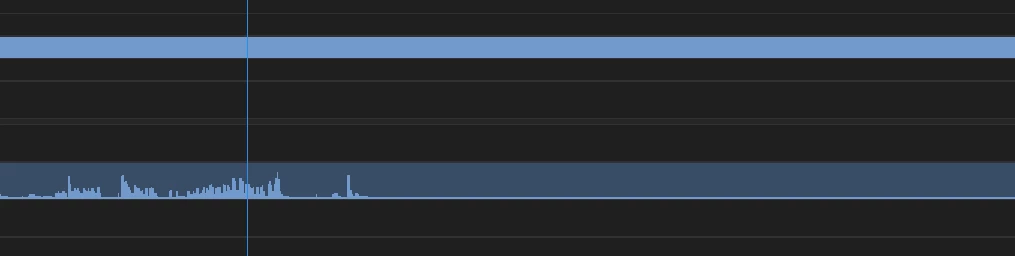
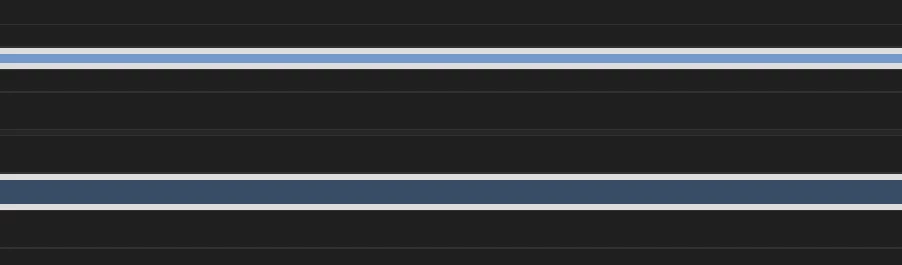
Having issues with this since updating to 2019. Basically, after importing a clip into the timeline everything is as it should be (video plays, audio plays) but the audio waveform does not show up until it's played through so I cannot visually see the audio waves unless I play/skip through the whole clip, which obviously makes editing a lot slower.

Attached an example. Image 1 is the clip just imported to the timeline and image 2 is after playing through a few seconds (as you can see the audio only shows up after I've played through the clip and the remaining audio waves are still blank)

Any help would be appreciated!

Using Windows and Adobe Premiere Pro 2019.
Correct answer just take actioi16874188

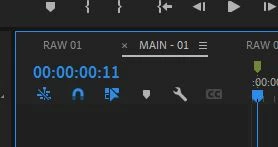
Another option is to click on the timeline display settings button - it's the wrench icon in this pic.... There you'll see an option to turn the waveforms on or off. 

47 replies

KillyjoyyJess
Participant
April 8, 2019

The last update completely fixed it for me and all of my co-workers, thankfully :/ good luck to those that didn't benefit from the update. It might be worth uninstalling and re-installing now that we know the update is supposed to fix it.

Inspiring
April 8, 2019

Congrats but the update did nothing to help me like I hoped

Participant
April 8, 2019

Just downloaded and used the latest update of PrPro - no luck with waveforms.

Adobe please help??? My work flow has slowed down dramatically... Final Cut X is looking more interesting all them time, especially considering the render times that program offers with Mac computers.

Participant
April 1, 2019

Hi guys - I've trashed the preferences and done the other tips but no good.

Very frustrating - really slows down editing audio when you can't see the waveform, means selecting the talking parts needs to be done aurally and in real time not visually.

Has there been a fix yet?? Adobe help?????????

Inspiring
April 1, 2019

One work around would be to convert the audio file to a video file

Participating Frequently
March 31, 2019

I've suddenly got the same issue - existing audio files show waveforms, newly-brought-in ones do not. None of the suggestions above solves the problem, including the so-called "answer". This is obviously something different from the problem noted in January - it's an "end of March" version of the issue.

No known software updates, Adobe or system (Mojave 10.14.3) here since last time I used the app the other day.

ryanf61127703
Participant
March 29, 2019

I to am having this issue. When the sound clip is playing I can see the levels from the sequence timeline but on my screen its just a flat line.

Inspiring
March 29, 2019

SAME HERE. AND IT HAPPENED FOR NO REASON

Inspiring
March 26, 2019

I found the problem this. Make sure the

save .cfa and .pek media cache files next to original media file when possible

is checked i goes it can't find the files if it not next to the originals.

this is in the Media cache preference

Averdahl
Community Expert
Community Expert
January 2, 2019

First, go to Edit > Preferences > Audio and make sure that the setting "Automatic audio waveform generation" is ticked. If this is un-ticked no waveforms are generated when importing files. This will not affect already imported clips, it will only affect clips you import from now on.

Second, for creating audio waveforms on clips that dont have them, select the clip/s in the Program panel and go to Clip > Generate Aduio Waveform.

If the first trick fails i would have trashed the Preferences in Premiere Pro since odd behaviours often are linked to corrupted preferences: FAQ: How to reset (trash) preferences in Premiere Pro?

Participating Frequently
March 25, 2019

So waveforms are not visible in Premiere today. Both on my computer and everyone else in my department. I've tried every "fix" "trick" the internet has to offer and still nothing.

Anyone else experiencing this fun quirk today?

Inspiring
March 25, 2019

Having the same problem. I trashed all my cashe , prefs, peks. and that  got them to show on the timeline. But the waveforms will only show if they are zoomed in on the source monitor. If I take that same audio marry black to it so now it is a video clip I see the whole waveform without having to zoom in.