

Brainiac
August 21, 2023
Answered

Auto Detect Log Video Color Space

  • August 21, 2023
  • 3 replies
  • 1065 views

Hello Everyone.


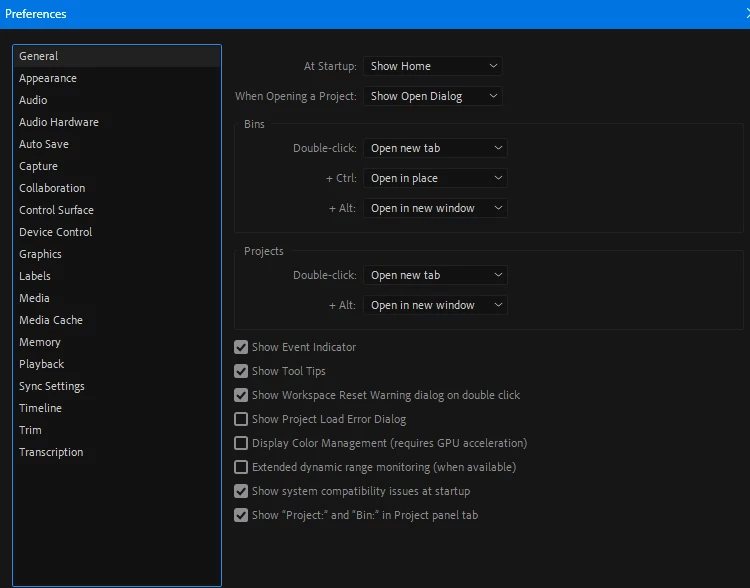
I am a PC User, and I do not see this feature in my Preferences-General. Here is the Screen-Shot

Thanks.
This topic has been closed for replies.
Correct answer Ann Bens

Try the Project Settings > General.

3 replies

R Neil Haugen
Brainiac
August 22, 2023

There are puzzling things still, the way this is implemented. Apparently, we need to know all the if this/that, but if that/this but not on Tuesday little detail bits. There aren't many with more knowledge & experience pushing Lumetri around than me ... there are some, but again, not many ... and there's some things about the new color management that I can't always get to work.


So ... @Fergus H ... we have a Canon user with a log issue. Can you assist please?

Everyone's mileage always varies ...
Brainiac
August 22, 2023

Ms. Ann.

Thank you very much. It is inside project Settings-General. I noticed it does not work with all Log Files. For example, my Canon C200 Files don't work. But I noticed Sony S-Log Works.

Thanks Again.

R Neil Haugen
Brainiac
August 22, 2023

It doesn't work with every log type file. So which Canon log are you using?


And have you checked the clip's color space ... in the Project panel, right-click/Modify/Interpret color, check the color management settings at the bottom. You may be able to set the media to the correct log form there. Then the auto-detect will work.


And the CM controls will all be going to a Settings tab in the Lumetri panel eventually. They already have this in the public beta.


Neil

Everyone's mileage always varies ...
Brainiac
August 22, 2023

Mr. Neil.

Here is the Screen-Shot, It looks like Color Management is Grayed-out. Shooting with my Canon C-200, I use Canon Log2 and Log3. Most of the time, working In Lumetric Color Panel and working with Curves, and watching my Lumetric Scopes carefully, I can get away from using any LUTS, Or Logs. Sometimes I use Magic Bullet, and Film Convert Nitrate, on my Adjustment layer, and I get very good results. Also, Instead of shooting Log2, and Log3. My favorite Gamma Setting Is Wide DR. I noticed many times I get a better result when shooting Wide DR than shooting Log. I have noticed some LUTS work well with some Clips, and some don't look good at all with other Clips. That is why I like to adjust my Lumetric Panel Manually, having a good White Balance, and watch the Lumetric Scope, using the Waveform (LUMA), Parade (RGB), and Vectorscope (YUV).

Ann Bens
Ann BensCorrect answer
Community Expert
August 21, 2023

Try the Project Settings > General.
