


Answered
Automation Blocks: Adding Row Numbers and Sorting by Column in CSV export
Hey @Mathias Moehl, I've been using Automation Blocks for a month to export shot lists from PP (vs previously exporting to EDL, converting to CSV etc) and love it — so handy!
There are two things I haven't been able to build automations for yet, both of which seem very simple. I've searched these forums, the user guide and asked ChatGPT to write a script (didn't work sadly), but still haven't figured them out, so wondered if you could help/point me in the direction of a tutorial which will:
- How would I add a column of row numbers to a CSV/spreadsheet export (e.g. in a leftmost column of the attached, starting at 1)?
- Is there a way to sort the CSV export by a specific column (either before or after it's generated but still using Automation Blocks)? For example, in the attached screengrab I'd like the CSV to be sorted in ascending order by the timecodes in the fifth column.
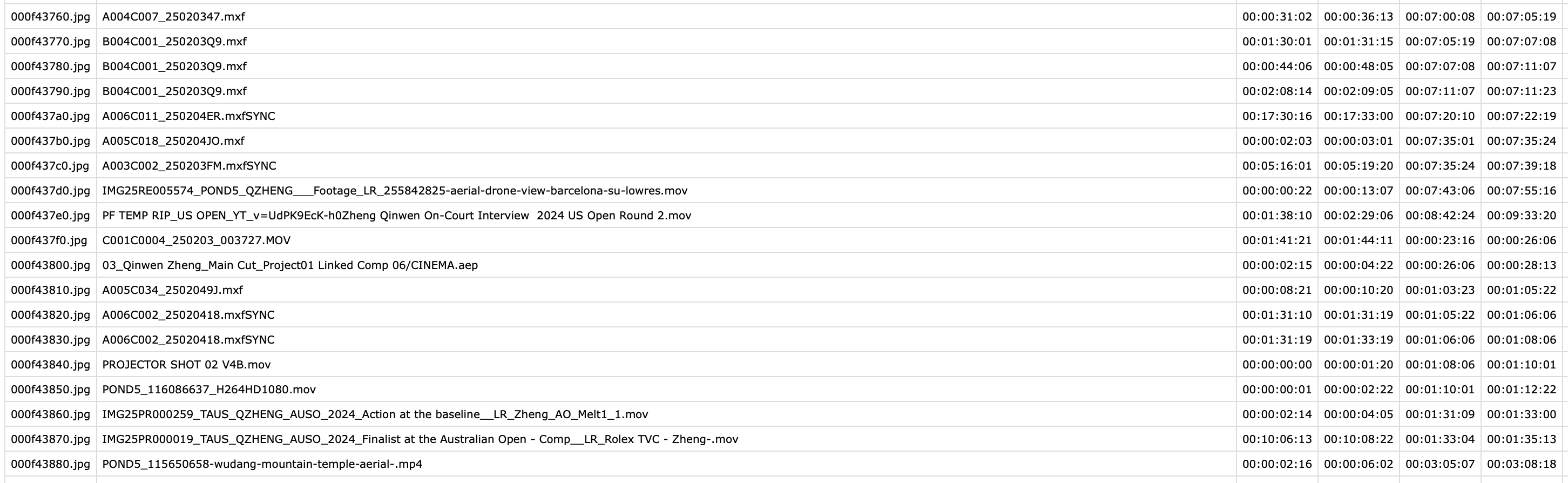
Thanks again for the amazing tool!
 AdChoices