Inspiring
April 3, 2024
Answered

Automation Blocks - Creating a script that changes frame rates

  • April 3, 2024
  • 1 reply
  • 961 views

I just started using Automation Blocks and I'm having a lot of success so far.

I'm a little stumped on this one script, as I can't figure out the flaw in my logic.


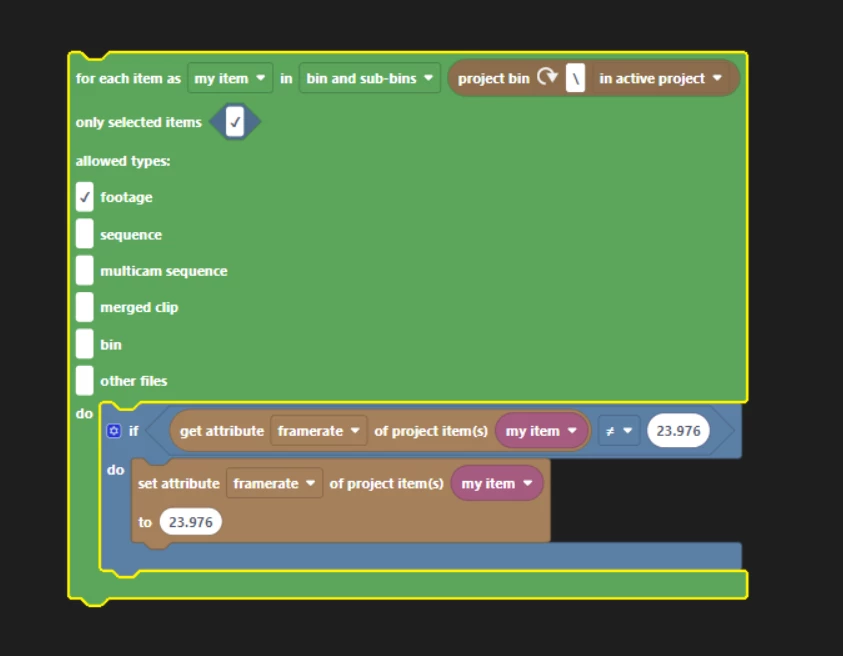
I want it to examine all selected clips in the project, and interpret the frame rate of any clip that's NOT 23.976.

I feel like what I have below should work. Any ideas why it isn't?


This topic has been closed for replies.
Correct answer Mathias Moehl

I just did some more experiments:
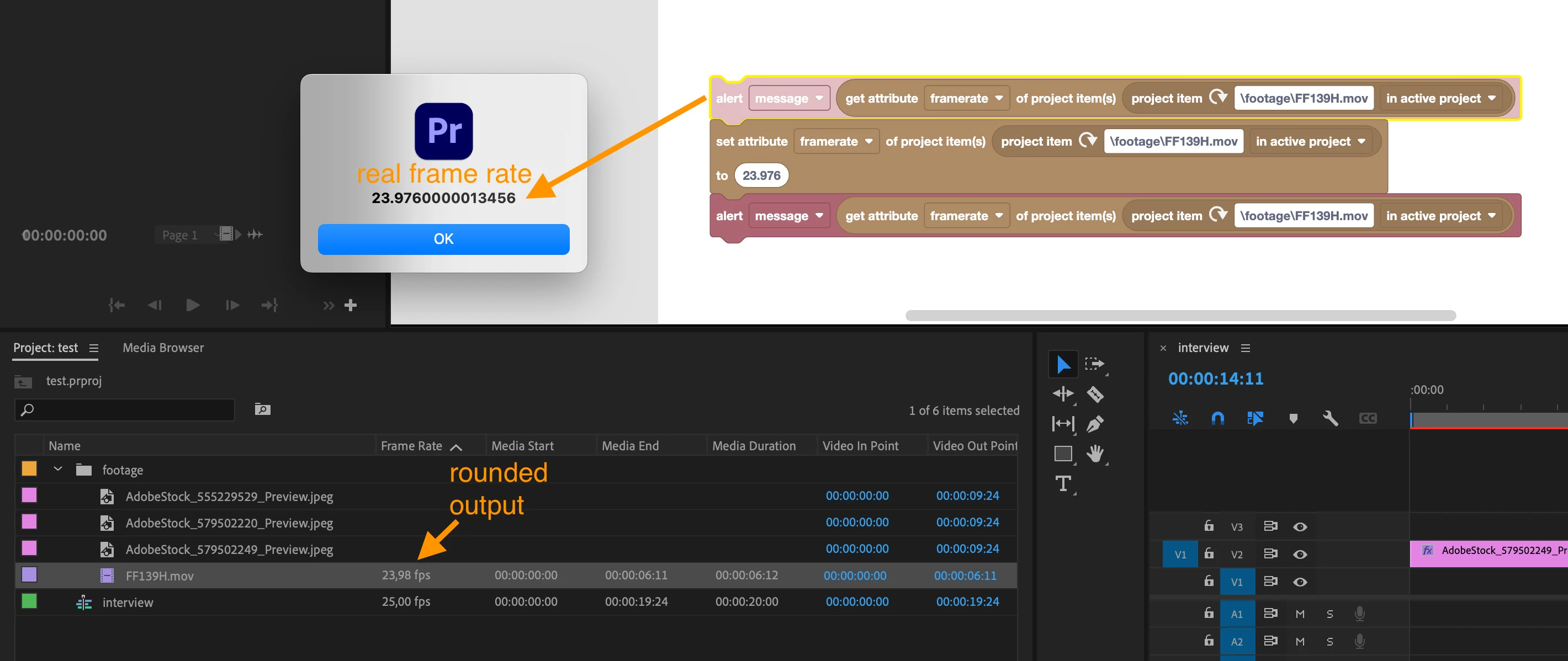
In this test you can see that when setting the frame rate to 23.976, Premiere displays it as 23.98, but when retrieving the actual value with Automation Blocks again, it is 23.97600000something - i.e. really almost 23.976 except for some tiny rounding issues.

I used alert() to show the actual frame rate both before and after changing it. When I run the tool the second time, I see the 23.976000... value also in the first alert message. Hence, I can be sure that this is the value that Pr actually stored and that the 23.98 is just what it displays.


Here is a variant of your tool, which sets the framerate of all selected project items:
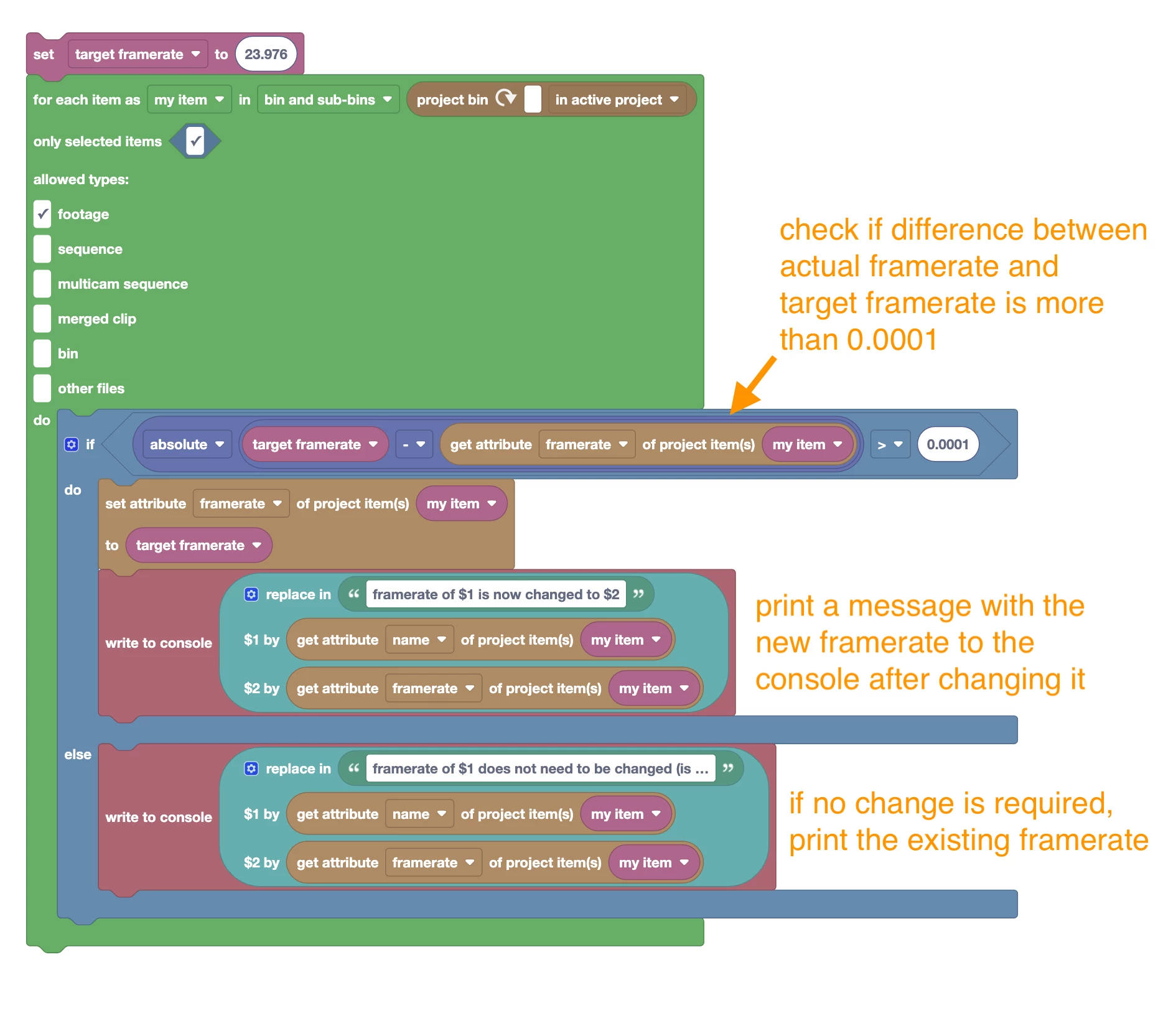
Instead of your equality check, which sets the framerate only if the item does not have EXACTLY that framerate already, I added a more fuzzy check.

Now it only sets the new framerate if the item does not have a very similar framerate already. I also added some output to the console, such that you can see what is going on. Script is attached.




1 reply

Mathias Moehl
Community Expert
April 3, 2024

It looks like the code should do what you want.

Does it only fail for 23.976 or also if you try it with say 30pfs?
If it only fails for 23.976,  it must be related to some rounding issues.

Mathias Möhl - Developer of tools like BeatEdit and Automation Blocks for Premiere Pro and After Effects
Mathias Moehl
Mathias MoehlCorrect answer
Community Expert
April 3, 2024

I just did some more experiments:

In this test you can see that when setting the frame rate to 23.976, Premiere displays it as 23.98, but when retrieving the actual value with Automation Blocks again, it is 23.97600000something - i.e. really almost 23.976 except for some tiny rounding issues.

I used alert() to show the actual frame rate both before and after changing it. When I run the tool the second time, I see the 23.976000... value also in the first alert message. Hence, I can be sure that this is the value that Pr actually stored and that the 23.98 is just what it displays.


Here is a variant of your tool, which sets the framerate of all selected project items:

Instead of your equality check, which sets the framerate only if the item does not have EXACTLY that framerate already, I added a more fuzzy check.

Now it only sets the new framerate if the item does not have a very similar framerate already. I also added some output to the console, such that you can see what is going on. Script is attached.



Mathias Möhl - Developer of tools like BeatEdit and Automation Blocks for Premiere Pro and After Effects
Inspiring
April 3, 2024

Wow. You nailed it. Thank you so much for your time and attention on this.

This plugin is an absolute game changer for my workflow. I can't wait to see how far I can take it.