


Inspiring
January 30, 2025
Answered

Automation Blocks - Exports not Matching Timelines when using Script

  • January 30, 2025
  • 1 reply
  • 1882 views

Hello @Mathias Moehl 


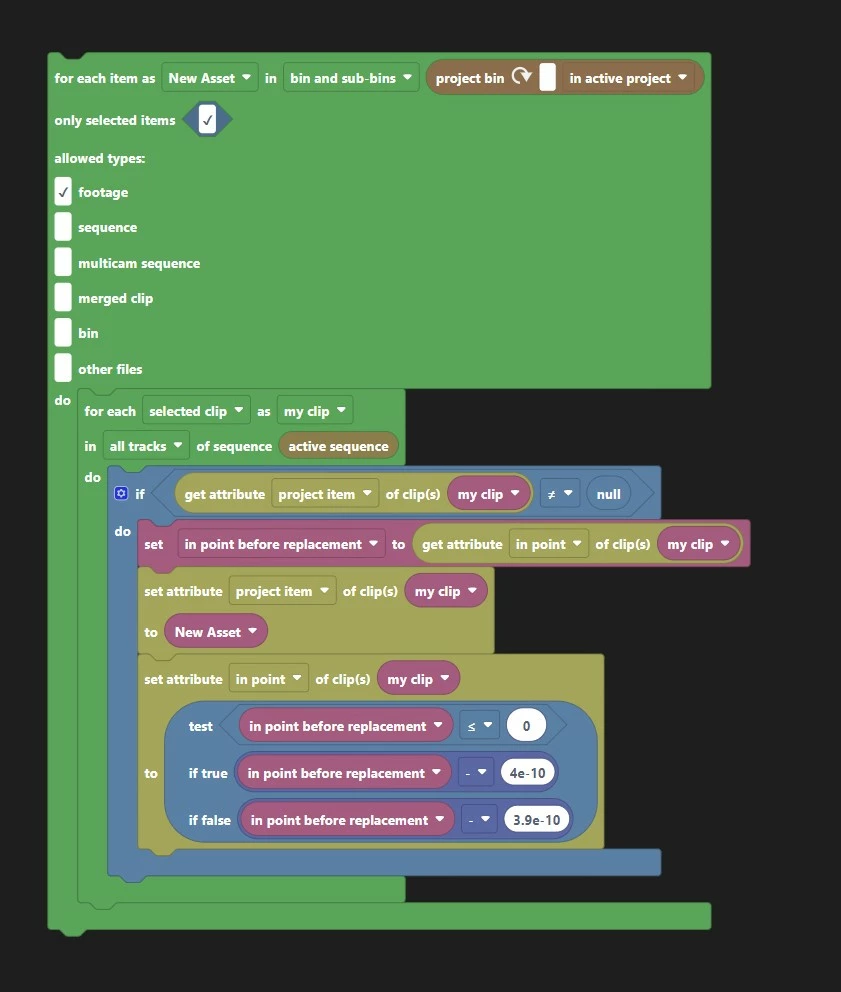
The attached script swaps out the selected clip in your sequence for the selected project item in your bin, retaining the in-point of the sequence clip.


It works fine, but the exported files don't match the sequences! All clips in the timeline that were applied by the script start at the wrong frame in the exported video files.


For example...

Clip 1 should start a 1:06, but starts at :19

Clips 2 and 3 should start at  :20, but start at :19


Then, after you close and re-open the project, the sequences match the exports, showing that the clips in the sequence have the incorrect in points. Boggling that the project can look one way, and then another way after you re-open it.


I would think it has something to do with the framerate rounding error the script accounts for, but Clip 1 is off by too many frames.


Two editors on two different machines were able to recreate this error a number of times.


Very confusing one! Any thoughts?
Correct answer Mathias Moehl

I think your issue are the two nested "for each" blocks.


If you have selected 3 items in the project panel and 3 clips in the sequence,

then the inner green block is called three times (namely once for each selected project item) and in each of these calls it executes the blue block three times (namely for each selected clip in the sequence).

Let's name the three selected project items A1,A2,A3 and the three clips in the sequence C1,C2,C3. Then you do step by step the following

- set C1's project item to A1

- set C2's project item to A1
- set C3's project item to A1

(now the first round of the outer loop is complete and the second round of calling the inner loop starts)

- set C1's project item to A2

- set C2's project item to A2
- set C3's project item to A2
(now the second round of the outer loop is finished)

- set C1's project item to A3

- set C2's project item to A3
- set C3's project item to A3


In other words: The code inside the two nested green loops is called once for each combination of a selected project item and a selected clip.

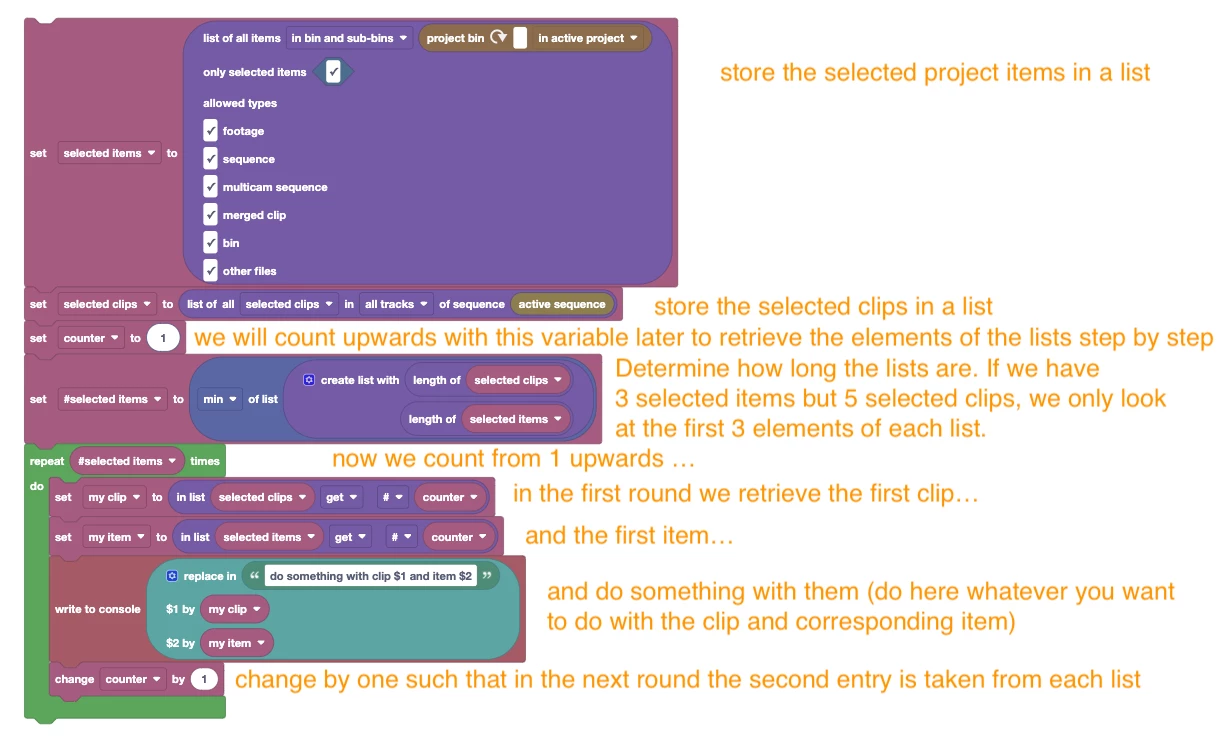
If I understand you correctly, you just want to set C1 to A1, C2 to A2 and C3 to A3 and not all the other combinations in between. Then you have to use a single loop like this:


1 reply

Mathias Moehl
Mathias MoehlCorrect answer
Community Expert
January 30, 2025

I think your issue are the two nested "for each" blocks.


If you have selected 3 items in the project panel and 3 clips in the sequence,

then the inner green block is called three times (namely once for each selected project item) and in each of these calls it executes the blue block three times (namely for each selected clip in the sequence).

Let's name the three selected project items A1,A2,A3 and the three clips in the sequence C1,C2,C3. Then you do step by step the following

- set C1's project item to A1

- set C2's project item to A1
- set C3's project item to A1

(now the first round of the outer loop is complete and the second round of calling the inner loop starts)

- set C1's project item to A2

- set C2's project item to A2
- set C3's project item to A2
(now the second round of the outer loop is finished)

- set C1's project item to A3

- set C2's project item to A3
- set C3's project item to A3


In other words: The code inside the two nested green loops is called once for each combination of a selected project item and a selected clip.

If I understand you correctly, you just want to set C1 to A1, C2 to A2 and C3 to A3 and not all the other combinations in between. Then you have to use a single loop like this:


Mathias Möhl - Developer of tools like BeatEdit and Automation Blocks for Premiere Pro and After Effects
Inspiring
January 30, 2025

Hi @Mathias Moehl 

Thanks for your reply. Apologies, I didn't explain myself well. I am only selecting one sequence clip and one project item at a time.


So in my example, the user has run the script three times.


The most confusing things to me are...

Why does the sequence look one way, and the export another way?

Why does the project change after closing and re opening it?

Why did all three clips in-point happen to change to frame 19 after reopening the project?

That's an awesome script you wrote though, and I'll probably use it in the future!

Mathias Moehl
Community Expert
January 31, 2025

If the changes are correct, but not permanent this sounds like a bug  or some kind of caching issue with the scripting API


Your test block also looks suspicious to me: If the inpoint is <= 0, then subtracting a tiny number from it will make it a negative value. But the inpoint must always be 0 or greater.


@Bruce Bullis are you aware of bugs where setting the inpoint of a clip in the sequence appears to work, but when rendering or saving and reloading the project the change is gone again?

Mathias Möhl - Developer of tools like BeatEdit and Automation Blocks for Premiere Pro and After Effects