


Inspiring
April 8, 2024
Answered

Automation Blocks - Modifying Audio Channels and Laying Tracks into Timeline

  • April 8, 2024
  • 1 reply
  • 1627 views

Hi There,


I have a script that does the following...

For all selected project items:
-Modify Audio Channels from Stereo to Dual Mono (some of the selected won't be stereo)

-Lay project items into specific tracks on a sequence dependent on file names.


I have it working, with some flaws...

-It lays project items into the sequence before modifying the audio channels, and then overwrites them on the sequence after modifying audio channels

-If there are no project items with audio channels that need modifying, it still lays the project items in the correct sequence tracks, but gives me an error:
"Cannot set property audioChannelsType (line 4)"


The ultimate result is the script does what I want. But I feel like it's bad practice. 
Can you tell me how to modify the script to:

-lay project items in sequence tracks only once, after modifying

-Understand that if no project items need audio channel modification, that's ok


Also, you'll see from the attached script that I repeat the if-do multiple times, just to run the same script. Is there away to combine all those if-do statements into one?
This topic has been closed for replies.
Correct answer Mathias Moehl

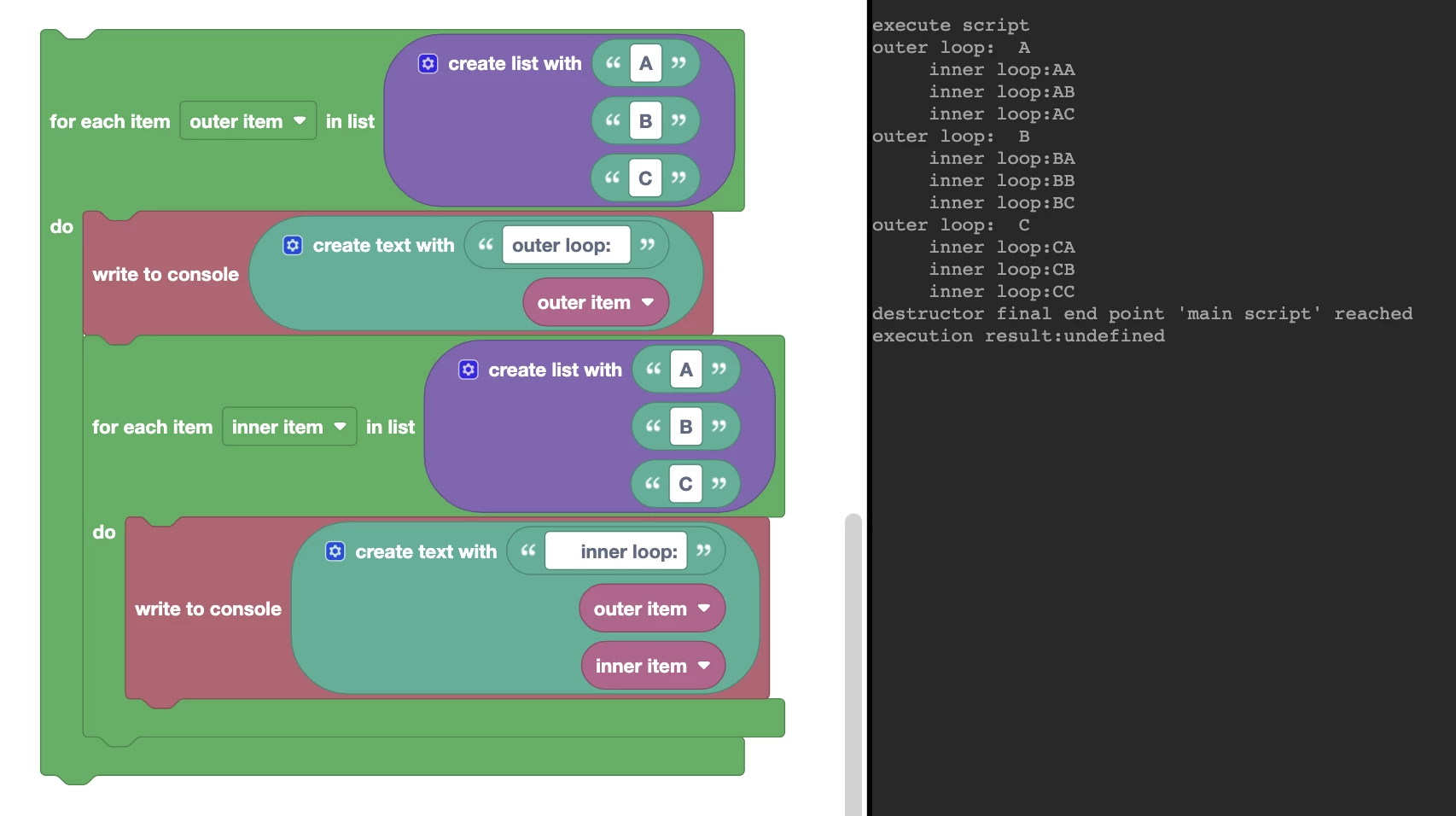
Here is simplified example showing what happens if you nest loops inside each other:


On the right side you can see the console output of the "write to console" blocks. And as you can see, the first "write to console" message is executed 3 times (once for each iteration of the outer loop) and the second "write to console" message is executed 9 times, namely 3 times for each run of the outer loop.

1 reply

Mathias Moehl
Community Expert
Community Expert
April 9, 2024

Hi Sam,

here is a revised version of your code:

You can search for multiple strings at once using the search in text block which is like a more powerful version of the basic  find in text block with more options. In particular it offers a "Regular Expression" option, which allows you to search for complex patterns.


The more important change is that I eliminated the second green "for each item" block, which you nested inside the first one. Say the outer green block is executed three times (if you have three project items selected) and you nest a second copy of the same block inside of it, then everything inside the nested block is executed nine times (3 times for each time the outer loop is executed). That means, you inserted each clip not only once, but three times - and in the first round of insertions all three clips where insertet, but only for the first one the audio channels have been changed already.

Code is attached.

Mathias Möhl - Developer of tools like BeatEdit and Automation Blocks for Premiere Pro and After Effects
Mathias Moehl
Community Expert
Mathias MoehlCommunity ExpertCorrect answer
Community Expert
April 9, 2024

Here is simplified example showing what happens if you nest loops inside each other:


On the right side you can see the console output of the "write to console" blocks. And as you can see, the first "write to console" message is executed 3 times (once for each iteration of the outer loop) and the second "write to console" message is executed 9 times, namely 3 times for each run of the outer loop.

Mathias Möhl - Developer of tools like BeatEdit and Automation Blocks for Premiere Pro and After Effects