I am looking for ways to make AB more compatible with different UI languages. Currently it is such that tools writen in English Pr might not work on systems with other languages. Most tools work fine, but the one which access clip parameters like "Scale" or "Opacity" don't work, because they have other names in other languages of Pr. So you can write a tool in German Pr, for example, which manipulates the "Skalieren" of a clip, but if you wrote a tool in English Pr which manipulates the "Scale", Automation Blocks does not know that it should look for "Skalieren" instead of "Scale".
You can change the UI language of Pr quickly as shown here, without the need to reinstall it:
https://www.youtube.com/watch?v=W9yg88C6g44
1. in Pr use the keyboard shortcut to open up the console window:
Mac: fn + command + F12
Win: ctrl + F12
2. in the Console, make sure the Debug Database view is open:
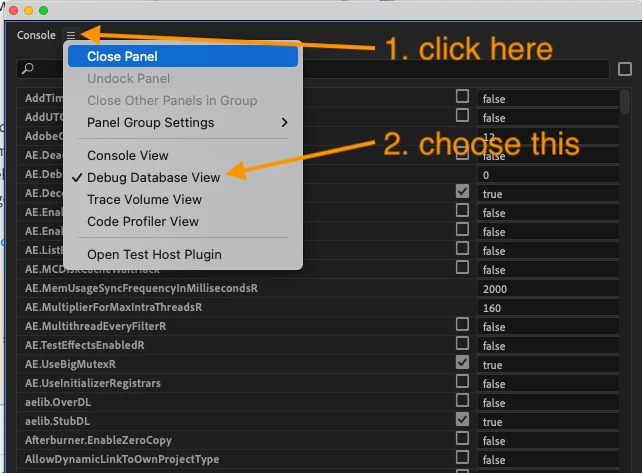
3. search in the Console for "ApplicationLanguage" and set it to "en_EN" for English
4. restart Pr
UPDATE: I just published Automation Blocks for Pr 1.1.001, which fixes the language issues and now also supports non-english Pr versions properly.



 AdChoices