


Inspiring
December 16, 2024
Question

Automation Blocks - Script Fails with Null Object in Timeline

  • December 16, 2024
  • 1 reply
  • 520 views

Hello @Mathias Moehl !


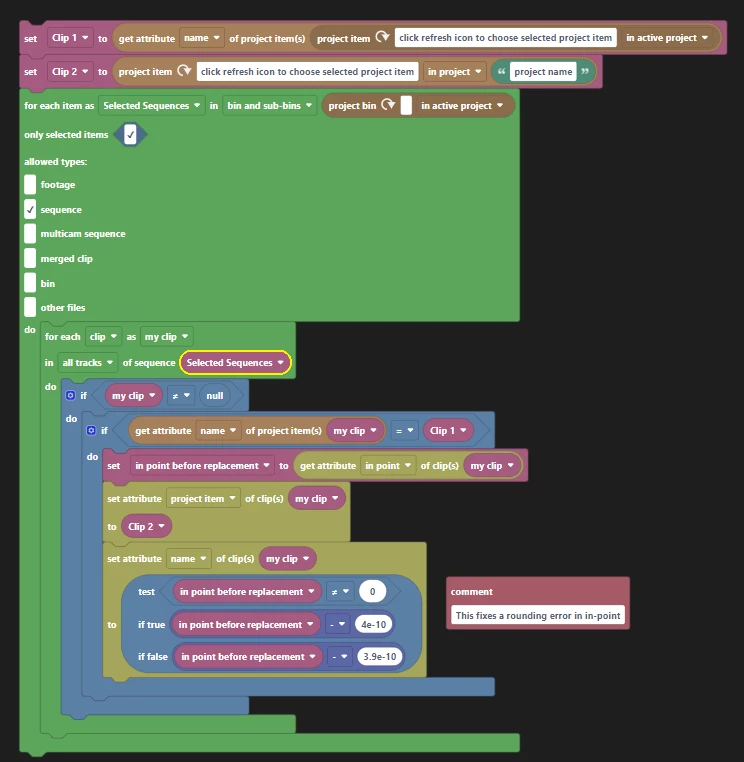
The below (and attached) script replaces a clip in the sequence for another another clip in the project, retaining the in point of the original sequence clip.

The script works great EXCEPT when there is a text graphic in the timeline created with the text tool (null object?).


I tried to filter out for null objects, but I still get the error 'TypeError: null is not an object (line 12)' at the point where the script walks over that graphic in the timeline...


Instead of If My Clip ≠ Null, I also tried...


and the inverse (has type footage).
That script reaches 'Done' but doesn't do anything.

Any ideas on how I can get this script to work when that null object is in the timeline?

This topic has been closed for replies.

1 reply

Mathias Moehl
Adobe Expert
December 17, 2024

I guess your issue is the "set attribute project item of clip" block. For text clips, the text itself exists, but its attribute project item is null and cannot be set to anything else. I would wrap the "set attribute project item of clip" block into an if statement, where you check 

if( "get attribute project item of clip my clip" not equal null)

That way you ensure that you never try to set the project item of a clip which has no corresponding project item.

Mathias Möhl - Developer of tools like BeatEdit and Automation Blocks for Premiere Pro and After Effects
Inspiring
December 17, 2024

Excellent! That worked when I wrapped that entire section in the command you suggested...