


Inspiring
April 6, 2024
Answered

Automation Blocks - Spreadsheet Being Generated with Combined Columns

  • April 6, 2024
  • 1 reply
  • 707 views

Hi Mathias and Premiere Community,


I followed the tutorial on Export Properties of Selected Clips to Spreadsheet for Automation Blocks.

When viewing the .csv in Open Office, the Clip Name, Parameter, and Value are all combined in column A, instead of in separate columns like in the video. Each cell in column A has clip name, parameter and value all together, separated by commas. Quite a jumble.


Column B has "Path"


Any idea why?


This topic has been closed for replies.
Correct answer Mathias Moehl

Hi Sam,

there are different flavors of cvs files - some use tabs as as separator symbol between the cells, some use tabs and some use ;

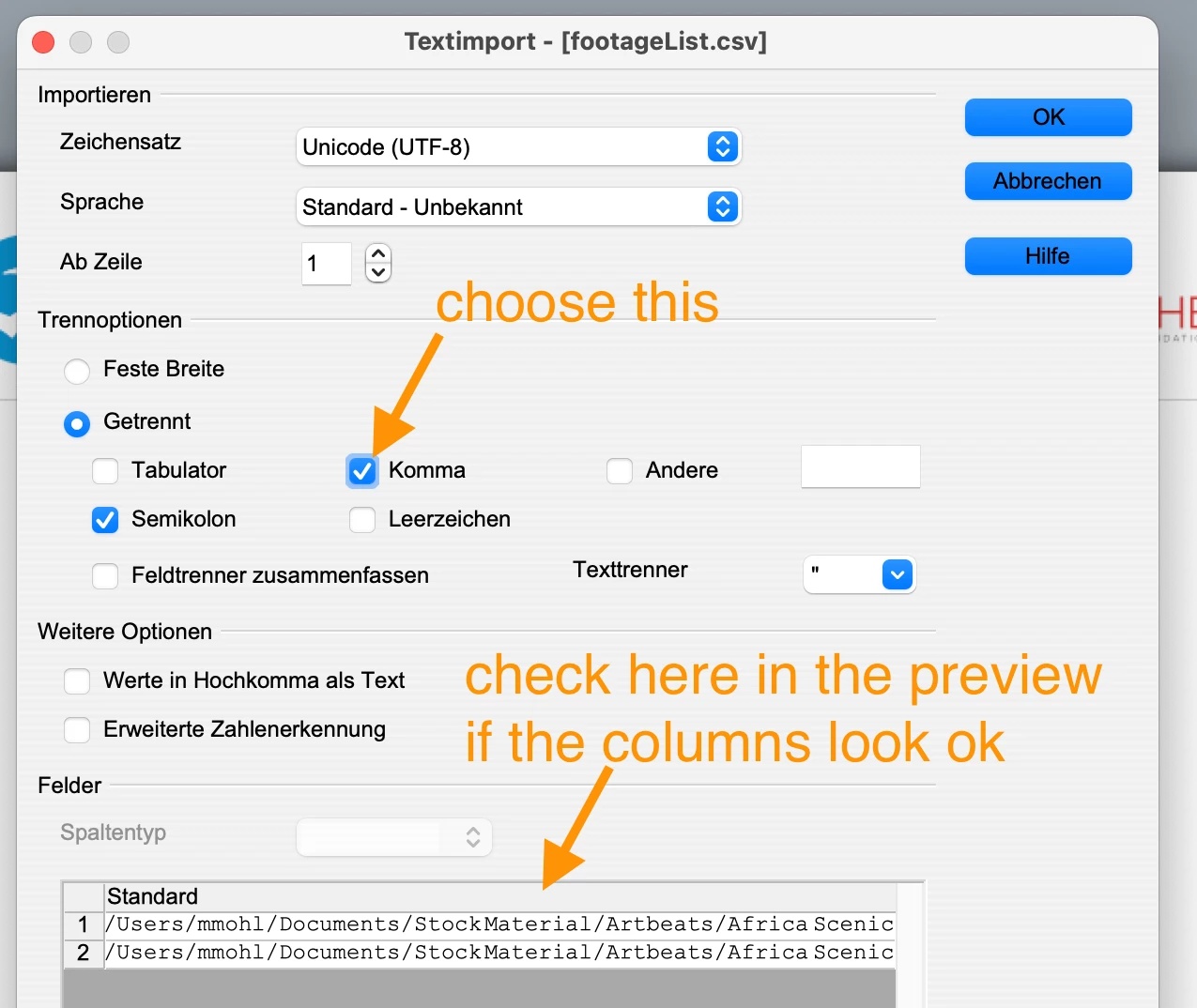
In Open Office during import you can choose which separator symbol you want. Make sure to use comma.


This is what the import dialog looks like in my German Open Office:

1 reply

Mathias Moehl
Mathias MoehlCorrect answer
Community Expert
April 6, 2024

Hi Sam,

there are different flavors of cvs files - some use tabs as as separator symbol between the cells, some use tabs and some use ;

In Open Office during import you can choose which separator symbol you want. Make sure to use comma.


This is what the import dialog looks like in my German Open Office:

Mathias Möhl - Developer of tools like BeatEdit and Automation Blocks for Premiere Pro and After Effects
Inspiring
April 8, 2024

That worked! Thank you!
There wouldn't be a way to export only the 'source file' parameter, would there?

Mathias Moehl
Community Expert
April 9, 2024

You can write custom tools which export exactly what you want.


See 


and 


Mathias Möhl - Developer of tools like BeatEdit and Automation Blocks for Premiere Pro and After Effects