Exit
  • Global community
    • Language:
      • Deutsch
      • English
      • Español
      • Français
      • Português
  • 日本語コミュニティ
  • 한국 커뮤니티
0

Autosave in Premiere Pro CC 2019?

New Here ,
Nov 10, 2018 Nov 10, 2018

Hello,

I recently upgraded to Premiere Pro CC 2019. I am working at a new Computer (A Mac) and I can't find the "autosave" preference anymore. Can someone help?

3.8K
Translate
Report
Community guidelines
Be kind and respectful, give credit to the original source of content, and search for duplicates before posting. Learn more
community guidelines

correct answers 1 Correct answer

LEGEND , Nov 10, 2018 Nov 10, 2018

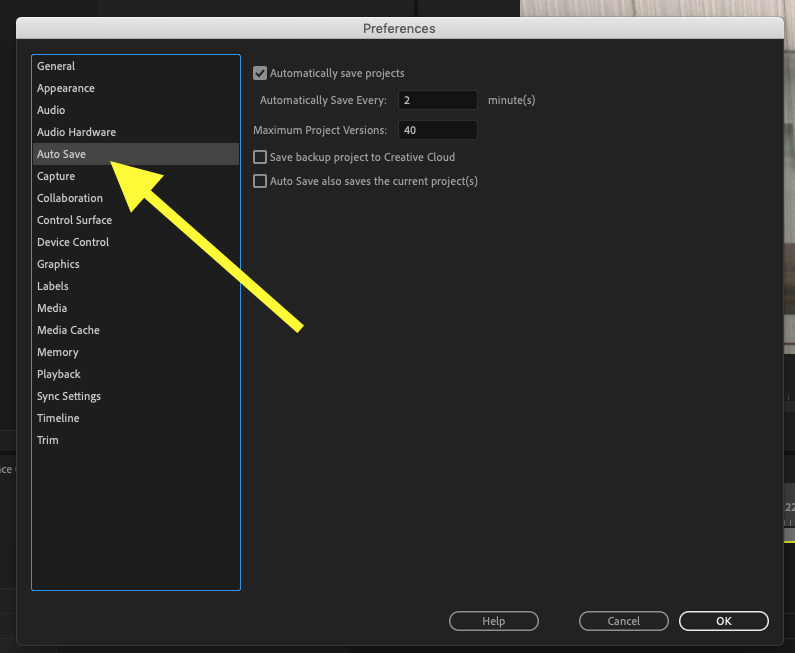
Preferences > Auto Save:

Screen Shot 2018-11-10 at 8.10.14 AM.png

or did you mean the location of the Auto Save files?

Go to the menu File > Project Settings > Scratch Disks > Project Auto Save

MtD

Translate
LEGEND ,
Nov 10, 2018 Nov 10, 2018

Preferences > Auto Save:

Screen Shot 2018-11-10 at 8.10.14 AM.png

or did you mean the location of the Auto Save files?

Go to the menu File > Project Settings > Scratch Disks > Project Auto Save

MtD

Translate
Report
Community guidelines
Be kind and respectful, give credit to the original source of content, and search for duplicates before posting. Learn more
community guidelines
Community Expert ,
Nov 10, 2018 Nov 10, 2018

It's in there.

Did you go Edit > Preferences?

I'm not at my video editing computer now, but it may be under Project Settings or one of the other Preference settings.

Translate
Report
Community guidelines
Be kind and respectful, give credit to the original source of content, and search for duplicates before posting. Learn more
community guidelines
Community Expert ,
Nov 10, 2018 Nov 10, 2018
LATEST

Meg beat me to it.

Translate
Report
Community guidelines
Be kind and respectful, give credit to the original source of content, and search for duplicates before posting. Learn more
community guidelines