

sputnikvideo
New Participant
July 29, 2018
Answered

Button Editor not responding

  • July 29, 2018
  • 4 replies
  • 8712 views

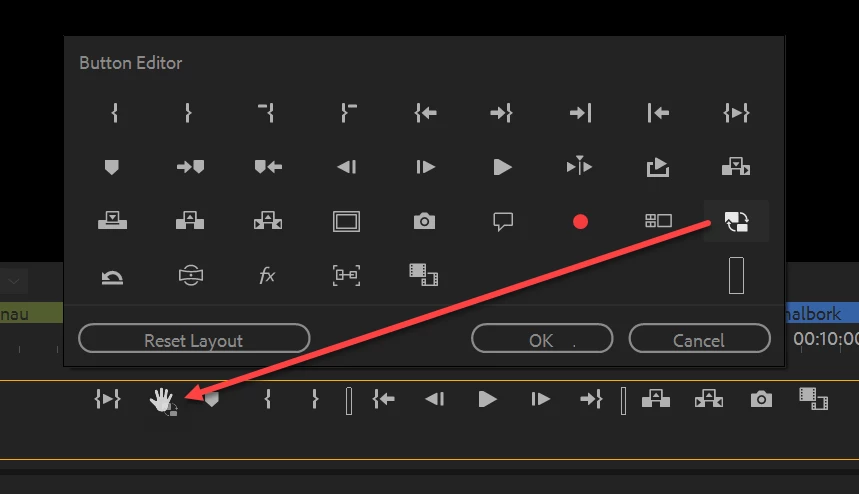
When I try to add a button with the button editor in the monitor windows, nothing happens. Trying to add toggle proxies. I click it, nothing happens. I click reset, nothing happens.

    This topic has been closed for replies.
    Correct answer Ann Bens

    Click and drag the button to the Transport Controls.
    4 replies

    New Participant
    May 25, 2021

    Hi there, I am having an issue with the button editor now and am wondering if somebody could help. It suddenly stopped working and It wont let me edit / drag new buttons down (using drag and drop) Please see the below. The button just goes grey and wont add.

    Thanks!

    Mac OS High sierra 10.13.6

    Premiere 14.5.0

    Ann Bens
    Community Expert
    April 7, 2022
    New Participant
    August 16, 2020

    This has got to be one of the dumbest ways of doing this.  I've already hit the "Add" button, why wouldn't clicking the icon just put it next in the cue.  Having the fuctionality of clicking and dragging is fine, but I literally just spent 15 minutes trying to figure out why Premiere was 'unresponsive'.  This isn't intuitive.  Adobe HAS to know that.  


    One other comment: Adobe, please check out Ableton's info box.  I know you're trying to manage a lot in one layout, but Ableton is doing something similar and just has an info box that (while you can minimize it) activates terms, definitions, and functionality. 

    Inspiring
    July 29, 2018

    MtD

    Ann Bens
    Ann BensCorrect answer
    Community Expert
    July 29, 2018

    Click and drag the button to the Transport Controls.

    sputnikvideo
    New Participant
    July 29, 2018

    Duh... thanks so much for making me look as dumb as I am! Cheers.

    chrism36562438
    New Participant
    July 29, 2019

    Came for the same question. You don't look dumb. This works like nothing else in Premiere.