


Inspiring
December 25, 2021
Answered

C++ Runtime error on launch

  • December 25, 2021
  • 1 reply
  • 2957 views

I update to Premiere 22.1.2 and upon launch i get a Microsoft Visual C++ Runtime Library error. This also happens when starting Media Encoder. It does not happen with Photoshop or Lightroom. This didn't happen before the update. I tried uninstalling and reinstalling  Premiere and Media Encoder, but the error still occurs. I did not try to downgrade to older version yet.


See attached screenshot of the error.
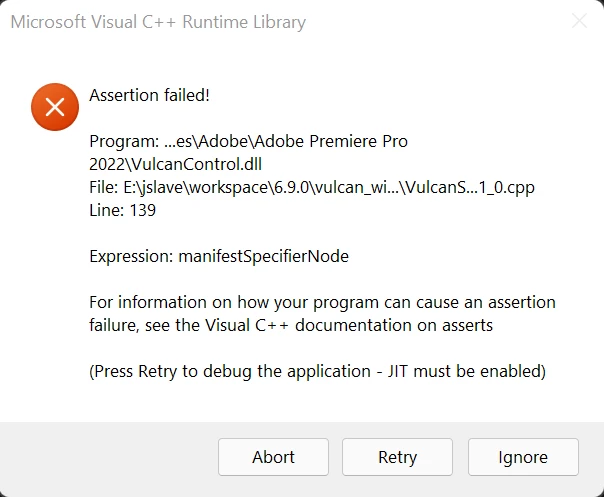
Any advice? 

This topic has been closed for replies.
Correct answer Pavel5E74

This is a public forum with "some" Adobe staff participation, use the link below to make a report
-for Video & Audio & Animator programs https://adobe-video.uservoice.com/
-https://www.adobe.com/products/wishform.html for everything else


Thanks for the link. I submitted a bug. If anyone wants to add a vote go to my bug report here: 
https://adobe-video.uservoice.com/forums/911233-premiere-pro/suggestions/44610339-c-runtime-bug-in-premiere-22-1-2 

1 reply

John T Smith
Community Expert
Community Expert
December 25, 2021
Pavel5E74Author
Inspiring
December 26, 2021

Reinstalling C++ runtime didn't help, I tried both x86 and x64 versions. 


I did try a Premiere downgrade to 22.0 and that solved the problem. I then upgraded Premiere back to 22.1.2 and the problem reappeared. So will have to stick with 22.0 for the moment.

John T Smith
Community Expert
Community Expert
December 26, 2021

This is a public forum with "some" Adobe staff participation, use the link below to make a report
-for Video & Audio & Animator programs https://adobe-video.uservoice.com/
-https://www.adobe.com/products/wishform.html for everything else