
mandurphy
Participant
September 16, 2014
Answered

Camera Raw like interface for Premiere Pro CC

  • September 16, 2014
  • 11 replies
  • 45551 views

Hi Adobe


I'm a photographer and video producer looking for an easier way to grade and adjust the levels of my footage in Premiere.


The DynamicLink with SpeedGrade is really lovely and quick, but getting my head around the new SG interface and being able to squeeze the best results out of it is a real challenge. Recently I discovered that I can open video files in Photoshop CC and use the Adobe Camera Raw interface as an effect on the footage and apply colour and levels changes there. This has really opened up the grading process for me and coming from a stills background with several years of using Lightroom to process my photos, I find the Camera Raw interface much more intuitive. It has allowed me to get better results much faster than I was getting out of SpeedGrade. The only issue is the workflow and render time involved in getting the video from Premiere to Photoshop and then back again is drawn out and complex.


My questions are:

Is there a current effect or plugin that replicates the Camera Raw interface and feature set in Premiere Pro / SpeedGrade?

Is this a feature Adobe is looking to include in future updates of Premiere?


It maybe laziness on my behalf not taking the time to learn the interface of SpeedGrade, but I know Adobe is a responsive developer and that this feature would speed up the grading process and would really appeal to the DSLR community who use your products for both photos and videos production.
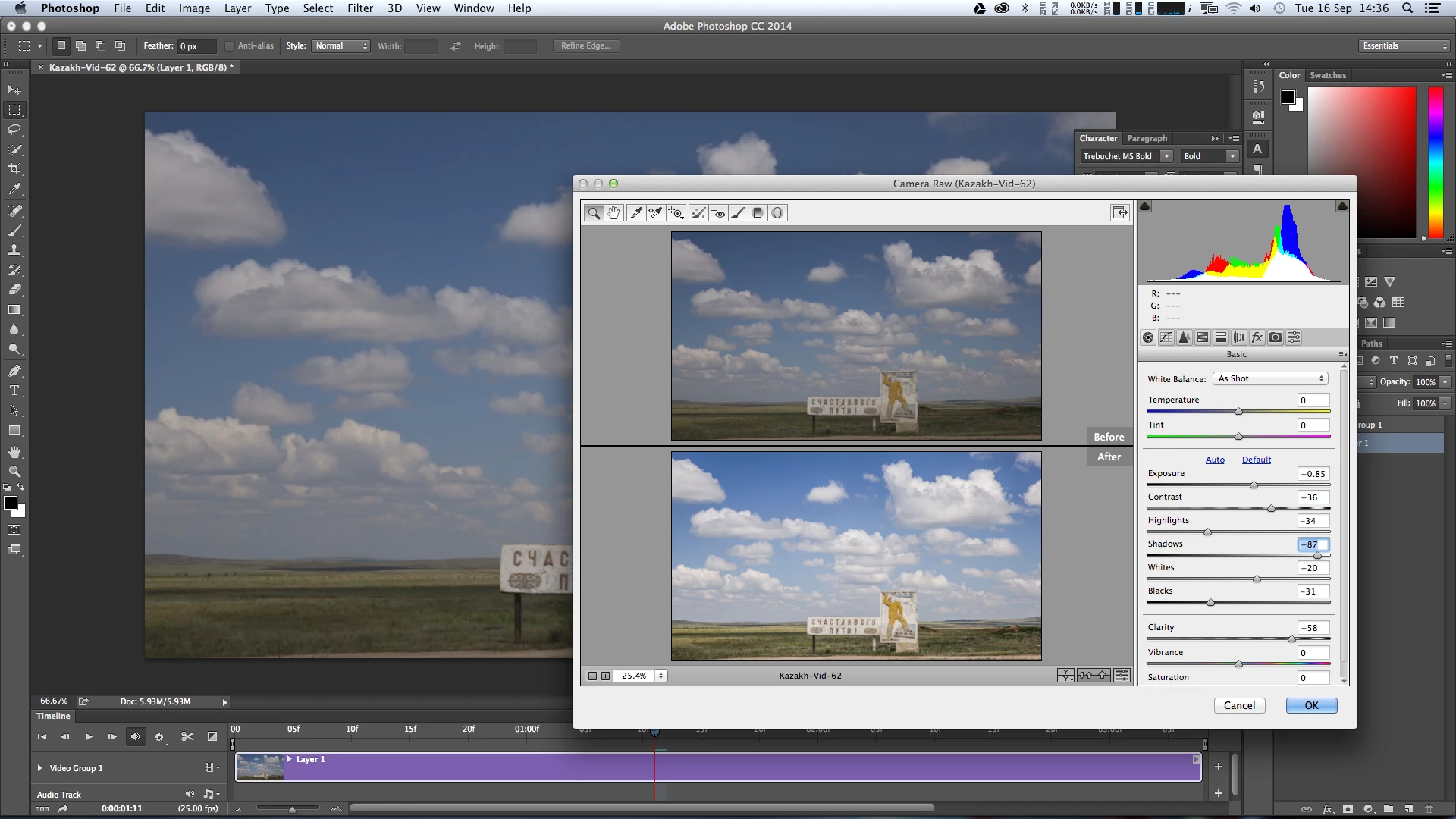
 

Thanks in advance


Dan

[signature with personal info removed by mod]PEC

This topic has been closed for replies.

11 replies

psychillesCorrect answer
Participant
April 9, 2015
Known Participant
April 9, 2015

but... does it allow RAW?

R Neil Haugen
Legend
April 10, 2015

It brings a LR style workspace to PrPro, but I don't know what if any more RAW file capabilities the new ish ... whenever it does "happen" ... will have. Not been publicized yet.

Neil

Everyone's mileage always varies ...
Participant
March 28, 2015

I put in a feature request as well for the Camera Raw filter in Premiere Pro. It doesn't need to work with raw files but just for quick corrects like in Photoshop. Please make this happen! It would save me days and days of work every year. Thanks!

Jon

Kevin-Monahan
Community Manager
Community Manager
April 2, 2015

Hi Jon,

I put in a feature request as well for the Camera Raw filter in Premiere Pro. It doesn't need to work with raw files but just for quick corrects like in Photoshop. Please make this happen! It would save me days and days of work every year. Thanks!

As I said before, you cannot have Camera Raw in Premiere Pro, the files have terrible performance. What users are suggesting are controls that are similar to Camera Raw in a color correction tool that could provide similar results.

Thanks,
Kevin

Kevin Monahan - Sr. Community and Engagement Strategist – Adobe Pro Video and Audio
Participant
April 2, 2015

Thanks Kevin,  but I was just mirroring their requests that's why I said it doesn't need to work with raw and just for quick corrects. I should have called it a color correction tool. I just wanted to add to the conversation so that can get a little steam going. Thanks again for the reply! 

Inspiring
March 6, 2015

Been using Resolve for the last month and it is vastly superior to Camera RAW for video (and I love Camera RAW). Speedgrade is not even close.

R Neil Haugen
Legend
March 6, 2015

Would appreciate your thoughts on differences betwixt Resolve & SpeedGrade, and of course the PrPro->Resolve process you're using.

Neil

Everyone's mileage always varies ...
Inspiring
March 6, 2015

I didn't spend a lot of time in Speedgrade, but it just felt a bit feeble. Resolve is one of those apps which is just a pleasure to use. I always try and pick up an app the first time without reading any docs to test its UX/UI and I got really far into using Resolve before I needed to refer to the manual. It's really well thought through and feels like a modern take on things. Lightroom and maybe Premiere are the only Adobe apps which feels like that to me.

As far as workflow, I'm shooting Magic Lantern Raw (.mlv) on a 5D3 which I mount as .cdngs using MLVFS(http://www.magiclantern.fm/forum/index.php?topic=13152.0). I bring these into Resolve as CinemaDNG and convert to Cinelog (Cinelog), correct the whiteballance and output everything as ProRes4444. I bring all this into Premiere where I edit, then export FCP XML and import into Resolve Lite for the grade. Then back out of Resolve as an FCP XML and into Premiere for finishing. It certainly won't fit everyone's workflow, but it gets me the best results possible. I also picked up Neat Video(Neat Video - best noise reduction for digital video for Resolve for noise reduction as Resolve Lite doesn't allow noise reduction.

Clover@New Story Media
Participating Frequently
January 14, 2015

Camera Raw filter in PP CC 2014 yes please. Tried feature request but it is down at the moment.

Known Participant
December 29, 2014

I too would love some Lightroom/CR like color controls in Premiere or Speedgrade. Speedgrade has most of it covered, though in a slightly different context. I find manipulating the shadows, highlights and midtones in Speedgrade actually a little more accurate than lightroom. what I would really love is the Clarity slider. I use that a lot in stills and wish I could use it in video. Not sure what would happen for things like flicker if that algorithm was applied to successive frames, but I would sure love to have it.

Thank you.

R Neil Haugen
Legend
December 29, 2014

"Clarity" across apps is basically a control on local contrast, in other words, similar to applying a small controlled set of Unsharp Masking.

That's the Theory at least. As an accounting adviser we once had taught in his accounting clases, "There's Accounting in Heaven (holding the text book in hand, then setting it down) and accounting on earth (and you could easily hear the Initial Caps & then lack thereof when he spoke) ... and though we use The Book at times, I TEACH accounting on earth."

The concept seems to apply here ... In Theory, clarity is just a bit of unsharp masking with a particular setting to the algorithms for a small effect. That said, I've been able to sort of come close with a bit of play in a full Unsharp Mask tool. After a LOT of work. When if there's a clarity control, I'm "there" in a half-second without thinking about anything.

Yea, clarity could be a darn nice thing to have. Put in a Feature Request for it, probably one each for PrPro's controls & one for SpeedGrade ... I've done about 4 or 5 over time for this myself.

Adobe - Feature Request/Bug Report Form

Neil

Everyone's mileage always varies ...
Peferling
Inspiring
December 29, 2014

Love that effect in LR3 and missed it when LR5 came out.

You can fake it easily in PPro:

Create an adjustment layer over your target track.  In the adjustment layer add shadow/Highlight: Auto, then add unsharpen mask: 20, 50, 0  Tweak to taste.  Bang, bang.

Forgot to mention that you use an AL so you can adjust it's opacity to mimic the slider effect.

R Neil Haugen
Legend
December 10, 2014

Dan,

An ACR interface still leaves you depending on your eyeballs ... and that ain't good. I asked for that when I first "hit" digital two years ago, and now though at times it would be useful, well, I wish SpeedGrade was designed more for stills workflow. I'd love to get an Sg interface in Lr! For a little background on credentials to talk ...

I've got 36 years now of being a studio/environmental portrait photographer. Yep, same as the missus (though I've got three years on her) ... we've both got our PPA Masters & CPP, I'm two credits from a Craftsman degree. It has been our ONLY family income for all that time. Our stills are done on my D3 or her D600, though even with that she steals my D3 every chance she can. We've been a Lightroom shop for years now. Since 1 in the last beta-cycle, actually.

Sg has a unique interface, and some parts I wouldn't mind changing, such as that choice to go (as the Adobe apps went) to the dark blue text on charcoal. 'Nuff been said on that, I think there might be changes next 'cycle'. However, mostly it is fast and amazing for what you can do ... when you learn HOW to approach video color correction & stylistic work, which is very different from stills. And then learn a bit how the Sg interface does do its magic, and much of the time, it really is magic.

There's a book on video correction in general by Hullfish & Fowler ... YOU SHOULD GET THIS. It's mid-$30's even in e-book form, and well worth twice that. You'll understand what needs doing, why, and how the various styles of tools work in different video processing software within a couple days. EXCELLENT book. There's also a book by van Hurkman on getting started in Sg for about $16 as an Amazon ebook ..

Amazon.com: Adobe SpeedGrade: Getting Started eBook: Alexis Van Hurkman: Kindle Store

Amazon.com: Color Correction for Video, Second Edition: Using Desktop Tools to Perfect Your Image (DV Expert Series) (97…

I have both books and review them regularly. Also ... there's some excellent tutorials on Adobe TV, look especially for Jago or Palmer as the 'host' ... Patrick Palmer was the co-creator of what became Iridas then SpeedGrade, and until a couple months ago was still head of the program development. There are also excellent tutorial series on lynda-dot-com and Wolfcrow. Subscription yes but dang they're good. I'm there for a couple hours a week still.

When you learn how to look at your scopes for correction work more than your program monitor, you'll be flying through this stuff. Stylistic work blends using scopes & eyeballs. And the array of controls in Sg, from the wheels & sliders of the "default" tool-set, to the mass of individual sliders as the second option, and now the addition of curves controls ... plus Looks that you can make and then apply like crazy on your "standard" stuff ... it's really fast and amazing but VERY, VERY low in Adobe manual & info on it.

If you want I can send you a few steps of how I go about things.

Neil

Everyone's mileage always varies ...
Known Participant
October 31, 2014

I'm trying to find a way to use Adobe Camera Raw with Premier. There does not seem to be a convenient way, only workarounds (e.g. render out of after effects).

The annoying thing is that sending a clip to After Effects from Premier does not work - After Effects only recognizes a single frame, not the sequence. Bummer!

I submit feature request.

Kevin-Monahan
Community Manager
Community Manager
October 31, 2014

All known issues. Sorry, Joe. Thanks for filing the feature request.

Kevin

Kevin Monahan - Sr. Community and Engagement Strategist – Adobe Pro Video and Audio
Known Participant
October 31, 2014

No worries, hopefully Adobe video software will continue to make leaps and bounds, and better raw processing is part of it.

The feature request I made was specifically for After Effect to successfully receive Dynamically Linked clips from Premier, since this seemed like a fairly likely feature to happen at some point.

Participant
October 14, 2014

Filled the request form!

Kevin-Monahan
Community Manager
Community Manager
September 22, 2014

Hi Dan,

Camera raw will probably not be added to Premiere Pro because it generates files that are too difficult to edit with. In Premiere Pro you can adjust Source Settings. If that is not enough control, you can always import them to After Effects where you can use Camera Raw. Then, export files that are high quality, yet are still able to be edited. Sorry if this is not exactly what you wanted to hear. If you'd like more parameters to be added to Source Settings, feel free to make a feature request: http://adobe.ly/feature_request

Thanks,
Kevin

Kevin Monahan - Sr. Community and Engagement Strategist – Adobe Pro Video and Audio
mandurphy
mandurphyAuthor
Participant
September 23, 2014

Hi Kevin..

Thanks for your reply.

My suggestion isn't really about having the ability to grade and then edit RAW footage in Premiere. 98% of the footage I shoot is in MOV H.264 content, not RAW video. My interest is having one single effects panel (or window) where I have the ability to adjust shadows, tint, contrast, white balance (I know, limited in non-raw), brightness, sharpness, clarity, vibrance, saturation, vignette, lens correction, etc, etc. Much like the feature set presented to us with Adobe Camera Raw. Most of these effects are available as separate effects within Premiere, with some being GPU accelerated. I'm keen to have them all in the one spot with a curves and sliders based interface similar to ACR/Lightroom. Even if I had to wait to render half res previews to watch the corrections in Premiere, it would be worth it. Hopefully this makes more sense.

For the odd occasion I work with raw footage from a RED, it would be nice to use ACR/Lightroom to do the grade there too, but not a deal breaker.


Also, How do bring my H.264 video files into After Effects and get the Camera Raw dialogue on them? I know how to do it with a folder of CR2 Canon raw stills, but not a video file.


Thanks again.


Dan

--

---------------------
Dan Murphy
Video Production & Photography
+61 0449 53 9797

www.mandurphy.net

Participant
October 7, 2014

I'm looking for exactly that!

Love the simple interface of the camera raw filter.

Eyemo
Participating Frequently
September 22, 2014

I couldn't agree more. I wish I could stuff the ballot box in support of Dan Murphy's request.

The addition of Camera Raw Filter to Premiere would be the most useful feature Adobe could bring to Premiere at this point. I don't believe it would greatly diminish the use of SpeedGrade (well, maybe it might for primary grading). I have to believe the reason it hasn't yet been added is because of some deeper issues than mere product differentiation.

In the meantime, perhaps we could push for the ability to extend the video-export options inside Photoshop CC, which already uses Adobe Media Encoder, yet restricts us to an H.264-based or an arbitrarily limited list of QuickTime codecs. We ought to be able to set up custom exports in AME and then call those from within Photoshop. I mean, exporting everything in QuickTime Animation (instead of, say ProRes or in the native format that we imported to PS) is aggravating and inexplicable.

Kevin-Monahan
Community Manager
Community Manager
September 22, 2014

Hi Eyemo,

Eyemo wrote:

The addition of Camera Raw Filter to Premiere would be the most useful feature Adobe could bring to Premiere at this point. I don't believe it would greatly diminish the use of SpeedGrade (well, maybe it might for primary grading). I have to believe the reason it hasn't yet been added is because of some deeper issues than mere product differentiation.

From what I've been told, Camera Raw files are too difficult to edit with, so it will probably not be implemented. Premiere Pro deals with raw video via source settings so a feature request to improve that rather than adding Camera Raw would probably an easier way to deal with this issue.

Eyemo wrote:

In the meantime, perhaps we could push for the ability to extend the video-export options inside Photoshop CC, which already uses Adobe Media Encoder, yet restricts us to an H.264-based or an arbitrarily limited list of QuickTime codecs. We ought to be able to set up custom exports in AME and then call those from within Photoshop. I mean, exporting everything in QuickTime Animation (instead of, say ProRes or in the native format that we imported to PS) is aggravating and inexplicable.

Feel free to let the Photoshop team know: http://adobe.ly/feature_request

Thanks,

Kevin

Kevin Monahan - Sr. Community and Engagement Strategist – Adobe Pro Video and Audio
Eyemo
Participating Frequently
September 23, 2014

Thanks, Kevin. I took your suggestion and submitted a request for expanded AME export options in Photoshop to that team.

Just to clarify my point about Camera Raw in Premiere, I was not referring to editing raw files (i.e. CinemaDNG or camera native) but rather including a Camera Raw filter effect -- exactly (or close as possible) to the Camera Raw filter effect in Photoshop CC, which, as I'm sure you know, can be applied to any source material -- including JPEGs, individual layers and video files -- in that application.

I'd be satisfied if Premiere would simply open and put on the timeline a Photoshop video file that had the Camera Raw filter applied. And if you're getting the idea that people generally love the Camera Raw interface and function and *greatly* prefer it in many cases to the Simple Color Corrector and/or 3-way Color Corrector and Shadow/Highlights (to say nothing of SpeedGrade), I think that would be the right take-away.