New Participant
December 13, 2019
Answered

Can I disable hover scrubbing?

  • December 13, 2019
  • 1 reply
  • 2876 views

Hey is there any way to disable hover scrubbing? I find it super annoying in the following case. You have a clip. Set your in and out marks and create a subclip by dragging it in a bin to organize your footage. When you drag that subclip in the timeline you get the footage between the in and out points. Cool. But when you hover scrub over the clip in the bin it shows you the whole footage and ignores the in and out points which makes it useless if you just want to have a quick look of what you have in the subclip.


Hope I could make the case clear enough. I not a native English speaker so...


Would really appreciate an answer. Thanks
This topic has been closed for replies.
Correct answer Meg The Dog

You can either -

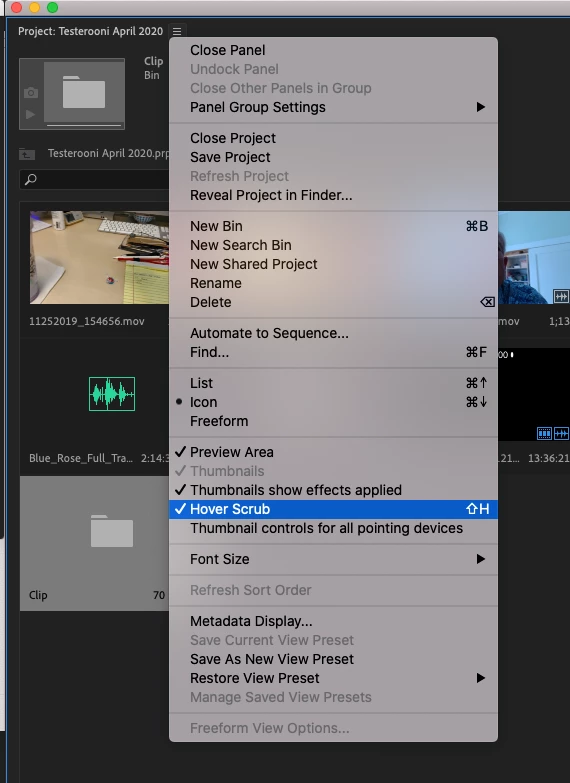
1) Toggle of Hover Scrubbing by right clicking on the stack of three lines next to the Project Name in the Project Panel and from the drop down menu, un-checking Hover Scrub:

Keyboard command Shift + H,

or

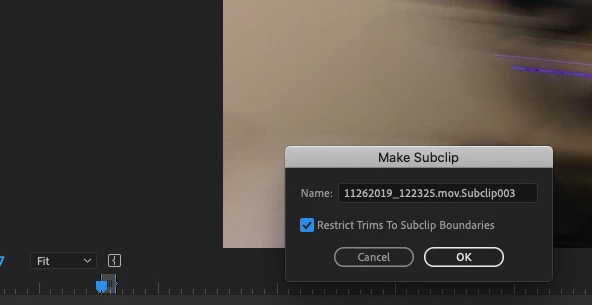
2) Make the subclip by loading the source to the source monitor, marking your in and out points, then typing Command (Contol) + U. This will bring up the Make Subclip pane where you can name the subclip but also keep Restrict Trims to Subclip Boundries checked: 

this will prevent the hover scrub from showing footage outside the In and Out points you set.

MtD

1 reply

Meg The DogCorrect answer
Inspiring
December 13, 2019

You can either -

1) Toggle of Hover Scrubbing by right clicking on the stack of three lines next to the Project Name in the Project Panel and from the drop down menu, un-checking Hover Scrub:

Keyboard command Shift + H,

or

2) Make the subclip by loading the source to the source monitor, marking your in and out points, then typing Command (Contol) + U. This will bring up the Make Subclip pane where you can name the subclip but also keep Restrict Trims to Subclip Boundries checked: 

this will prevent the hover scrub from showing footage outside the In and Out points you set.

MtD