Participant
November 29, 2017
Answered

Can't hear audio tracks that are a darker shade.

  • November 29, 2017
  • 2 replies
  • 2814 views

I am working on a project that has been worked on by several other editors.  All the camera audio has separate tracks for the different mics they had running.  If you look at the screenshot below, only the lighter shaded tracks can be heard.  I can't figure out how to unmute the darker shaded tracks.  If I re-add the files to the timeline, it puts the audio in as three separate tracks and all are the same shade and unmuted.  Any help would be greatly appreciated.  Thank you!


This topic has been closed for replies.
Correct answer Meg The Dog

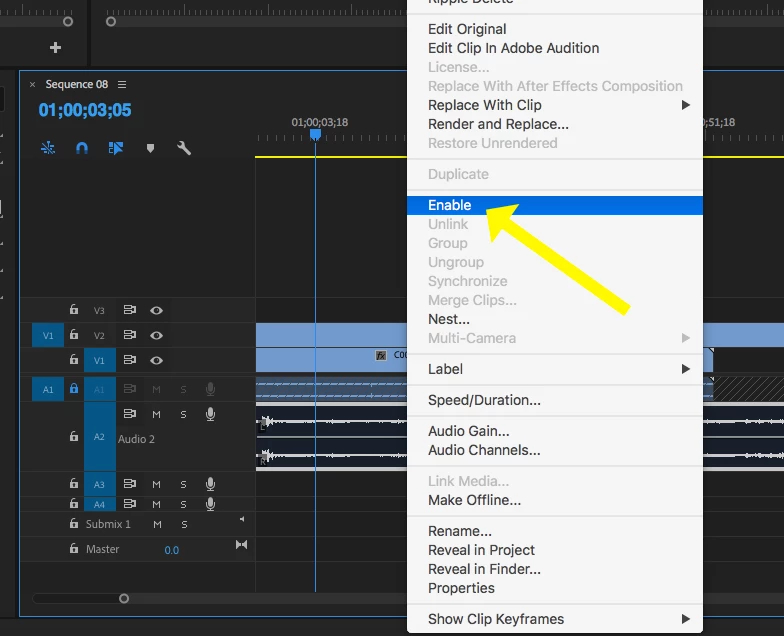
Select the audio clips on the timeline that are the "darker shade" and once selected, right click (Control click) on one of the clips and from the drop down menu, click on Enable:

MtD

2 replies

cow1911Author
Participant
November 29, 2017

It worked!  Thanks!

Meg The DogCorrect answer
Inspiring
November 29, 2017

Select the audio clips on the timeline that are the "darker shade" and once selected, right click (Control click) on one of the clips and from the drop down menu, click on Enable:

MtD