


Known Participant
August 8, 2017
Question

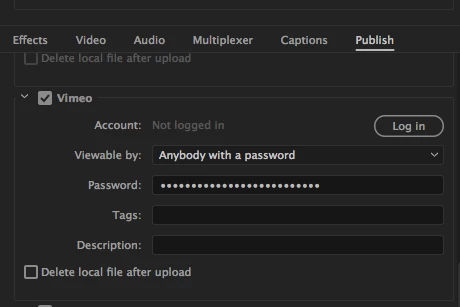
Can't log into Vimeo/ upload directly to Vimeo from Premiere CC

  • August 8, 2017
  • 19 replies
  • 13376 views

Hello,

When I try exporting from Premier and attempt log in to Vimeo, as I have for many months now, when I enter my password, it still does not connect, even though I am logged in already to Vimeo. Also, I do not see premiere listed in the connected apps section of Vimeo's preferences either.  any one know why this just started happening?
This topic has been closed for replies.

19 replies

Stan Jones
Community Expert
Community Expert
May 17, 2020

I've been connected on the app for some time. Exporting from PR or AME produced same results - no problem. I logged out and cannot log back in....


The first post in this thread is from 2017, and the GUI is very different. In any event, I "signed out" from Vimeo in PR, and cannot log back in. Unlike some (getting a plain Vimeo page), I click "Sign In" and I get a window with "Authorize the application" in the top left and "Log in to Vimeo" options. But instead of success, I get a Vimeo screen with "See plans" and "Joint for Free" as if I am not recognized. Logging in produces various loops with "join" (rather than just login). In any event, logging in at every opportunity produces no joy. Tried logging in to Vimeo first (no problem; credentials are okay), and leaving that page open while I tried connecting.


I updated to 2014.1.0 April 14. I uploaded a video after that, but I do not recall if I was already logged in to Vimeo.


Loaded PR 2019.1.5. Same thing.


I do not use the same email address for Vimeo as I use for my Adobe accounts. Since I've been meaning to change that, I changed my Vimeo login email to the same as Adobe. No change. 


In the Vimeo site, I showed throught as "Connected." I "disconnect." No change to the PR side: cannot connect. Vimeo now also shows disconnected (PR/AME does not appear at all).


Edit: Posted bug report in uservoice. Upvote:

https://adobe-video.uservoice.com/forums/911308-media-encoder/suggestions/40445803-vimeo-cannot-connect

Posted in Media Encoder because that is what shows in the Vimeo connections list.


Stan


Participating Frequently
May 17, 2020

Exactly the issue I am facing. Log in the app and get the same page as you are seeing.

Legend
May 17, 2020

I just had a thought...  could this be a firewall issue on the computer?  not sure where you'd be able to change this, but might be worth some googling.  

Participating Frequently
May 17, 2020

No - tried on two different machines: PC and Mac. Same issue.

Legend
May 17, 2020

could be the same issue on both machines.  Could be a firewall issue on the router if they're both connected to the same one or could be a default setting on both systems...    If it's working on some people's machines, I would guess that it's not a premiere issue but a system issue.   Can anyone report success with this feature?  Maybe if I get inspired (or really bored or just desperate not to do the work I should be doing) I'll see if I can get it to work.  I seem to remember trying to do this a few years ago but I may be misremembering.  I've found just exporting to a folder on my computer that automatically gets mirrored on to dropbox on the cloud works just fine and I can easily access vimeo from home or wherever and instantly copy the video from dropbox to vimeo.   but I'm repeating myself....

Participating Frequently
May 17, 2020

Same issue for me - when trying to log in to Vimeo on Media Encoder, there is no Authorise page that comes up. Just the Viemo homepage appears even though I am logging in with my credentials.

dakotakid_parker
Known Participant
April 25, 2020

Having the same issure here. Using Premiere 14.1 (latest build also has issues with Red Giant Colorista). Can't log-in to Vimeo via Media Encoder. No problems logging in via Vimeo and Chrome on a Mac.


Logging out of Vimeo and logging back in does nothing, unfortunately. It's a busted Premier/Encoder fature. Not surprised.

Participating Frequently
May 16, 2020

I'm having this issue as well. Used to work. Tried clearing cache's and all that. I spend waaaaaaaaay too much time doing this kind of BS in Premiere.

Participant
April 21, 2020

I am having the same problem and have been trying to fix it for hours!!! When i try to login through the publish tab in the export window, it wont log me in it just goes to a join now page even though there is nothing wrong with my vimeo account. Some one please help me i am so frustrated! 

Russell Scott
Participant
April 21, 2020

I am having the same issue as Anna - very frustrating - I am using a Dropbox workaround but publishing via the PP app would be so much better!

Kevin-Monahan
Community Manager
Community Manager
October 4, 2017

Hi Reelife,

We have a bug fix that addresses this issue in the upcoming version of Premiere Pro and Media Encoder. Please try it and let us know if it is working at that time.

Thanks,

Kevin

Kevin Monahan - Sr. Community & Engagement Strategist – Pro Video and Audio
mattf50978733
Participant
October 4, 2017

That's great news Kevin!

Are these new, fixed versions already available via our enterprise CC Packager?

Kevin-Monahan
Community Manager
Community Manager
October 4, 2017

Sorry Matt, all I can say for sure is that our team has isolated the issue and provided a fix in an upcoming version. No current versions carry this fix currently. For now, I have to ask for your patience.

Kevin

Kevin Monahan - Sr. Community & Engagement Strategist – Pro Video and Audio
mattf50978733
Participant
October 4, 2017

Hi everyone.

I just wanted to add to this as well.

We're deploying a lot of CC installations via our Enterprise licensing with Adobe.

In this case, with Premiere Pro 2017, I am seeing the exact same problems as the OP.

Adobe really needs to address this.

Legend
September 11, 2017

I would recommend uploading through your browser.

rienq
Participating Frequently
September 11, 2017

Jim_Simon  wrote

I would recommend uploading through your browser.

To me that's not really a helpful suggestion, Jim. Of course we can do that. But the thing is that we ask for a solution for a broken feature. Not for a workaround (which was the way before the feature was there, anyway).

Legend
October 4, 2017

we ask for a solution for a broken feature.

I generally take a more fundamental view.  I interpret most questions as "How can I get the job done so I can get paid?"

The How is incidental, so long as it works.

bucksommerkamp
Community Expert
Community Expert
August 8, 2017

I had this problem early on and realized that somehow the connection between Vimeo and Premiere Pro CC had been broken along the way. I think there are some cookies/tokens/back-channel things that have to be in order for it to all work (but MAN, when it works, it is so beautiful - I can go to bed at night and let everything compress and upload without intervention!).

Here's my recommendation:

  • Open up a browser, log into and OUT OF your Vimeo account.
  • Log back in to Vimeo (still in your browser).
  • Try connecting Premiere again - do just a quick test or something to make sure it works
  • CHECK THE TEXT LOG ON YOUR COMPUTER...it's where I started finding the problems spelled out. If it had trouble logging in, or the token/cookie was not valid, it will tell you in that log.

Please let me know if this helps! It's soooooo worth troubleshooting.

Buck

Known Participant
August 8, 2017

I tried that to no avail... where do i find the "text log" - thanks!

Regards, Tom Adams, Director/owner Reelife Documentary Productions
Known Participant
August 8, 2017

also I just noticed that when I go to log in from premiere's publish window... the media encoder app shows up in the window...NOT the premiere app... so, if I wanted just to export and not queue the file ...it's not connecting with premiere... something's all wacky...

Regards, Tom Adams, Director/owner Reelife Documentary Productions