


Participating Frequently
January 23, 2023
Answered

Captions not showing in program monitor: Premiere Pro 23.0

  • January 23, 2023
  • 2 replies
  • 2692 views

Hi, can anyone help here?

I've created captions, they appear on the timeline and in the Text window.

But they don't show on-screen.

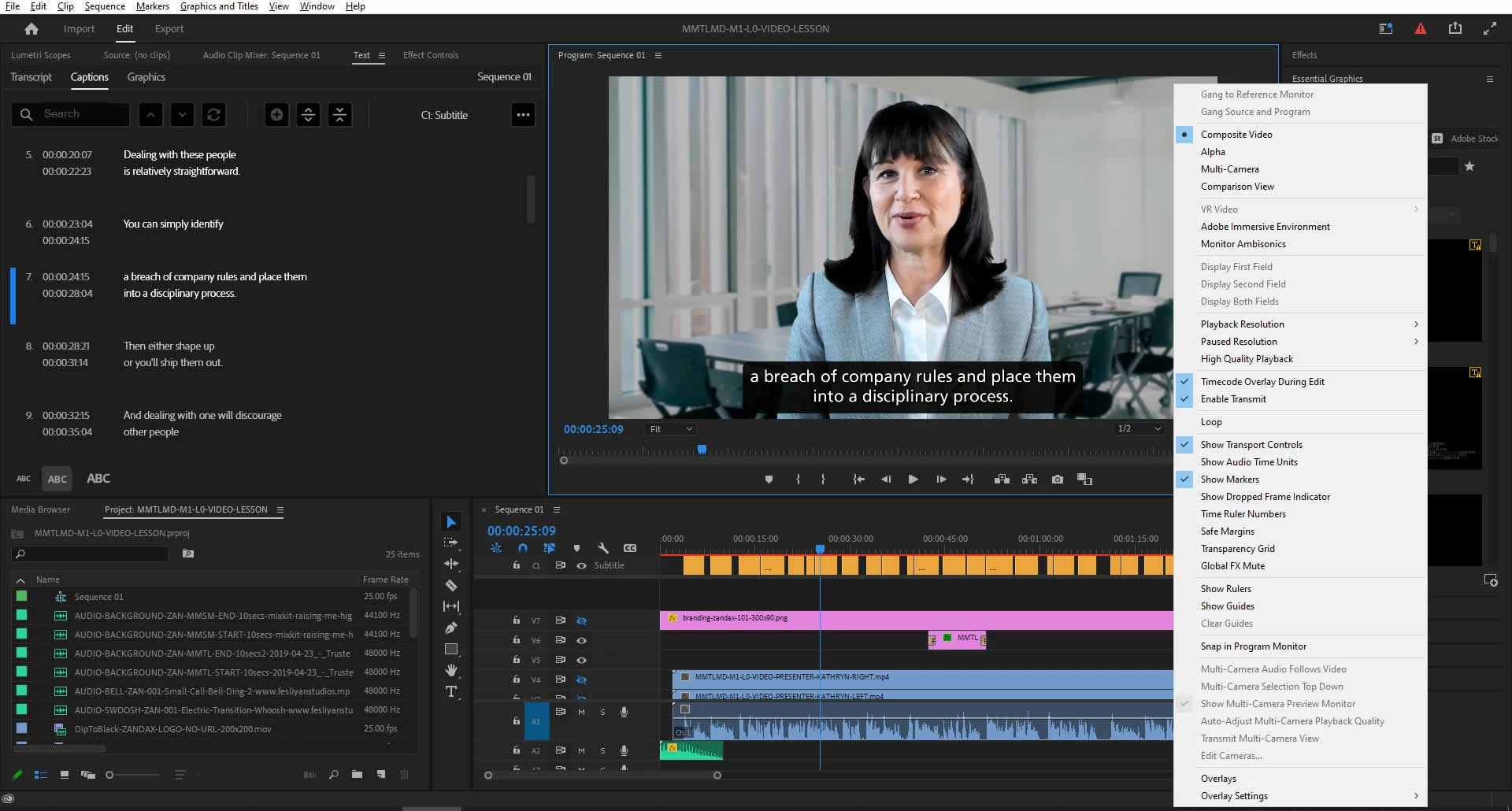
I click the wrench icon in the Program Monitor panel and there's no Captions option.

This used to work without a hitch but it has disappeared; I opened an old file that I created captions for and they're not showing here either. So it's the settings that have changed but I can't see a way to fix it.

And would this be connected to a recent issue where there used to be "Split Captions" and "Merge Captions" buttons in the text panel but now they're only available in a dropdown.

Very frustrated because the speech-to-text is amazingly useful ... but it needs to work !!!

Any help will be greatly appreciated...
This topic has been closed for replies.
Correct answer Stan Jones

Many thanks Stan

I worked till 2am and gave up. Came back this morning, turned on the PC and what do you think ... all good ...

I guess I spent too much time looking for logical solutions and not allowing for Premiere to go all "tired" on me (but I'm really NOT a power user!!!)

Your comment on clearing the render files/cache led me to follow up on improving palyback performance (which can be choppy...) so thank you for that, too.

And your suggestion on widening the Text panel was absolutely correct.  Brilliant!

So I'm out of the woods on this.  SO grateful for your help.

Just one thing left from my original post: I click the wrench icon in the Program Monitor panel and there's no Captions option.  Here's a screen shot (full resolution!) that shows the options I get when I click the wrench icon.  Am I clicking the correct icon?

Thanks again

Steve


Steve,


> not allowing for Premiere to go all "tired" on me


Too funny! Many of us have tried that approach, but the usual outcome is that 2AM, "I give up!"


Congrats on your persistence and moving ahead. And thanks for the feedback on widening the Text panel. I was convinced there was too much empty space for that to be it!


In the pre-PR 2021 caption workflow, there was indeed an Enable Captions button in the Program Monitor wrench icon menu. And it also was in the Source Monitor. In that captions workflow, captions were Video track items, and they needed a way to turn them on and off. Now, they do it with the visibility/disable caption (eyeball) icon in the caption track. So the button is not there!


And you can check that one off your list!


Stan


2 replies

Participating Frequently
January 23, 2023

Screenshot to illustrate: all looks good to me but the captions (sub titles) aren't showing...

Participating Frequently
January 23, 2023

Thanks Michael.

As it says, I'm new here; maybe this is a better wat to show a screen shot?

Stan Jones
Community Expert
Stan JonesCommunity ExpertCorrect answer
Community Expert
January 23, 2023

Many thanks Stan

I worked till 2am and gave up. Came back this morning, turned on the PC and what do you think ... all good ...

I guess I spent too much time looking for logical solutions and not allowing for Premiere to go all "tired" on me (but I'm really NOT a power user!!!)

Your comment on clearing the render files/cache led me to follow up on improving palyback performance (which can be choppy...) so thank you for that, too.

And your suggestion on widening the Text panel was absolutely correct.  Brilliant!

So I'm out of the woods on this.  SO grateful for your help.

Just one thing left from my original post: I click the wrench icon in the Program Monitor panel and there's no Captions option.  Here's a screen shot (full resolution!) that shows the options I get when I click the wrench icon.  Am I clicking the correct icon?

Thanks again

Steve


Steve,


> not allowing for Premiere to go all "tired" on me


Too funny! Many of us have tried that approach, but the usual outcome is that 2AM, "I give up!"


Congrats on your persistence and moving ahead. And thanks for the feedback on widening the Text panel. I was convinced there was too much empty space for that to be it!


In the pre-PR 2021 caption workflow, there was indeed an Enable Captions button in the Program Monitor wrench icon menu. And it also was in the Source Monitor. In that captions workflow, captions were Video track items, and they needed a way to turn them on and off. Now, they do it with the visibility/disable caption (eyeball) icon in the caption track. So the button is not there!


And you can check that one off your list!


Stan


Legend
January 23, 2023

just want to make sure you're not missing the little eye icon to the left of the caption track...