


sinclaira81104072
New Participant
June 21, 2017
Answered

change frame size within a video

  • June 21, 2017
  • 4 replies
  • 17515 views

I am trying to create a tutorial using footage of a screen recording from a mobile device and screen recording from a laptop. The problem I'm having is trying to combine the two. I have the most mobile device footage and that's what I started with so that is the frame size. (looks like the size of a phone screen.) when I try to add in the laptop footage it only shows what fills the smaller frame? I know how to set to frame but I need to do the opposite and have the frame scale to picture.

I've looked everywhere and cannot find a solution. Keep in mind I'm a beginner and self taught. Thanks!
    This topic has been closed for replies.
    Correct answer premieregal

    Hi sinclaira -

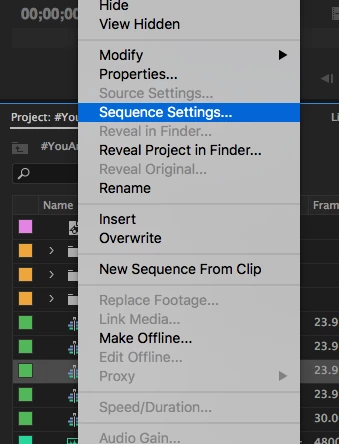
    1. Right click on your sequence from the Project Panel and select sequence settings.

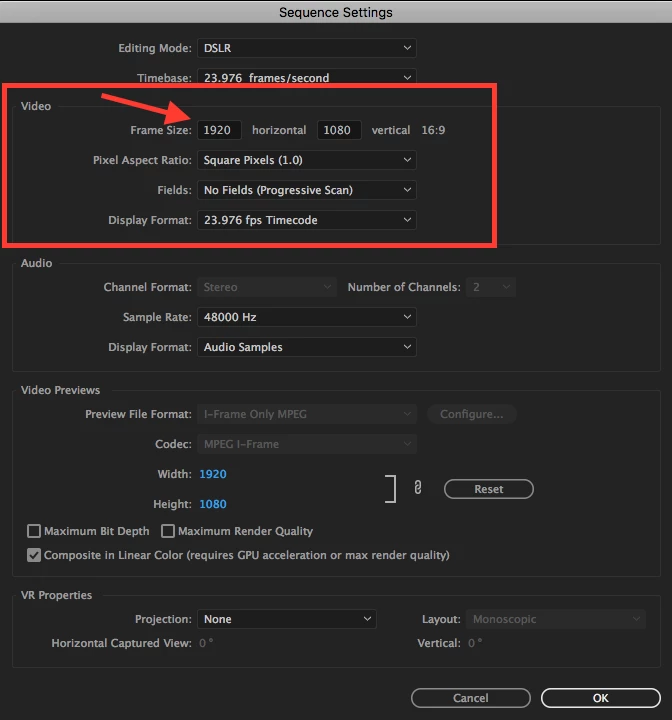
    2. From the sequence settings window, under "Video" change your horizontal to 1920, so you will get a 1920 x 1080 pixel resolution and an aspect ratio of 16:9.  Then hit ok.

    4 replies

    premieregal
    premieregalCorrect answer
    Inspiring
    June 22, 2017

    Hi sinclaira -

    1. Right click on your sequence from the Project Panel and select sequence settings.

    2. From the sequence settings window, under "Video" change your horizontal to 1920, so you will get a 1920 x 1080 pixel resolution and an aspect ratio of 16:9.  Then hit ok.

    Ann Bens
    Adobe Expert
    June 22, 2017

    If the sequence is made of a preset you cannot change height and width without changing the editing mode to Custom first.

    premieregal
    Inspiring
    June 24, 2017

    Interesting, I'm able to change height and width from the DSLR preset without changing the editing mode to Custom first.

    Ann Bens
    Adobe Expert
    June 22, 2017

    If you want to change the framesize, select sequence in Project Window,

    Go to Sequence / Sequence Settings,

    Set Editing Mode to Custom,

    Change horizontal and vertical parameters.

    Brainiac
    June 22, 2017
    Steve Werner
    Adobe Expert
    June 21, 2017

    What Adobe application (and version) are you trying to use? If you tell us, we can forward your request to the appropriate forum. (This one is not for that purpose.)

    sinclaira81104072
    New Participant
    June 22, 2017

    Premiere Pro CC 2017, sorry about that.
    Thanks!

    [Moved... Here is the list of all Adobe forums... https://forums.adobe.com/welcome]