


Vallzr
Participant
May 14, 2019
Answered

Choppy playback / skipping frames?

  • May 14, 2019
  • 3 replies
  • 18322 views

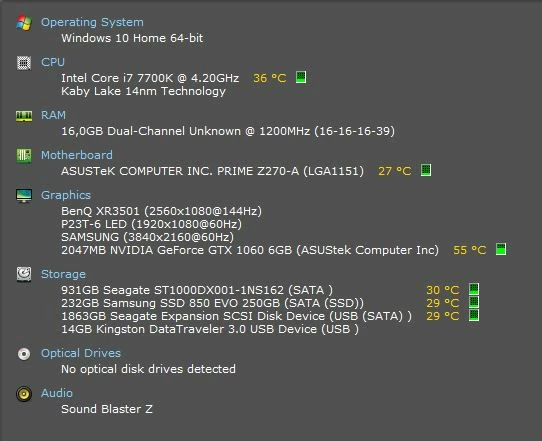
Was editing one day and it was fine. Went to start Premiere the next day and this happens (check video). It lags like crazy and drags out everything. Same thing when opening older projects and even creating new ones. Also included specs for the curious. Thank you in advance.
Correct answer Vallzr

This?

EDIT: Changing "Default Input" to "No input" fixed it. Thank you for your help!

3 replies

Participant
April 17, 2025

I've been having this issue for YEARS, I would say I hope they fix it but it only shows up sometimes when I open the app, I have to close and open it and sometimes that fixed it, and sometimes I'd have to restart my computer. Gonna try your fix now, it's super annoying and idk if I really have hope for them "fixing" it or if it's something on our end. Kinda annoying too considering how much I spent on my newest pc

Participant
March 25, 2025

The "answer" by the staff is not the solution. This is the Solution:
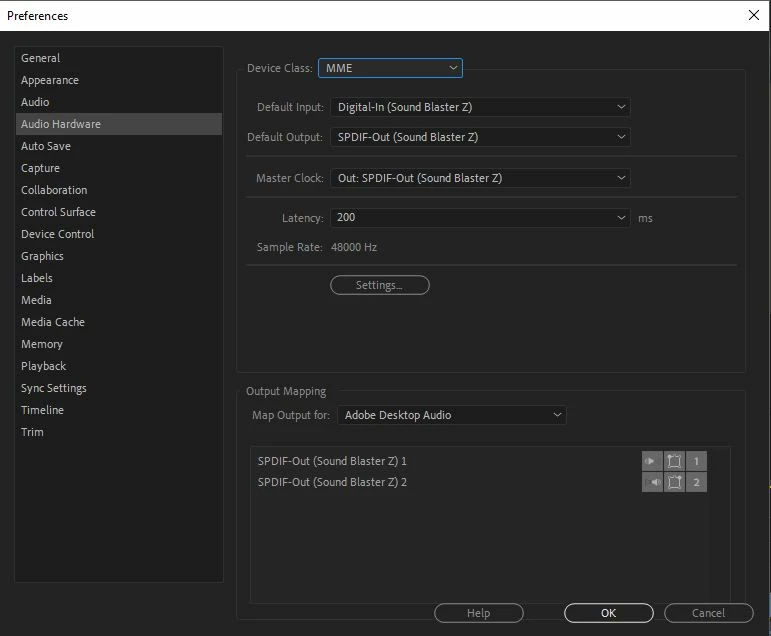
Under Edit > Preferences > Audio Hardware > Default Input change the Audio input to No Input.

If that doesn't work you can proceed with the troubleshooting:
Troubleshooting issues related to playback and performance in Premiere Pro.

Thanks to:

quote

..SO simply changed the Audio input under Edit > Preferences > Audio Hardware > Default Input / Output..

By @daizy


I don't understant why having a mic selected is causing playback to skip but this fixed it at least.
2025 and still this problem exists.

Kevin-Monahan
Community Manager
Community Manager
March 25, 2025

Thanks for drawing our attention to this error. I fixed it so the response to Vidya Sagar's post was chosen as the correct answer. Yours is the same, so I upvoted your post. Thanks for that once more.


Cheers,
Kevin


Kevin Monahan - Sr. Community & Engagement Strategist – Pro Video and Audio
Vidya Sagar
Adobe Employee
Adobe Employee
May 15, 2019

Thanks for posting in detail, Vallzr.

Have you tried the steps recommended in this article? Troubleshooting issues related to playback and performance in Premiere Pro

Share a screenshot of the application "Preferences > Audio Hardware" with us.

Vidya

Vallzr
VallzrAuthorCorrect answer
Participant
May 15, 2019

This?

EDIT: Changing "Default Input" to "No input" fixed it. Thank you for your help!

Participant
July 19, 2020
It was my headphones! Lol changing default input to no input fixed it! Thank you.

Ah after a solid 5 hours troubleshooting - trying everything in the above article, changing file types (as recommended by YouTubers) and playing with other settings. I realised it was audio input was automatically picking up a new mic software thing I'd installed (Kinon!) and that was the cause of all the choppiness. SO simply changed the Audio input under Edit > Preferences > Audio Hardware > Default Input / Output change to your inbuilt computer option