


Participant
October 21, 2013
Answered

Closed Captions Not Working (Premiere Pro 14.9 and earlier)

  • October 21, 2013
  • 14 replies
  • 152196 views

I am trying to create a closed caption in premiere pro cc (trial version) but when I am in the captions tab, am unable to select the 'add' caption button. I have enabled the captions and have watched many video tutorials and searched the web for answers but there is nothing about why the 'add' caption option might not be available?


[Please choose only a short description for the thread title.]


Message was edited by: Jim Simon
This topic has been closed for replies.
Correct answer Mark Mapes


I see two issues:

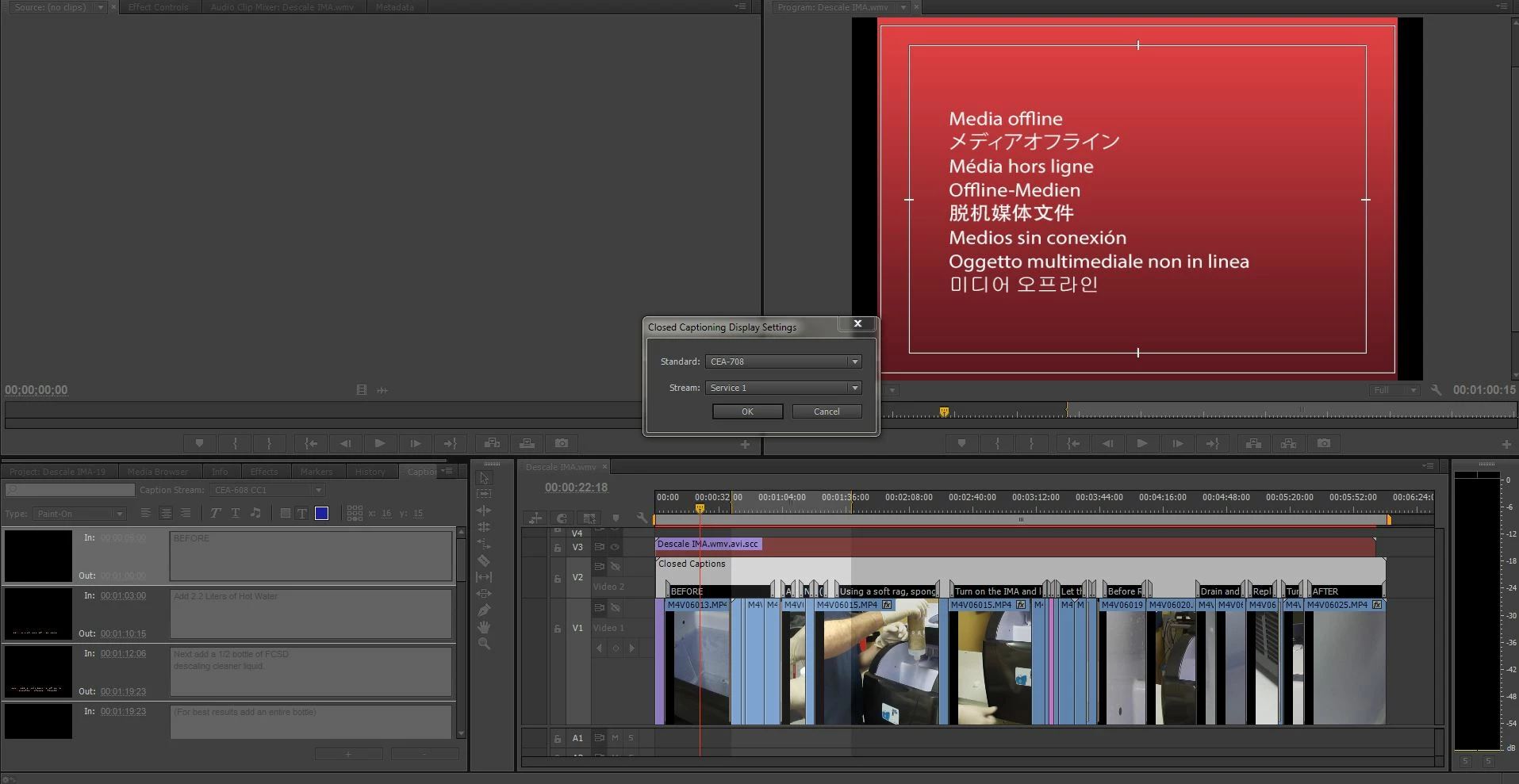
  1. If we're talking about the closed captions on Video 2 in the screenshot, then I notice that the track is disabled, as indicated by the slash across the eye icon.
  2. The caption clip that's loaded in the Captions panel is 608, but the Captions Settings panel is set to 708.

So you may need to set the Caption Settings to 608 and enable V2 by clicking the eye icon.

14 replies

Dude1x
Participating Frequently
February 4, 2015

I'm using Premiere CC Pro 2014.

I tried every hint in this thread to try to make closed captions show up, they won't.

This is ridiculous.

This is my workaround.

Create a title (CTRL+T).

Set a text and a background and there you have your subtitles and they are even more versatile than scc, you can use any font you want and place them wherever you want.

Adobe Employee
February 4, 2015

Sorry to hear you are having problems with closed captioning. Try this:

1. Import a caption file (sidecar or embedded MOV or MXF) into the program. Or go  File-> New-> Captions and make a native closed caption

2. Double click on it in the Project Area to verify what type it is -- 608 or 708, and the channel

3. Go to the wench icon in the monitors, click on them, make sure captioning is enabled. Make sure it is set to whatever standard and channel the caption file says it is

4. Put the caption file in a Sequence, or double-click it to load it to the Source

You should see closed captioning displaying -- if not -- let me know!

Dude1x
Participating Frequently
February 5, 2015

I tried all that, but to no avail.

The only thing you can't see on this screenshot are the "Settings..." below Closed Captionning Display->Enable. I tried both 608 and 708 there, but it makes no difference.

As you can see on the very left of the image, the subs show up in the thumbnails, but not in any of the preview panels in the upper half of the screen, even though the time cursor in the timeline is on the sub.

Am I missing something?

Adobe Employee
June 24, 2014

It should be as simple as

1. Go File-> New-> Closed Captions

2. In the "New Closed Captions" dialog, click <OK>

3. In the second "New Closed Captions" dialog, pick CEA-708, click <OK>

4. Double-click on the native 708 closed caption you created in the Project area

5. Captions panel should open

6. Add 708 captions by clicking on the "+" button


And


Make sure in both Monitors, in the wing menu, that 'Closed Caption Display' is Enabled and under 'Settings' the standard is 708


atldsl
Participating Frequently
June 24, 2014

When I follow these steps and then export as an XDCAM HD422 with the caption embedded and then play back on a Harris Nexio, I see errors on a few different scopes:

1. 708 caption block sequencing error.

2. 708 Triplet precedes 608 Triplet.

So, I think there is an issue with embedding the captioning.  I can upload the files to Harris (now Imagine) to review, but in past experience this is a lingering issue that will affect not everyone, but will affect many.

I also use a Ross CDP100 which is a specific hardware device designed to find CDP errors with caption streams to give an idea of how this might impact broadcasters with their downstream equipment.

I would like to know what Adobe uses to qualify their closed captioning streams as that might help in better understanding their process?

Adobe Employee
June 24, 2014

Thanks for the information -- putting the files somewhere where I can get at them would be awesome. I do thank you for the time you have spent on this, send me a private message when you allocate the files. Then I can take a look.

Participant
November 15, 2013

Jess,

Did you ever figure this out?  am having the same problem and I don't know what to do. I have my captions and I can see them in the caption tab but it doesn't show up on my video.

Mark Mapes
Community Manager
Community Manager
November 16, 2013

Please be more specific about what you mean by "it doesn't show up on my video." Do you mean that you can't see the captions displayed in the Source Monitor? In the Timeline? In the Program Monitor? In encoded outputs with captions set to be embedded?

If you're referring to either or both of the monitors in PPRO, have you enabled caption display and made sure in each monitor's Closed Captions Display Settings dialog that the Standard and Stream match your source captions?

Participant
December 27, 2013

I am having the same issue in PProCC. The captions are showing in the captions tab & in my timeline. But they are not showing in the Program Monitor and I have enabled them. I have also done what you suggested here ensuring that the Settings match. In the Source monitor the option to enable is not available (greyed out).

Ann Bens
Community Expert
Community Expert
October 21, 2013
JessTAuthor
Participant
October 21, 2013

Hi Ann,

Thanks for this, I have tried that option and seen that adobe help page. The captions still don't show up on my video - I have enabled the closed captions in the top right hand drop down menu, I have selected the correct time that I want the caption to appear and it just doesn't appear.

If anyone could help me that would be great, the following is what I have done:

Is there any reason why it wouldn't be showing up?

Known Participant
October 30, 2013

Here is a video of the latest attempt. This is incredibly frustrating.

http://youtu.be/XYYztRqt_cs


The closed cpation editor may be the problem. Editing one entry effects the others. Major bug in here somewhere.

http://youtu.be/DZa8niYgxyk