Inspiring
July 24, 2025
Question

Color Management Tone Mapping By Channel and Weird Results

  • July 24, 2025
  • 7 replies
  • 375 views

First off, I'm sorry to say this color management setup is really not that intuitive. Using hue preservation makes for very weird highlight areas in video, and by channel seems to be buggy at best, sometimes not allowing you to grade anything over 70 IRE brightness and othertimes not. Overall having a bad experience but this but is the most show stopping: 
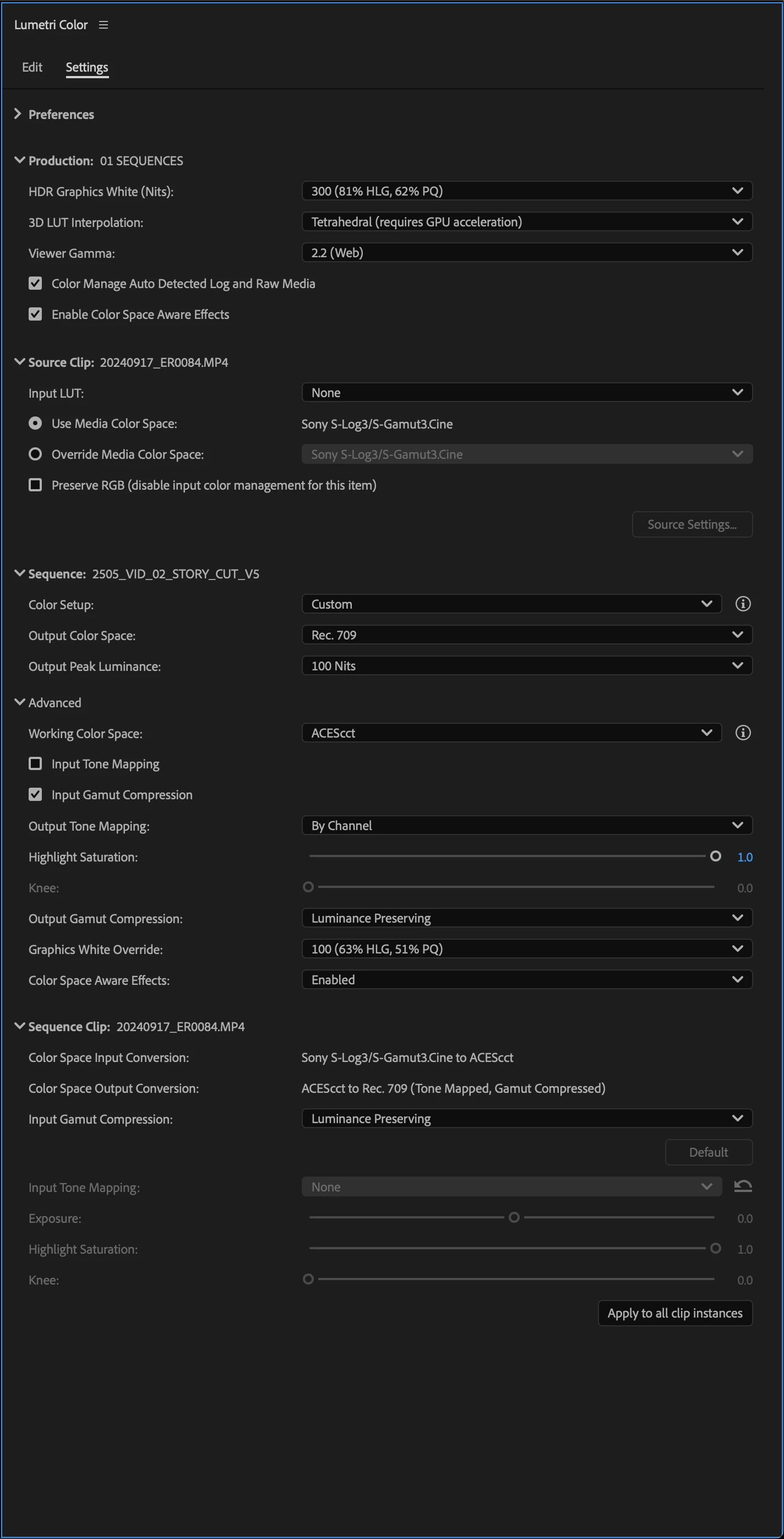


If I apply basic color correction, a creative effect, and do an RGB curves adjustment the picture goes to hell.


7 replies

jamieclarke
Community Manager
Community Manager
July 29, 2025

Hi @Scott.C. - Thanks so much for the detailed feedback you’re not doing anything wrong. What you’re running into is a real limitation with how color correction and LUTs currently work in Wide Gamut.

At the moment, applying creative LUTs in a Wide Gamut project can cause issues like clipping, especially when combined with other adjustments like Basic Correction or RGB Curves. Hue Preservation and the “by channel” controls can also behave unpredictably in highlight areas or at high brightness levels.

This isn’t expected behavior, and we’re working to fix it. In the meantime, the best workaround is to stick with the Direct Rec.709 workflow when you’re using creative LUTs.

R Neil Haugen
Legend
July 25, 2025

If you are talking broadcast or streaming, some of Shebbe's comments are quite applicable. And the team was very direct about this at NAB in April: the new CM tools get users a good share of the way to solid usability but not for all workflows yet.


That said, for probably most web bound workflows , there are good ways to get things finished quite usably. 


So it depends on needs. Preserve RGB, then sending out for color as before, will work well for separate color needs.

Everyone's mileage always varies ...
Shebbe
Community Expert
Community Expert
July 25, 2025

I would advise to not use 'Wide Gamut' workflows in prodction. Your intuition is correct that it is definitely not ready for prime time. See here a thread about another bigger issue with it's current implementation. My comment there also refers to the initial launch thread of the updated colormanagement where you can see the amount of issues there are with their current approach.


I'd recommend sticking to manual management with LUTs. There is little benefit to gain from their wide gamut workflows currently.

Scott.C.Author
Inspiring
July 24, 2025

Hi I'll email you a problem project stub. I'm not on 25.3 because my org hasn't update yet. I can nudge them if you think that will solve this. 

jamieclarke
Community Manager
Community Manager
July 24, 2025

Hi @Scott.C. -   Thanks for submitting your bug report. We need a few more details to try to help with the issue.  Please see, How to Report a Problem.


That is a very strange result is this your program monitor or an external monitor?


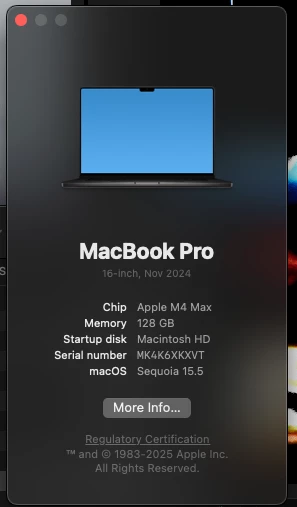
Can you post a screenshot of your lumetri settings or send a project to jamiec@adobe.com 


Is there a reason you are not using version 25.3?

if you are using an external LUT make sure you have the preserve RGB box checked as well.

There is a known issue in version 25.2 where Color pickers malfunction with Wide Gamut presets in Lumetri Color panel.  I wonder if this is what you are experiencing.

Sorry for the frustration.

R Neil Haugen
Legend
July 24, 2025

Color management is necessary by can be amazingly confusing and complicated. I work both in Premiere and Resolve, and the other app has even more choices and more places for users to muck themselves up. Yeesh.


Could you provide a link/dropbox to a clip I could test on my rig?


As I've done a number of different media including S-log variants and haven't had troubles.


Some further details ... like why the 300 nits in the Project graphics white (an unsually high setting) with the normal 200 nits in the Sequence setting ... whether you've tried the input tonemapping option ...  would be nice also.

Everyone's mileage always varies ...
Scott.C.Author
Inspiring
July 24, 2025

If I load a creative lut with "by channel" tone mapping it seems to clip off any and every highlgiht at 70 IRE. I pushed exposure just to show the issue.  If I turn off color space aware effects it works ok, but the colors are very weird and bad. All around this whole thing makes me want to go back to my old way of doing things, this feels not quite ready for prime time.