

Inspiring
June 8, 2022
Answered

Combining two videos

  • June 8, 2022
  • 4 replies
  • 2000 views

Can I combine two separate h.264 videos previously created in Premiere without reincoding?

This topic has been closed for replies.
Correct answer Averdahl
quote

Can I combine two separate h.264 videos previously created in Premiere without reincoding?


By @Media Editor


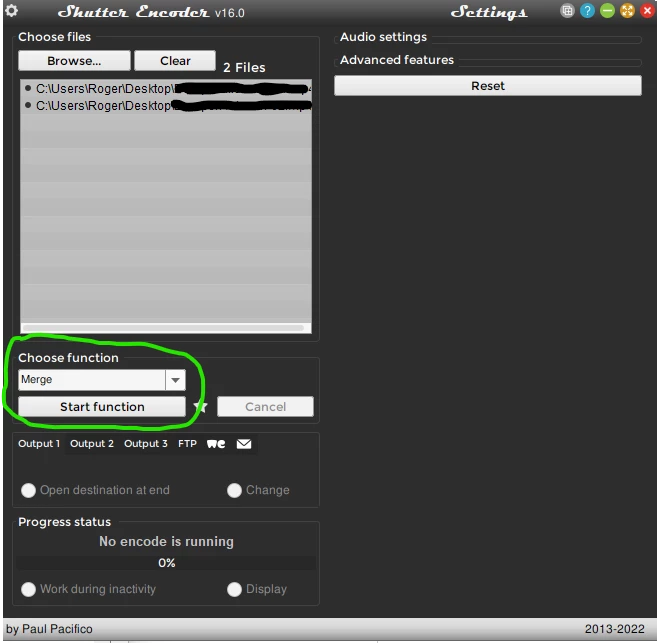
Use the Merge function in Shutter Encoder encoding|converting video FREE PC|Mac to combine two videos fast without reencoding. Load the two files, choose Merge and click on Start function. Name the new file in the dialog that pops up and click on Save. It will just take a couple of seconds.


4 replies

Inspiring
June 9, 2022

Thank you.  Shutter Encoder merged the two videos without any loss of quality.

Averdahl
Community Expert
AverdahlCommunity ExpertCorrect answer
Community Expert
June 8, 2022
quote

Can I combine two separate h.264 videos previously created in Premiere without reincoding?


By @Media Editor


Use the Merge function in Shutter Encoder encoding|converting video FREE PC|Mac to combine two videos fast without reencoding. Load the two files, choose Merge and click on Start function. Name the new file in the dialog that pops up and click on Save. It will just take a couple of seconds.


R Neil Haugen
Legend
June 8, 2022

"Muxing" is a very specific thing, which no NLE I know of can do.


As Graeme notes, there are other apps out there that can mux H.264 within certain parameters. So you can search for muxing software.


Neil

Everyone's mileage always varies ...
Graeme Bull
Community Expert
Community Expert
June 8, 2022

You can not. If you want to make a file that has both of those files then you have to combine them in Premiere and export again. If that's what you're referring to. If you're technical, you can use other software to combine files (like ffmpeg), but it's all the same anyways, still have to make a brand new file out of the two.