


- Home
- Premiere Pro
- Discussions
- Contrast/gamma shift going from Premiere>AE>Prem
- Contrast/gamma shift going from Premiere>AE>Prem
Contrast/gamma shift going from Premiere>AE>Prem

Copy link to clipboard
Copied
hello im struggling with a color/contrast issue when trying to add shake in after effects to a bunch of clips. im doing the usual right click>replace with ae comp, add my fx (wiggle position, motion blur and scale) then from premiere right click "render and replace" usually everything works fine but on this session im seeing the clips that went through AE slightly brighter and with less contrast, there is also an ever so slight pinkish shift, and a slight cooling of the image, maybe a hair less saturation too. ive messed with color space settings in AE which seemed to be changing SOMETHING but the issue never got resolved fully. im running OSX 10.10.5 with an nvidia 970 running driver 346.02 cuda 7.5.3, 32gb ram with max allocated to adobe. idk if it matters but i have a SSD scratch drive and the media is on a 4x hd raid. chat support has tried to help me but told me to post on here, he remotely accesed my mac and tried a few tests comparing the AEP file which led me to here. here are two screenshots showing the difference in color temp/contrast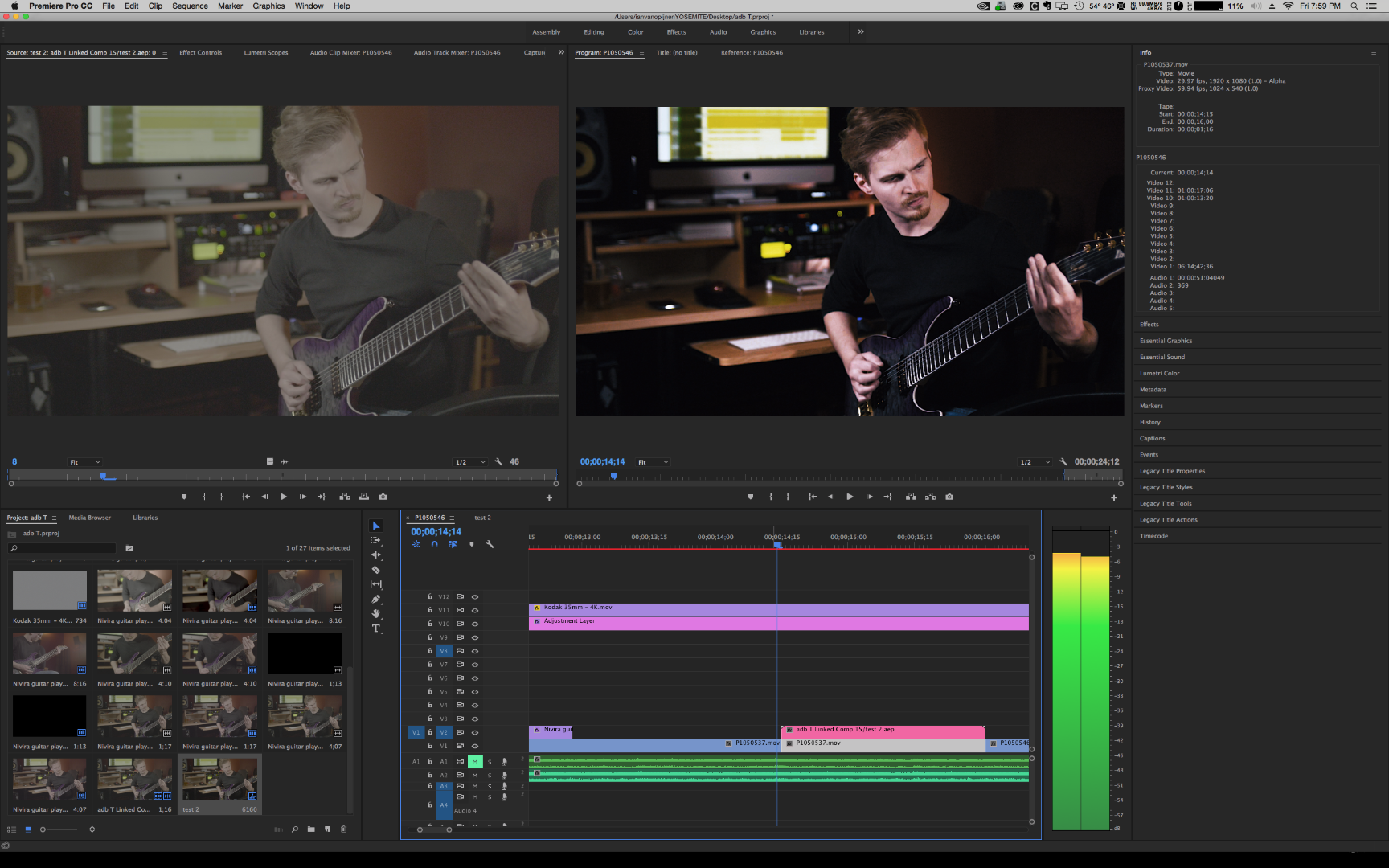 darker.......and lighter


 6
Replies
6
6
Replies
6


Copy link to clipboard
Copied
[moved from Adobe Creative Cloud to Premiere Pro CC]


Copy link to clipboard
Copied
Hi jessev8420905,
Sorry for the inconvenience. Just for a test, change the renderer in both Premiere Pro & AfterEffects and check the color.
In Premiere Pro, File > Project Settings > General > Renderer, change it to Mercury Playback Engine Software only.
In AfterEffects, File > Project Settings > Vdieo Rendering & Effects > Use > Mercury Software only.
Please let us know the status.
Thanks,
Vidya.
Copy link to clipboard
Copied
i have changed both to software only and the shift is still there. also verified on a windows machine running a less up to date version of premiere and Ae. something i just realized.... ae does not work in yuv colorspace.....(so i hear) which is what my cineform transcoded files are. I have only recently started using aftereffects as part of my workflow , could I potentially be seeing the difference between YUV in RGB color space ??
Copy link to clipboard
Copied
made a slight discovery... im on my 2nd rig (windows 10/not up to date cc) used ame to convert a single gh4 recorded file to both yuv 10 bit and rgb 12bit with max bit. made a new premiere timeline and stacked the original gh4 under each cineform conversion, then copied each cineform clip to the next track which i then sent to AE and back. now in this specific case, i can not visually see ANY difference in the files, but if i look at my scopes i can see that v and levels change strangely... original file has 0-100 ire placed with some blank space below 0 and above 100/255. on the cineform rgb clip it looks like the values have extended, now my black and white levels look like they are at the same value but the whole scale hasn't gotten larger and there is no black space below 0 or above 100/255 while on the yuv converted clip, the original gh4 file shares the exact same values,range and appearance on the scopes.

Copy link to clipboard
Copied
Having this same issue! Did you ever solve it?

Copy link to clipboard
Copied
Bkitt11,
Something like this can be fairly setup-specific.
So ... what's your hardware, including OS and GPU and drivers and settings especially.
What settings do you have for AfterEffects in color management?
What monitor are you using, and is Enable Display Color Management set in Premiere?
Neil


Find more inspiration, events, and resources on the new Adobe Community
Explore Now
 AdChoices