


Participating Frequently
February 17, 2025
Answered

Create custom resolution sequences from a spreadsheet using Automation blocks

  • February 17, 2025
  • 3 replies
  • 3723 views

Hi!
I would need to create many custom sequences for a project, they all have a custom resolution (all at 25fps), examples:
336x672

1024X512

1080x1920

2048x512

3120x1248

1872x936
And many more...

I was wondering if there was a way of creating all these sequences with the help of Automation Blocks, retrieving the height and width needed from a spreadsheet would be ideal.
As doing more than 30 of these sequences manually would take a long time.
Hope there's a solution, many thanks!
Correct answer Mathias Moehl

You can create a custom Automation Blocks script which creates a new sequence using the

New Sequence from Preset  block. Just use multiple copies of the block to create several seqences.


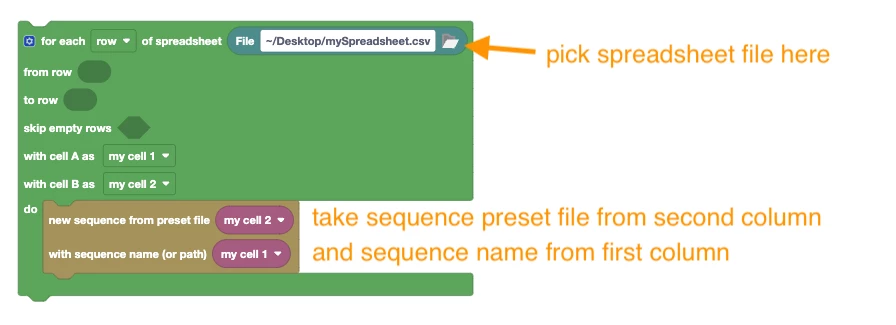
If you want to read the sequence names and sequence preset files from a spreadsheet, combine it with a

For Each Row/Column of Spreadsheet block as follows:


The code assumes that

- the first column contains the names of the new sequence (optionally with a bin like "bin\subbin\sequence")
- the second column contains the file path of a sqpreset file (sequence preset) see how to create such sequence preset files.


(block code is attached)


3 replies

Mathias Moehl
Community Expert
Mathias MoehlCommunity ExpertCorrect answer
Community Expert
February 17, 2025

You can create a custom Automation Blocks script which creates a new sequence using the

New Sequence from Preset  block. Just use multiple copies of the block to create several seqences.


If you want to read the sequence names and sequence preset files from a spreadsheet, combine it with a

For Each Row/Column of Spreadsheet block as follows:


The code assumes that

- the first column contains the names of the new sequence (optionally with a bin like "bin\subbin\sequence")
- the second column contains the file path of a sqpreset file (sequence preset) see how to create such sequence preset files.


(block code is attached)


Mathias Möhl - Developer of tools like BeatEdit and Automation Blocks for Premiere Pro and After Effects
Participating Frequently
February 17, 2025

Hi Mathias, thanks a lot for your solution!
If I undestood it correctly I would still need to have a sqpreset file already made before running the script, correct?
Because the issue I'm having is that for every project the resolution needed is so different, that I would need an infinite amount of formats in order to create all possible combinations.
I've thought about creating it with the preset file option but I don't know what resolution I will need to create per project, therefore a more dynamic approach would be needed, is there any solution inside Automation blocks? Or for this case some JXS is needed? I have attach an example of the spreadsheet with some resolutions.
many thanks again!


Participating Frequently
February 18, 2025

Hi Emanuelle,

oh, yes, this is a very good observation! Automation Blocks has some performance optimizations, which result in files being usually saved only at the very end and not after each write operation (that saves a lot of time if you write a lot of content to a file step by step). Here is a version which uses an Execute Code block with the code

$._extAutomationBlocks.all.fileCollection.cleanup()

which forces Automoation Blocks to save all open files at that point.


Great, now it's working! (almost)
I realize that the code was running too fast and wasn't creating the sequences fast enough, so it was rewriting some resolutions already created.
I've added a like of code to pause the loop to 2 seconds which should be enough 🙂
I've also attached it.
Thanks again!

Community Expert
February 17, 2025

I takes me about 15 seconds to make a custom sequence, in 10 min I could have made more than your 30. It would take longer than that to make a spreadsheet and write a script.

Participating Frequently
February 17, 2025

Hi, yes that is true. But I often have this types of project, so in the long run automating it would save time, it's not this one project, and the resolutions are always different.

Participating Frequently
February 17, 2025

Also I need to rename the sequences based on the resolutions, here mystakes can occur too, when doing it for 30 or 40 times

Participating Frequently
February 17, 2025

Hi, thanks for your reply. I currently need it for Premier Pro 2024 only.
I've been trying to find a way on how to implement it, but struggling a bit to find the right Scipt to add using Automation Blocks.