


Crossfade issues :(

Copy link to clipboard
Copied
Hi Everyone,
I am new to these forums so please be gentle 
I am having an issue within premiere pro cs6 when using any sort of transition.
When transitioning from one clip to the next the original clip continues to play in color and the secondary clips appears in black and white (Grayscale) until the transition has complete and it the jumps to color. (Pictures below)
I have tried different kinds of transitions just in case I had clicked the wrong one but Film Fade, Cross Fade, Dissolve all produce the same dreadful effect.
Does anyone have any clues??
Both clips are from the same footage and its a 2.7k MP4 file from my DJI Phantom 3 standard.
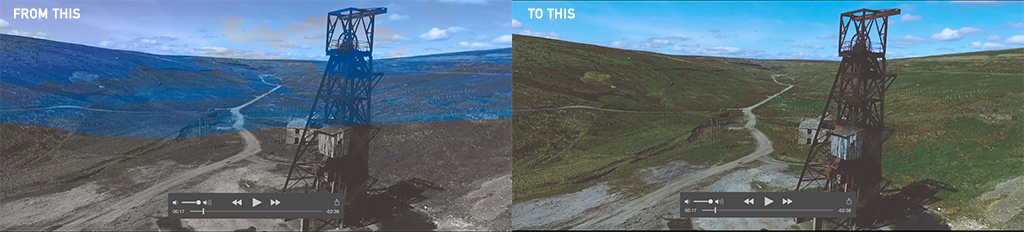
Please help
Brett


 7
Replies
7
7
Replies
7



Copy link to clipboard
Copied
Hi Brett,
Thanks for sharing the screenshots and that sample footage.
That seems to be an issue with the display drivers.
Please share your system specs and which OS are you on?
What is the make/model of graphic card & what is the version of display drivers?
Try these steps:
- Open your project, click on File > Project settings > General and change video renderer to 'Software Only Mode' and delete previews.
- Clean the media cache & reopen your project. FAQ: How to clean media cache files?
- Export your sequence again.
Please share your observations after trying these steps.
Thanks,
Kulpreet Singh
Copy link to clipboard
Copied
Hi,
system is:
OS X
13.3 inch
Yosemite
2.5GHz intel core i5
2x 4GB 1600MHz DDR3 ram
256 SSD
Intel HD 4000 1024MB graphics
all drivers/updates are installed
i have done what you asked but still does the same.
The renderer is greyed out but says: 'mercury playback engine software only'

Copy link to clipboard
Copied
As a test, go to the menu Sequence > Sequence Settings and if checked, UNCHECK Composite in Linear Color:

MtD
Copy link to clipboard
Copied
Sadly this didn't work either 


Copy link to clipboard
Copied
Does this happen on footage other then from the drone?
Copy link to clipboard
Copied
It does, i'm now at a total loss on why it is doing it.
I may have to not use Premiere and use something like iMovie! lol 
Copy link to clipboard
Copied
Restart computer.
Reboot Premiere while holding down shift+alt until welcome screen.
Make a backup of your presets first.


Get ready! An upgraded Adobe Community experience is coming in January.
Learn more
 AdChoices