
rajmc79
Participating Frequently
April 2, 2018
Answered

D2W transition causes the video to be over exposed

  • April 2, 2018
  • 2 replies
  • 310 views

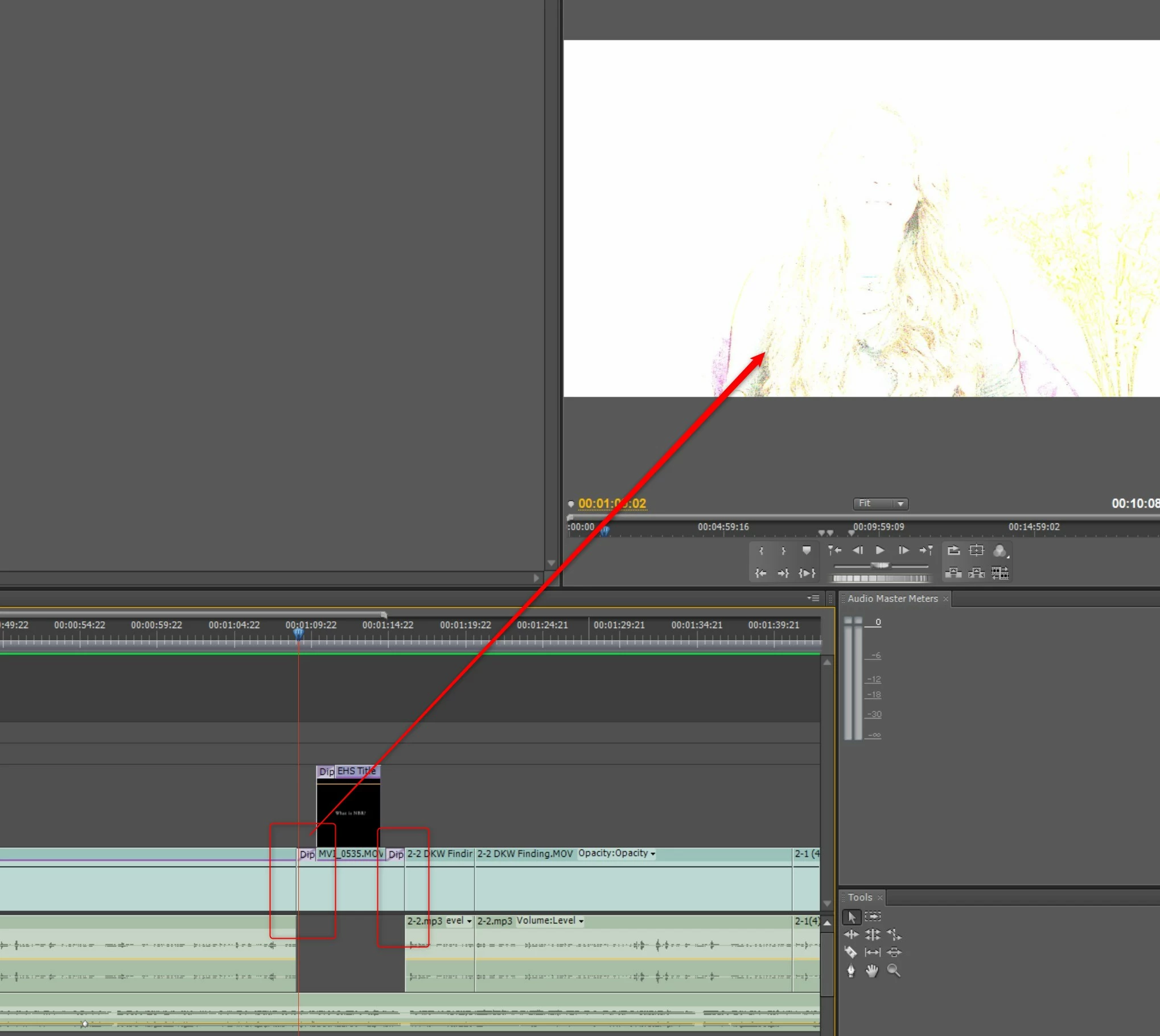
Hello I have a frustrating question and could not find an answer thru searching in the forum.  I am doing a transition from one video to another (first red square in image) then after that video progresses thru it timeline the video transitions into the erd video.  The middle video has a title over layed on it.  My problem is that when the first video Dips into White transition from one frame to the next it goes to an over exposed video (as pointed to the the arrow).  The same D2W is on the back end going into the 3rd video but that D2W works like I expect it to.  ALl three videos have the same effect on them to clean them up from the original shot.  I have tried cross dissolve, i have tried to remove teh D2W on the title thinking that was causing it.  I even moved the title slighty further down the timeline so it is roughly centered to the middle video thinking that was the issue.  Now in another section of the timeline I have a vdeo over layed on top of the main video (same vidoe channel as the title shown in the image) that has the D2W on the front end and the back end of it and that works like a charm....its only this particular transtion that is giving me the fits.  I even exported just this section thinking it was just the preview of it and that the final video would be smooth but that didn't work either.  Literally from one frame the video is perfect, then the next frame its this over exposed image that doesn't transition like it is supposed to.  I am on Premiere Pro CS4.  Please help!
This topic has been closed for replies.
Correct answer Ann Bens

Use a white color matte instead.

Dip to white/black is not suited to use as a single sided transition, rather as a double sided transition.

2 replies

rajmc79
rajmc79Author
Participating Frequently
April 7, 2018

Ann Bens I figured out what you were saying now with the White matte bg....but I am now having the issue in the middle of a video that is overlapps another video for the B-roll clip...I am using a cross dissolve to fade from A-roll clip to the B-roll clip then back to the A-Roll clip with another cross dissolve.  The B-roll clip has the same overexposure.  I have not been able to fix this. 

This over exposure was also happening where the cross dissolve was straddling two clips, fixed this by moving the cross dissolve completely on one or the other clip. 

This over exposure was also happening in the middle of a clip but all I would do is change the order of my effects where the Auto levels is above the Sharpen effect and then re-render. 

But that A to B back to A roll transition with the cross dissolve I have no clue what is going on.  ALl the clips were shot 1920x1080 at 23.967 fps. 

Ann Bens
Community Expert
Community Expert
April 7, 2018

I cannot follow your set up as you do not show the effect controls.

Just a timeline is not enough.

If you are using auto levels that might be the cause.

Ann Bens
Community Expert
Ann BensCommunity ExpertCorrect answer
Community Expert
April 2, 2018

Use a white color matte instead.

Dip to white/black is not suited to use as a single sided transition, rather as a double sided transition.

rajmc79
rajmc79Author
Participating Frequently
April 2, 2018

Ann

Forgive my noviceness on this but what and where do you mean use whie color matte in, the Title clip?  Also i used D2W on the back half of the secind video into the third one and that worked flawlessly should it not work on the first half of it as well.  Thanks for the help.