


New Participant
February 10, 2018
Answered

Deleting Source File

  • February 10, 2018
  • 6 replies
  • 13802 views

How can I use Premiere Pro to delete the original video files that I no longer want to keep? I've got all the clips star rated and labelled. I'd love to sort them, highlight all the low rated clips and simply delete them to save space on my hard drive. I'm only seeing the option to "clear" them which only removes them from the project. How else do people remove unused footage from their hard drive? Thanks for your help!


Sam
    This topic has been closed for replies.
    Correct answer Ann Bens

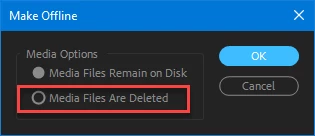
    If you realy want to delete from disk right click on clips in Project window > Make offline >

    6 replies

    New Participant
    February 3, 2022

    I know this thread is old... I was just doing a search for exactly this - if you haven't found it already, CTRL+DEL will remove the file from your project and pop up a confirmation to remove it from disk


    Participating Frequently
    June 15, 2022

    Sir, you made my day. Thank you very much!

    Known Participant
    September 19, 2018

    Hello,

    I have been trying to delete a file in this way by going to "Make offline>Media files are deleted" but when i click it I get a message saying "The file could not be deleted from disk. The file may be locked or you may not have access privileges"

    It is just a file located on my iMac.

    Any suggestions much appreciated.

    Thanks

    Brainiac
    September 19, 2018

    I recommend doing all file operations with a proper file manager.

    Use Finder.

    Known Participant
    September 19, 2018

    Yeah i used to but now im shooting mostly in 4k my quicktime player is struggling to view the footage.

    shooternz
    Brainiac
    February 11, 2018

    Although..not usually source files...I frequently use PPros Offline Media >Delete... to remove files from my HDD.

    This is in the case of Exports I dont need or have revised for what ever reason and I need to get them out of my Project (Clear) and off the HHD ( Delete Media)

    Strangely..this function has always had an error in PPro where by ..you can not name an Export ...the same name as a DELETED File!

    fishysamAuthor
    New Participant
    February 10, 2018

    Thanks for the replies. This really surprises me. With Adobe Lightroom, I can easily delete source pictures and this keeps my photography very manageable. After a shoot, I rate everything, use the 5's and after a year, I delete the 1's. But with Adobe Premiere Pro, there is not way???

    R Neil Haugen, you said "find ..." was an option. I don't see that option anywhere when right clicking on media. See screen shot.  Is there another way Premiere Pro can help me to identify the original clips? Obviously, I could open the folder next to Premiere Pro and pick them one at a time to delete. After one game, I have 200 clips though and after editing, I'd only keep 50. Multiple games, multiple seasons and this adds up really quickly.

    Jim_Simon, are you suggesting that you never delete files you will never use? I'm doing sports videos for my school and easily 4 of 5 clips will never be used. I'm half way through the year and I've go 200GB. By the end of one year, I'll have 400GB which could easily be under 100GB per year, if I can delete. I'm new to large amounts of video editing and to Premiere Pro but it's just hard to imagine that there is not a better system, then to keep everything or hunt and delete files one at a time.

    Thanks for you thoughts.

    Sam

    Inspiring
    February 10, 2018

    I, also, never delete anything.

    Brainiac
    February 10, 2018

    Editing requires lots of hard drive space.  It's better to accommodate that need than try to work around it.

    Get another, larger hard drive if you need more room.

    R Neil Haugen
    Brainiac
    February 10, 2018

    PrPro is purposely designed NOT to allow actually deleting media. You can use the options after selecting media to right-click, "find in explorer/finder" and do so from that OS window. Or ... if your media is nicely tucked into folders on disc, go through your folder structure and delete.

    For many of us, that takes more time than it's worth given the low cost of large spinning drives for storage these days.

    Neil