


Participant
August 6, 2018
Question

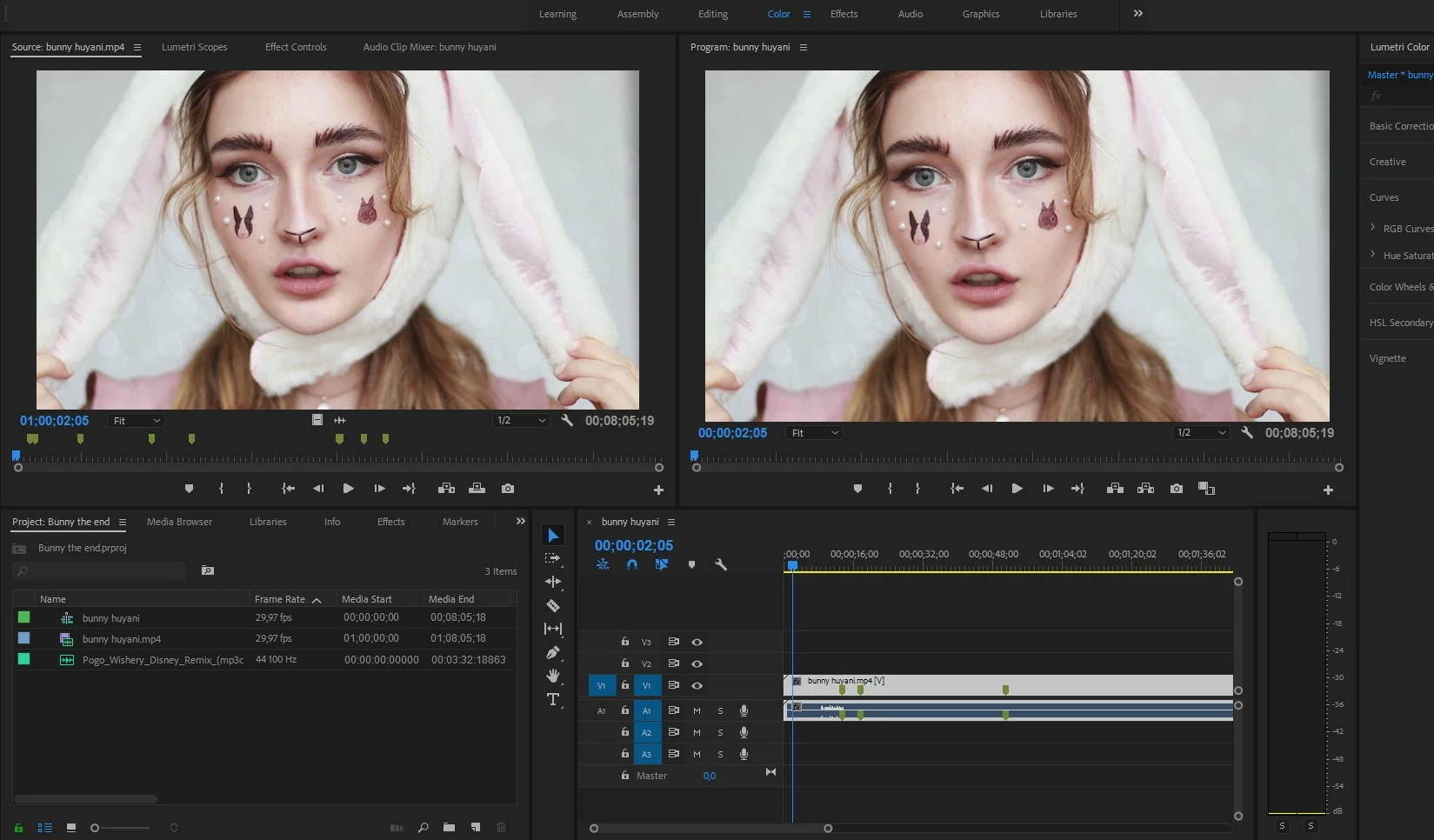
Different video color in source monitor and program monitor

  • August 6, 2018
  • 8 replies
  • 16154 views

First of all i'm sorry if the question is stupid and simply, i'm just a beginner, thank you for understanding. probably the problem is very common and have been answered 100 times but i even don't know how to make proper search inquary and what problem may be related to.

When i add video to timeline in program monitor i see diferent colors than in source monitor. Premier pro in just installed and i think it's use default settings, please help.

It looks like these monitors uses different codeks, soft or something else to display an image
    8 replies

    jorgec4258750
    Participant
    January 21, 2022

    To solve this problem do the following. 


    1- In the "proyect tab" right click on your sequence. 

    2- Select "Sequence settings..."

    3- In the "video" section (Working Color Space) - choose a different color space to match the source and program color.


    Works for me. 

    Regards, George.


    Puffancs
    Participating Frequently
    November 16, 2022

    Love you man! That's it! That solved the problem!

    Thank you very much!

    QingLyn
    Known Participant
    October 14, 2020

    This happened to me, then I noticed I had mistakenly added a color effect to full project cropping adjustment layer, making the entire timeline program window different from the source window.  Ooops. 

    povot
    Participant
    April 16, 2019

    I've encountered the same problem.

    My solution: check if PLAYBACK and PAUSED resolution is the same between source and program monitors. If you are working with high resolution footage in little monitor, resolution changes may shift colors.

    Legend
    August 6, 2018

    Averdahl, So true. But this was screenshots not eyeballs, and although it's hard to see difference ( in the white cloud for example) there is an extremely infinitesimal difference. So it could be screen isn't totally equal across, or some color space changed (YUV to RGB), or some size and frame rate changed ( project doesn't match exactly the resource) or whatever. Like Neil I have the opinion that if this were the worst of my problems in life and editing I would be happy as a clam.

    hehe, thank goodness there is a place like this where new people using this stuff can get an early start on understanding what is going on !  You help tremendously, as do many nice people here.

    chrisw44157881
    Inspiring
    August 6, 2018

    whenever in doubt, use a pixel sampler. i personally use instant eyedropper.

    a difference mode won't show small chroma difference as our eyes mostly see only luma.

    Averdahl
    Community Expert
    Community Expert
    August 6, 2018

    For me this is an illusion caused by the computer screen. Normally your face are staring at the very middle of the screen and thus one see the nuances in brightness/color/saturation of the computer screen when the eyes roll slightly left and right to see the Source (left) and Program (right).

    Some years ago i noticed the same thing on a Dell 24 inch screen and was sure that there was a difference between the Source and the Program monitor. After some time (months...) and frustration i discovered that it all depended on where i sat, meaning that if i moved my body/chair to the left so my face is staring directly on the Source and then moved my body/chair to the right so my face is staring directly on the Program they looked exactly the same.

    If you don´t believe this, take a screen dump of the Source and Program when the same footage is loaded and then import them, place them on a timeline, align them correctly and then add the Difference blend mode to the top layer all you will get is black. Black=no difference.

    Legend
    August 6, 2018

    Neil, I was gonna say, " can't see the difference from MY HOUSE" but he obviously is trying to get as exact as possible. It will be interesting to see what is posted after 'export' . Yikes.

    But at least it's worth mentioning all the help and stuff that is at our disposal so he understands from the ground up what is going on. It will help him / her have that much more understanding, as it was mentioned this is a new thing.

    People watching the final export product won't have the 'comparison' issue, and would love either one of those images, but it's something worth tackling from the start so that the future is more understandable.

    Legend
    August 6, 2018

    I think Jamie LeJeune has it right in the following thread from the Blackmagic forums.  He's specifically talking about Resolve, but the idea holds true for all NLEs.  The upshot is, "The only image you can trust is to run SDI out to an accurately calibrated reference monitor."

    http://forum.blackmagicdesign.com/viewtopic.php?f=21&t=68410

    https://www.lightillusion.com/why_calibrate.html

    Legend
    August 6, 2018

    computer monitors don't always have the same color and tonal range across the entire face of the monitor. You can easily test this. Move your resource monitor panel to where your program monitor panel is, and move your program monitor panel to where your resource monitor panel WAS.  You will probably see that the problem is now reversed.  That means that your monitor is not giving you an even and accurate rendition of colors and tones ( luminance, etc. ) across the whole surface.

    Legend
    August 6, 2018

    the other thing is, make sure your resource monitor FILE ( in your project resources ) is NOT being 'interpreted' as some other footage size or frame rate or anything when you drop into timeline. Nor any OTHER effects applied.

    Graeme Bull
    Community Expert
    Community Expert
    August 6, 2018

    It may be because you are using "fit" as your setting for the size of the video. Try both at 100% maybe

    Participant
    August 6, 2018

    Hello, thank you for reply, as i understand fit is just a size of image, it couldn't affect to color and brightness, btw i tried and nothing changed. Also i opened Learning tab and ised adobe videos for check if i have same problem with other videos and yes, it's much difficult to see but the images is different

    R Neil Haugen
    Legend
    August 6, 2018

    On my screen I can't see any difference between the two worth mentioning,  as in so close to identical as to be of no consequence. (And I've a history of being a picky sot.)

    Next, the Source monitor is not supposed to always show the same thing as the Program monitor. They have 2 different purposes and designed usage.

    Source monitor is the best image as imported without any effects. Program monitor shows what has been done to the image.

    So your concern about this is irrelevant and immaterial. A waste of time.

    The Reference monitor and Program will be as nearly identical as possible.

    Neil

    Everyone's mileage always varies ...