


Inspiring
November 22, 2021
Answered

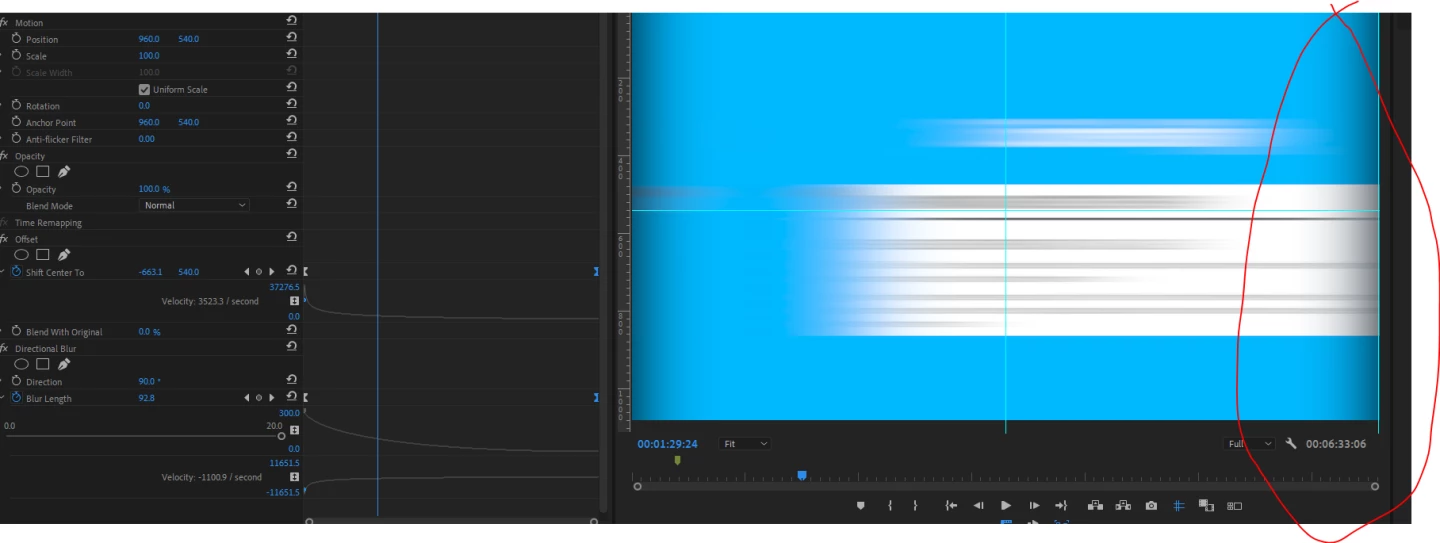
Directional Blur a way to repeat edge pixels?
  • November 22, 2021
  • 3 replies
  • 7974 views

Hey everyone so i have been practicing whipping to the right and left down etc for when i want this style of transition. I followed a youtuber who creates an adjustment layer with an offset and directional blur, is there a way to clean up this edges when the transition begins, i could live with it but was wondering how much work would be involved to make a successful transition like this, i have heard people say they use a normal blur and do it that way but i prefer to have the motion of the blur in the direction of the whip.

Cheers, 

Any help would be great

Correct answer aspire029

Dude what a miracle all i did was put the alpha layer and ticked ignore alpha and its fixed ... Amazing. No one was able to help me with this, i even was in a premiere pro discord channel but no one was able to come up with a solution that worked.. 


🙂 

3 replies

New Participant
June 29, 2025

In After Effects, to remove the black border while using Directional Blur, use the Set Matte effect and uncheck 'Composite Matte with Original'.

New Participant
November 7, 2022

This literally felt like a one-step solution and it made a really tough day a little better! Thank you!

New Participant
November 22, 2021

It may not be what you want, but please try it if you like.

aspire029Author
Inspiring
November 23, 2021

Thanks @Hiro_N I will try it now... Thanks 🙂

aspire029AuthorCorrect answer
Inspiring
November 23, 2021

Dude what a miracle all i did was put the alpha layer and ticked ignore alpha and its fixed ... Amazing. No one was able to help me with this, i even was in a premiere pro discord channel but no one was able to come up with a solution that worked.. 


🙂