


Participant
September 7, 2013
Answered

Display Audio Waveforms in Timeline, Premiere Pro CC

  • September 7, 2013
  • 17 replies
  • 292506 views

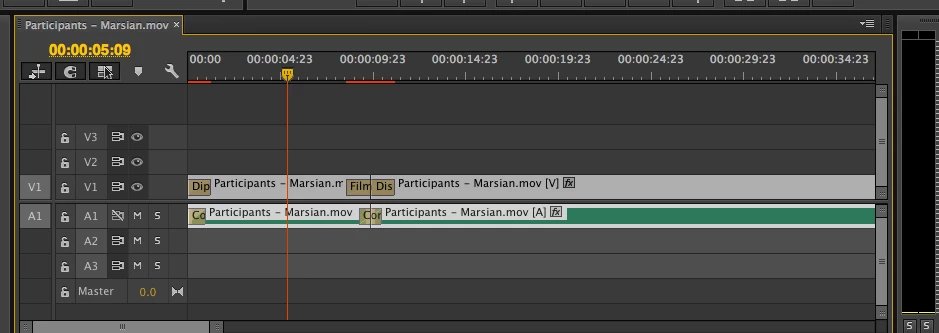
I have just started using Premiere Pro CC, watched all the turorials, and started a project. I am wondering how to display audio as waveforms in the timeline. I have tried suggestions like checking and unchecking rectify audio waveforms, but have not been able to get actual waveforms in the main timeline. It seems like there used to be disclosure triangles in a previous version, but there are none in this version.
Correct answer shooternz

You need to Expand the Audio Track (Scroll wheel in the track header or drag edge downward)

17 replies

ZachGates
Participant
April 16, 2015

I'm having this now. Audio waveforms not showing up randomly. Like right now in my timeline, I can see it on ONE of my video files, but not the other. Obviously, because I can see it on one, it's expanded and the "show waveforms" box it checked. I even rendered/edited/replaced the audio in Premiere and put it into the timeline, but it STILL won't show up. This is MADDENING.

Jenart-7889
Participant
March 26, 2015

March 26, 2015 ... NOT ANSWERED/fixed.  I've been stonewalled a whole day by this and falling more and more behind on commitments. Using an iMac (new in Sept 2014) with a 'magic mouse' (i.e. no roller ball), Yosemite OSX latest version, and PremierePro CC14 (Oct 2014 rlse).

I have taken every step in all these replies including restarting PR and this is STILL UNRESOLVED. Next step is to call Apple and Adobe ... I REALLY NEED HELP.

And I do hope that Adobe is monitoring this thread so this fundamental operation can be fixed.

Thank you for your assistance.

Jenart-7889
Participant
March 26, 2015

After 35 minutes with Adobe phone support ... this is what we found and resolved the issues (as both A1 and A2 had no sound wave):

(1) When media files are moved, PR does not know where to find them. We had to extensively search project files (Lynda.com tutorial) to locate some missing files.

     This resolved A1.

(2) For A2, we right-clicked on the audio track and selected "Render and Replace" ... that resolved the 2nd issue.

Another word of caution ... there is a significant privacy bug at the moment. Even though my forum profile was set to only display my screen name (and only show my account name to myself), the my account name was appearing in this forum. I had to change my personal name on the account in 2 places and then reboot my browser. That fixed the privacy issue to the extent that a bogus personal name is now showing - and my screen name is still missing

Participating Frequently
March 26, 2015

yeah I don't get why my actual names shows up for me, but my screen name shows up to others. Kinda creeps me out... I mean what do you see when I post? And what is the point for me to see my own name? I don't get it.

LeoSSom
Participating Frequently
March 15, 2015

The only solution for this matter is clean the media cache. But you have to go to the folder in the disk directely.

If you use the original location, better speaking , if you never change in preferencies|media, the location is, ( here we use a dedicated drive in network storage. when the media cache is filles around 25000 files, this phenomena starts to occur in time line) . for the original/default place is in <system Drive> users\appdata\roaming\adobe\media cache if i´m not wrong.

Delete all files in there and the behaviour of time line returns to normal . This is another bug in PPRO, presistent for years. since version CS2.

Probably adobe will never resolve this issue.

Best regards,

leon.

bandticker
Participant
December 3, 2014

The drop-down menu is not there! I'm stumped.

R Neil Haugen
Legend
December 3, 2014

Is this what you're looking for?

And when 'opened' ...

Neil

Everyone's mileage always varies ...
Participating Frequently
December 23, 2014

I've found the solution, clean the media cache

Cleaning up the Adobe Premiere cache | Jonathan's Best Mac Tips

Participant
May 27, 2014

I am having the same issue. I try everything and still I do not see any waveforms.

Participant
May 27, 2014

gregbemadadobe I found them under the Wrench tool and click the show audiowaves. I still can not adjust it like in the tutorial?

Participant
May 27, 2014

I did that and still no audiowaves.

Participant
May 27, 2014

I did expand the audio on timeline still can not see the waves. I can not add my screenshot?

Ann Bens
Community Expert
Community Expert
May 27, 2014

Under the same wrench: Show audio waveform.

shooternz
shooternzCorrect answer
Legend
September 7, 2013

You need to Expand the Audio Track (Scroll wheel in the track header or drag edge downward)

Inspiring
September 17, 2013

I am physically unable to do this with my mouse. All I can accomplish is dragging the audio track to the track below.

Can anyone show a picture of where I click to expand this audio track?

Come on, Adobe, bring back the disclosure triangles. Don't limit us to mouse-based moves for basic tasks. Without the triangle, I can't see the forms. Without the forms, I can't edit. Who has time for this?

UPDATE: OK I figured it out, you have to hoover on the side of the track not the track itself. This is still stupid imo. But thanks PP for the answer.

mediazeus
Participant
November 27, 2013

Inside the timeline, click on the Wrench icon and select Expand All Tracks and boom... waveform!