Participant
July 14, 2022
Question

DNxHR 444 10 and 12 bit Support

  • July 14, 2022
  • 3 replies
  • 7785 views

Premiere Pro has major issues with DNxHR 444. Regardless, if it's the 10 bit or the 12 bit flavor and if it's wrapped in MOV or MXF. I won't even get into the whole Full/Legal debate, as that is another topic, but you can take a look at this thread, it lays out very detailed explanations of that issue: 

https://community.adobe.com/t5/premiere-pro-discussions/dnxhr-444-doesn-t-work-properly-in-premiere-shame/m-p/8906263#M64908


As a colorist, this presents a challenge, since for a lot of us who do not work on a Mac, exporting ProRes from Resolve is not an option and not every production has the capacity of handling uncompressed files. Be they DPX/TIFF sequences or even uncompressed MOV wrapped codecs.


To give you an example, I just had a project shot on the Sony Venice in 6k, client wanted to do a roundtrip workflow where I send them the graded shots in 6k for them to online and deliver. I'm sure you can see the problem of trying to render and playback 6k uncompressed media, especially in an image sequence format, for most it's unmanageable.


Presently, Premire Pro just straight up is not reading DNxHR 4444, but it used to. I relied on it to substitute ProRes 4444 and now I cannot. I am that it is not officially supported as it's not listed on the supported file formats page - https://helpx.adobe.com/premiere-pro/using/supported-file-formats.html ;however, I find it unacceptable that such a major and established codec is incompatible with your software.


I urge the Premiere Pro development team to take a look at this issue and fix it as soon as possible, as there is a massive need from countless people who rely on it every day to be able to deliver to premiere users.


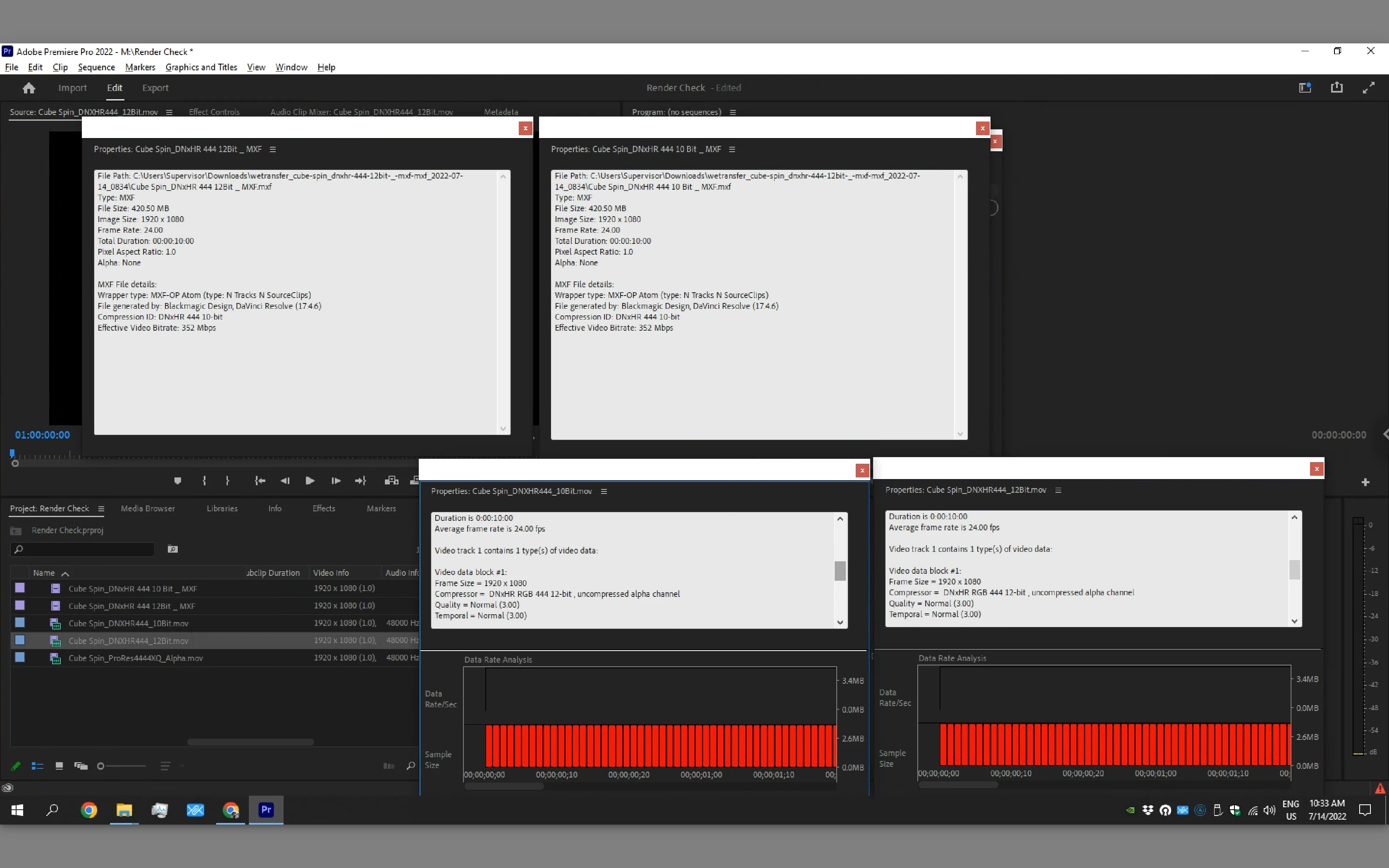
The image below showcases that even the properties' interpretation of different DNxHR 4444 favors is incorrect:

  • MXF wrapped 10 & 12 bit files are both seen as 10bit
  • MOV wrapped 10 & 12 bit files ar both seen as 12 bit.
 

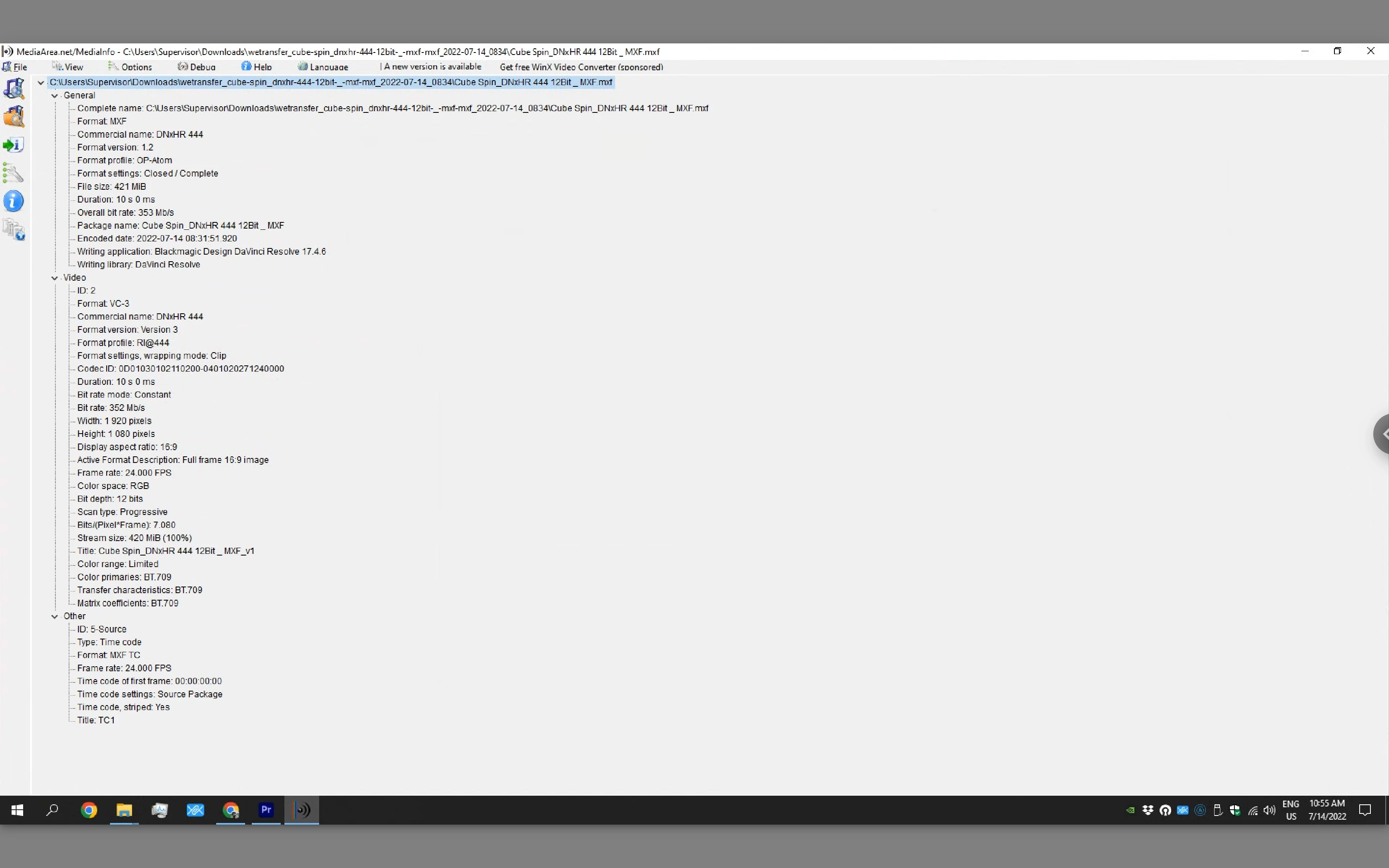
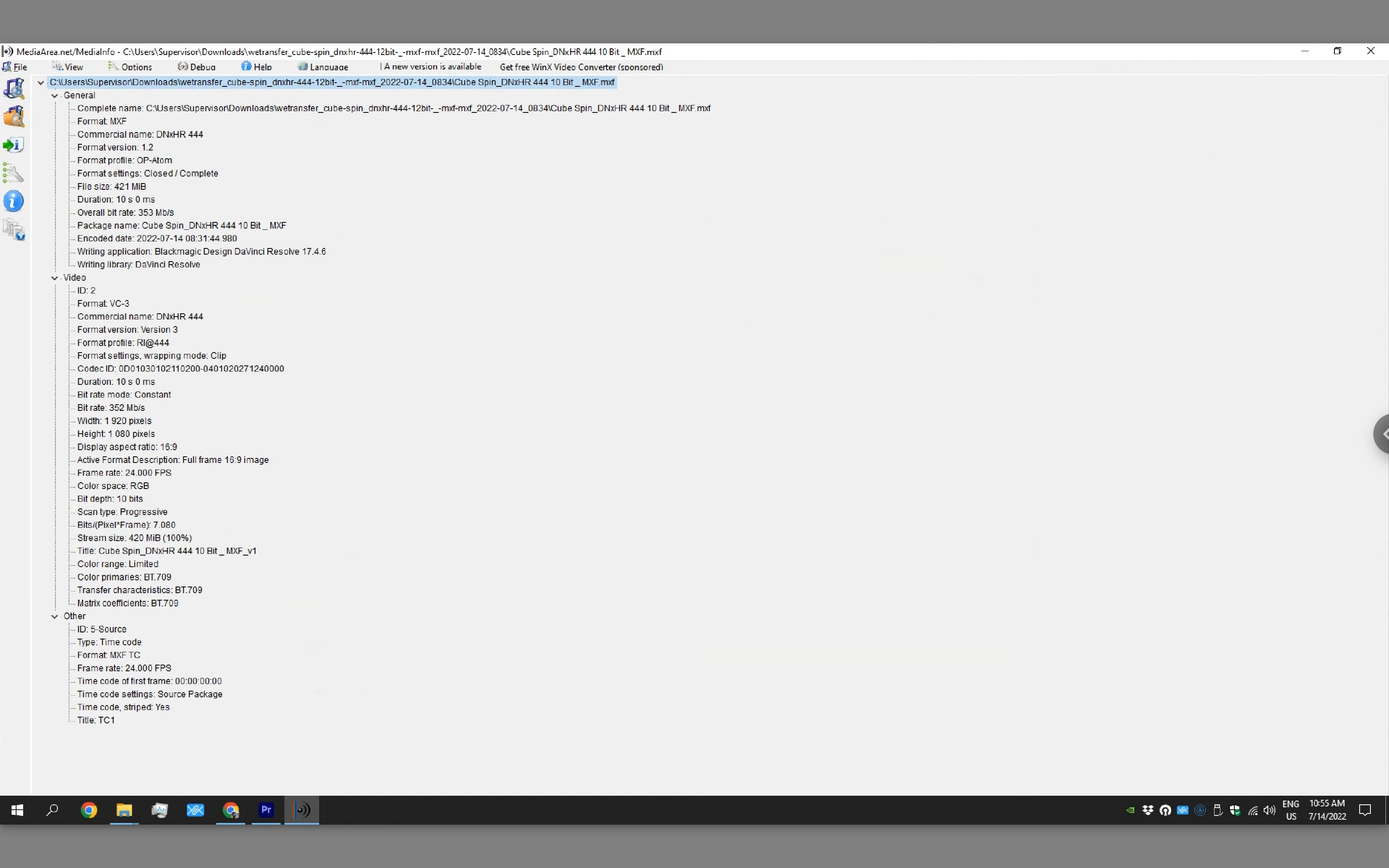
Below are the correct interpretations by the software Media Info:


This Problem only compounds when trying to deliver files with Alpha to premiere from Resolve on Windows. Again, most productions can't handle 6k DPX/TIFF sequences and DNxHR with Alpha is not supported and does not open in Premiere Pro.


This topic has been closed for replies.

3 replies

JackWheelhouse
Participant
March 6, 2023

I second that this is  huge issue as my team and I just ran into this issue with a big client.  DNxHR looked correct in Premiere when viewing the source files in the viewer, but in the Program viewer it looked washed out and completly not as creatily intended. Checked sequence settings and even made a new sequence with the colored DNxHR footage and the same problem persisted.  On export, it looked yet another way and we needed to so a patch job to try and get it close but I resent the fact we even had to do that considering Premiere Pro considers itself a professional software.

Waldorf & Statler
Inspiring
January 3, 2024

Hi Jack,


the Problem is that Premiere & AfterEffects understand DNxHR 444 as a Fullrange Codec,

but DNxHR 444 is a legal Range Codec.


@ Neil, Fergus now this Problem, he say it will be stop to the midel of 2023. I test it in September 2023 a day for the IBC, and the problem was not finish.

R Neil Haugen
Legend
January 5, 2024

Sorry Neil,

I don't see the wording on the AVID page,
that you can either work with the DNxHR 444 codec in YCbCr or RGB.
The only way I can understand AVID's wording is that you can switch between YCbCr and RGB with the codec without any color loss.
But this does not refer to the fact that both take place with the DNxHR 444.
That's how I understand AVID, and that's how the AVID formulation was on the IBC at the AVID stand. That, for example, there is no color loss when converting from DNxHR 444 to DPX and back.
The fact that you always have to pay attention to setting the fullrange and legalrange parts correctly is an additional point.

DNxHR 444 is a legal range codec.
ADOBE knows this too.
You also know that this is wrong.
We were once promised that this would be resolved by mid-2023.
But once again these were just empty words.

Neil, I agree with you, a small step forward would be the ability to edit the footage for Full. and legal range.
But apparently 🙂 cannot buy this function on the market,
You have to adjust them yourself, which is obviously too strenuous.

ADOBE charges a fair amount of rent from us users every year,
It's probably not too much to ask for the problem to be fixed after many years.

I think it will sort itself out, at least in EUROPE, in the next two years. Of the 40x ADOBE licenses in the Premiere / After Effects area in 2022, we will be at 20x in 2024 and around 10x in 2025. The artists I look after switch to another tool inflationary.
First the young people.
The older artists since summer 2023.


Best Greetings

C.


I had a LONG email exchange with an Adobe color scientist over this a few years back. He argued that (if I can recall correctly) 4444 in 12 bit by 'standards' is always RGB and therefore Full, I think it was. And should never be "mis-used" as YUV.


So in the main, I believe your reading is correct, as in the way the rest of the world sees this. But ... that key person is ... not ... seeing it that way. 


And we're still stuck in this mess.

Everyone's mileage always varies ...
R Neil Haugen
Legend
July 14, 2022

Yea, this is still an issue. Unfortunately ... and maybe time for @Francis-Crossman17221443 to pop in about this.


Although I've got a slug of DNxHR presets, RGB, HQX and such available here on my PC ...


But it's not accepting the 4444 on yours? I guess I need to test that on my rig later today.


Neil

Everyone's mileage always varies ...
R Neil Haugen
Legend
July 14, 2022

Well....


Premiere seems fine with Resolve 12- bit RGB files, unless you have an alpha channel attached ... then you get the dreaded frame-excursion warning and a black/void screen for the clip.


Neil

Everyone's mileage always varies ...
Participant
July 14, 2022

Are you wrapping them in MOV or MFX? 


For me, it's erratic at best:


I had to render 6k Source Res Files for a roundtrip workflow, and those weren't being read no matter the combination I tried. I get the same error you get with alpha; however, I don't have alpha.


But 1080p MOV wrapped 444 was working.

Jeff Bellune
Legend
July 14, 2022

@josemariaabreusantos wrote:

I urge the Premiere Pro development team to take a look at this issue and fix it as soon as possible, as there is a massive need from countless people who rely on it every day to be able to deliver to premiere users.


Premiere Pro User Voice