



Swandive stream
Inspiring
June 21, 2018
질문

Do you find Premiere Pro user interface hard to see due to lack of contrast?

  • June 21, 2018
  • 4 답변들
  • 4575 조회

Trying not to double post here. I am aware I can change the UI brightness but it doesn't help. Increasingly I'm having a hard time seeing the individual panels and sections in Premiere as they are all the same shade with little to no variation or gradient.

CC 2018:

Adobe Premiere Pro CC 2018 review

Versus CS6. Notice the difference in appearance, ignoring the Windows vs Mac aspect:
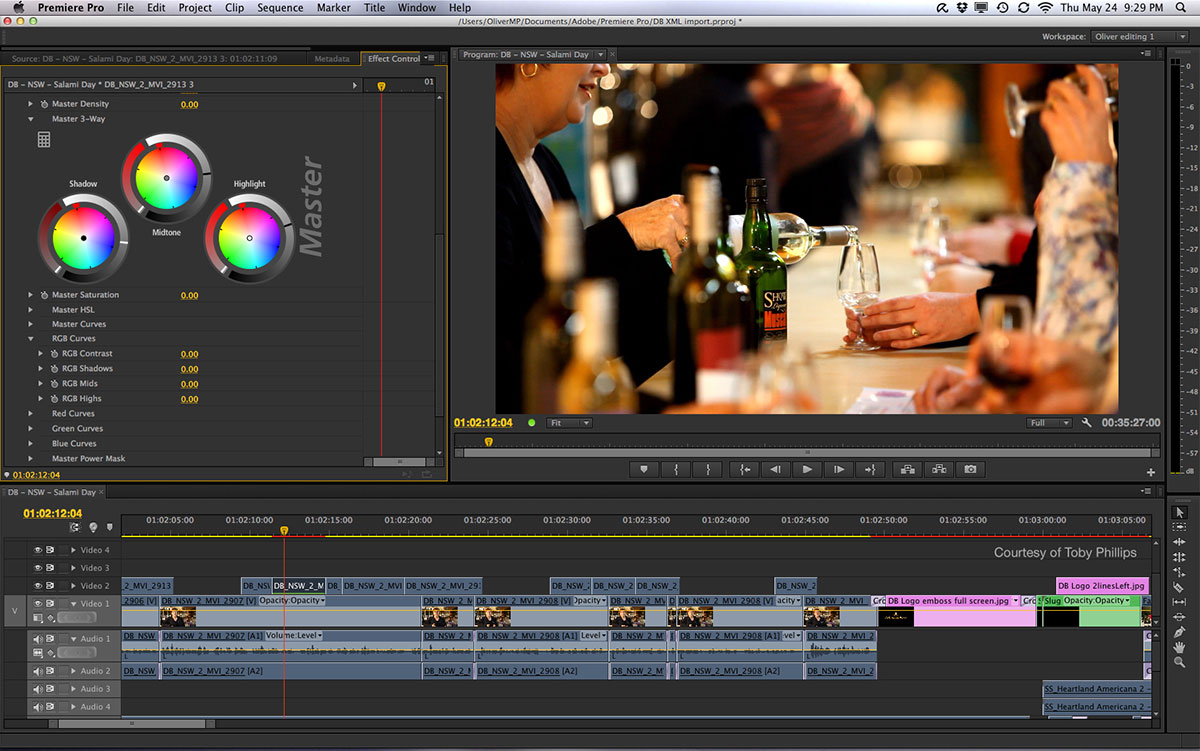
https://digitalfilms.files.wordpress.com/2012/06/df_prempro_1.jpg

In the former it feels like I'm looking into this dark murk and as mentioned, lightening it just makes it a lighter colour murk.

What do you think? I'm no expert on this.

이 주제는 답변이 닫혔습니다.

4 답변

Participant
June 22, 2023

Yes, very much so. I wonder if there are instructions anywhere on how to change these?

R Neil Haugen
Legend
June 21, 2018

I'm getting by. I lightened the background color as it's too dark for proper comparison of lights/darks in the media being edited, and also brightened the blue outline some, the blue text/numbers all the way.

Neil

Everyone's mileage always varies ...
Ann Bens
Community Expert
Community Expert
June 21, 2018

I am starting to get used to the dark background, setting it to a lighter color makes it less usable.

Legend
June 21, 2018

I think the idea is that you edit in a super dark room like the BAT CAVE.

Legend
June 21, 2018

I've no problem with it, and actually prefer the blue over the older yellow.

Ann Bens
Community Expert
Community Expert
June 21, 2018

If there was a choice I would have the yellow back and and increase the font size.

juanmario
Participating Frequently
June 21, 2018

https://forums.adobe.com/people/Ann+Bens  escribió

If there was a choice I would have the yellow back and and increase the font size.

Your wish is an order,

Cambiar color Interfaz de Premiere CC2017 YouTube - YouTube

Sorry, it's in Spanish, but it's understood.

For the size of the font is:   AdobeCleanFontSize 

Do not overdo it because you can superimpose the texts.

Legend
June 21, 2018

Lots of complaints about Adobe's flat user interface for Premiere and AE since it was introduced more than a year ago, but they keep refusing to change it. You can adjust the background color to "light" in Premiere's preferences, but that makes the contrast ratio even worse.

Software engineers invariably have big uncalibrated screens turned up to "burn my retinas" level, so they think everything looks fantastic. You could throw in another feature request, but someone very high up the food chain wants the UI to be like the buttons on the Heart of Gold.