


danielafort
Inspiring
May 23, 2017
Answered

Edit Selected Frame from Image Sequence in Photoshop

  • May 23, 2017
  • 1 reply
  • 2672 views

I'm working on a project that involves cleaning up dust on frames that were scanned from film. After various experiments we found that Photoshop was the best tool for the job but going through tens of thousands of frames to find the few frames that needed attention was taking far too long. So I had an idea, play the reels through Premiere and open the problem frames with Photoshop. Seems very straight forward, doesn't it?

The frames were scanned to 4K DPX frames which Premiere can easily handle.
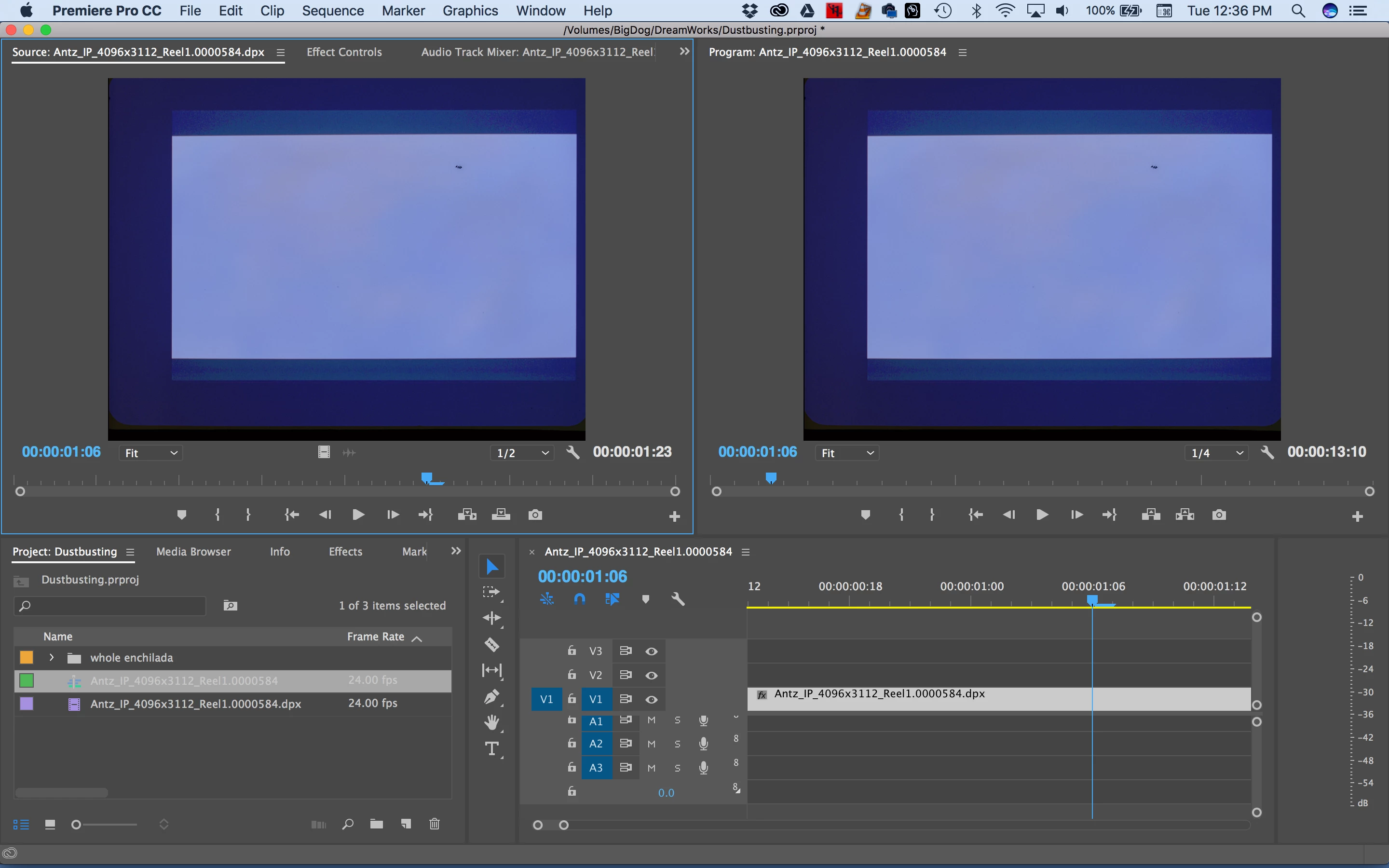
Here, I found a dusk speck on the timeline so I did a Match Frame (F) to open it in the source monitor and from there did Edit > Edit Original (command or control E) but when it opened in Photoshop it always opens up the first frame of the image sequence, not the frame that the source monitor is parked on.

Is there a way to open up the frame that the source monitor is parked on in Photoshop?

Note that I do have a work around by setting a 1 frame Image Default Duration in the Timeline Preference then loading the individual frames on the timeline but that isn't nearly as elegant as working with the image sequence.

This topic has been closed for replies.
Correct answer Meg The Dog

Hi Meg The Dog

Opening up a timeline in the source will disable the option to edit that frame in Photoshop so your suggestion doesn't work. In addition, loading up both the source and timeline and ganging them together puts a huge strain on the system.

However, opening up a clip imported as an image sequence uses up less resources but unfortunately will open only the first frame of the image sequence in Photoshop with Command or Control + E, not the clip that playhead is parked on.

I'm starting to sound like a broken record here.

I'm trying my workaround at the studio today and came up with a few more observations. It is very quick and easy to open up an image sequence made up of 31,000 4K uncompressed DPX frames (32.5 MB per frame) but importing all those individual frames and putting them on a timeline takes an excruciating long time. The playback is also better if imported as an image sequence rather than individual frames.

So far it seems that the best solution I've got so far for this particular job is my workaround but I would like to make a feature request to get this working on image sequences. How do I put in a feature request?


Here:

Feature Request/Bug Report Form

MtD

1 reply

Ann Bens
Community Expert
May 23, 2017

If it will only give the first frame of a clip

I would make it the first clip by cutting the clip.

If that is possible: never worked with dpx.

danielafort
Inspiring
May 23, 2017

Could you be more specific? Do you mean make a subclip? That doesn't work. Cut the clip on the timeline and match back from there? That doesn't work either. It always opens the first frame of the DPX image sequence in Photoshop.

Ann Bens
Community Expert
May 23, 2017

Ah pity.