/t5/premiere-pro-discussions/edit-workspaces-not-behaving-correctly/td-p/13569033Feb 09, 2023
Feb 09, 2023
Copy link to clipboard
Copied
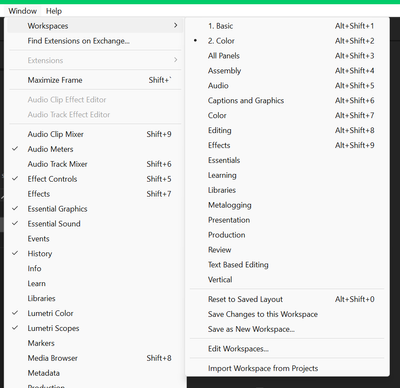
Since I recently decided that I only need a few of the workspace options I tried deleting old worksaces and hiding ones that I don't need but I know that are native to Premiere. The thing is that the hidden workspace aren't hidden nor the ones that I ordered properly arranged. Can this issue be solved? I have Premiere Pro 23.1 Installed Using Windows 11, version 22H2
MarekMularczyk • Community Expert, Feb 10, 2023Feb 10, 2023
Hi,
When you hide workspaces, they won't be hidden from the menu. They'll be hidden from the top-right corner of the application frame where you can get Workspace Tabs:
/t5/premiere-pro-discussions/edit-workspaces-not-behaving-correctly/m-p/13569365#M453254Feb 10, 2023
Feb 10, 2023
Copy link to clipboard
Copied
Hi,
When you hide workspaces, they won't be hidden from the menu. They'll be hidden from the top-right corner of the application frame where you can get Workspace Tabs:
Adobe Community Expert Adobe Certified Professional










 2
Replies
2
Replies




 AdChoices

