


oliverk37878173
Known Participant
February 13, 2019
Question

Encore compiling error because of pop-up menu

  • February 13, 2019
  • 3 replies
  • 3929 views

I created dozens of blu-rays, always with the same pop-up menu template.

Only the background and buttons are changed from project to project.

But this time the blu-ray built crashes and I get an error message saying:

"code 6", "Graphics buffer underflows" - Failed to multiplex with maximum IG PTS: 54900000 (in 90kHz)
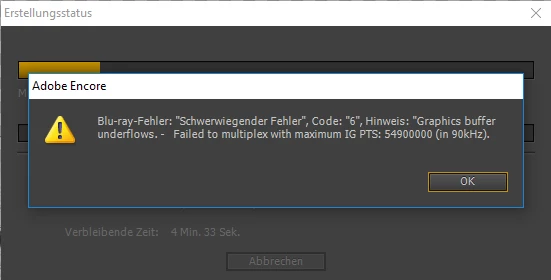
I searched the forums. Seems like I am not the only one and no one found a soluton.

The photoshop file has exactly the same dimensions and dpi like all my other pop up menu pages. But it doesn't work this time. I can't figure out why but I know the problem is caused by the pop up menus because when I delete the pop-up menu from the project the built works.

I also started from scratch and renamed the files etc.

When I start from scratch and just import a movie file and set the pop-up menu it works. But as soon as I link a chapter it doesn't work and I get the "buffer" error.

Also, when I want to preview the blu-ray in Encore and the pop up menus are active it does not work to preview. I get the error message:

"Zeile 21 ist für diesen Streamtyp nicht verfügbar."

I appreciate any help.

Thanks guys and girls.

This topic has been closed for replies.

3 replies

Stan Jones
Community Expert
Community Expert
August 24, 2020

Tony, the 2 links I had for your specific error (graphics underflows/recommended IG PTS) were not carried into the new Adobe forums. I have no idea what they suggested.


Neil Wilkes hasn't dropped by lately, but perhaps he will....


Stan

Participating Frequently
August 24, 2020

Stan,

Feel free to send me the links via Email:

[personal info deleted by mod]

Thank you for the reply!


Tony


Stan Jones
Community Expert
Community Expert
August 24, 2020

Sorry; what I meant was that the actual thread was not brought into the "new" Adobe forums. So when you enter the link, it takes you to the main forum page with no content. I could post the link here, but it would do no good.


Stan


Participating Frequently
July 17, 2019

For what it is worth - had very similar error message.  After much testing, here's how I solved it: the main menu used a video motion background – Menu/Properties/Motion tab.  I had it linked to a Blu-ray h.264 file.  The problem went away once I relinked instead to the full 1080p ProRes master, and then let Encore transcode just that menu background.  Surprised, as I used the same encoding preset in Media Encoder (2017 ME app, as it seems there is a problem with the 2019 ME app) that all the movies were encoded to (and those were not a problem).   No more error on the build!

Participating Frequently
August 23, 2020

I'm running into a similar problem. What does this mean? Simple answer please!

.

Stan Jones
Community Expert
Community Expert
February 13, 2019

Hopefully Neil Wilkes will drop in and comment. I'm not sure that I found another instance of your exact message: Fatal error (vs file exists) and Failed to multiplex vs other variations.

Line 21 sounds like captions, which are not supported in Bluray, and won't play in Encore preview anyway.

oliverk37878173
Known Participant
February 13, 2019

no captions, pop up menus are like I always do them (at least I can't spot any difference)

I spent a whole day with the psd file...I just don't get it to work

Stan Jones
Community Expert
Community Expert
February 15, 2019

I was not convinced it was the menu, but I have no idea.

Oliver sent me the psd. I looked at the psd, but did not have a chance to try it in an Encore project.

You have a multipage popup menu, but most of the layer prefixes are missing except for the highlight designation. I'm surprised it works, but, as you say, it has in the past! There are many layers, and a simple link might work and more might not. If it turns out to be the menu, I have no idea why it has worked before and not now.

I would modify a copy of the psd and try it in a test project. First just 3 or 4 links, then a second page also.

Here is a link to the EN CS6 pdf help. The on line links are messed up.

https://help.adobe.com/archive/en/encore/cs6/encore_reference.pdf

Menus -> Using Photoshop to create menus -> Layer name prefixes for menus.

Also, pull up a multipage popup menu from the EN library; example, Corporate/Space Multipage Popup HD.psd.

Button layer names always start with a plus sign in parentheses. (Jive keeps changing that into a big circle with a +, so I can't add it here!)

The code for a new page is (#) and then the page name. It is possible that as long as there is a # symbol, it works, but help and the library versions show just the # in parens, then "Page 1", "Page 2" etc. Note that the first page in a multipage is page zero, so the second page is the first one labeled, and it is "Page 1."

You will also find that a highlight layer (=1) is above a text or other set element in a button group. This does not matter unless the element covers the highlight and prevents it appearing.