


New Participant
May 27, 2017
Question

Equalizing the difference between tungsten and daylight

  • May 27, 2017
  • 1 reply
  • 908 views

Hello,
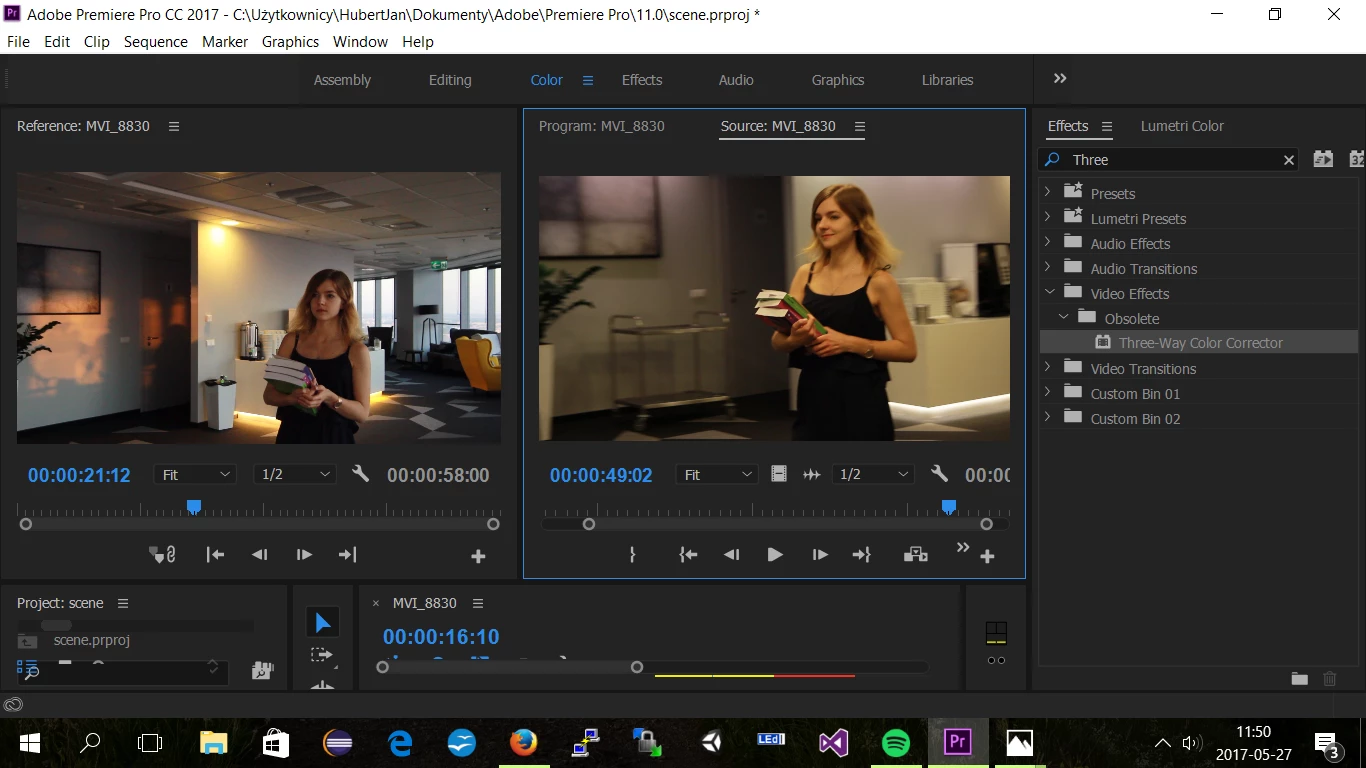
What would be possibly most simple way in Premiere CC '17 to neutralize (at least a bit - I am already aware there won't be a miracle) difference between two scences, one of which was shoot in the daylight and the other in the tungsten light. What I mean is below. Thank you for help.
This topic has been closed for replies.

1 reply

Kindhearted_Buttercup0D4D
Inspiring
May 27, 2017

The best way I could think of, other than gelling the lights with half CTB, or the windows with half CTO, which are both dependent on your production size, is to set the camera colour temperature to about 4300 kelvin. If you've already shot it and it's in the bag, try changing the temp to that in premiere. It's always a compromise but it's often used on set as digital is more forgiving than film when it comes to mixing temperatures. It will blue up the daylight a bit if you've balanced the camera to daylight (5500/5600k) when shooting, and cool down the tungsten. It can be a nice effect and is quite a popular look at the moment. See what that does then play with the temp until it suits what you like. The scene looks like tungsten is the dominant colour so that should help.