


New Participant
July 6, 2016
Answered

Error compiling movie error code -1609629695

  • July 6, 2016
  • 58 replies
  • 79713 views

My System:

Windows 7 ultimate 64bit

Premiere CC2015.3

Graphics Adapter Nvidia Geforce GTX 980

All Drivers and apps updated


Exporting large Premiere projects (Duration appx. 1 hour) with Mercury engine activated don't cause any problem in 2K and 4K as well. But after I have replaced my original Mercalli stabilizer effects by Adobe Warp stabilizer I get the following error Information:
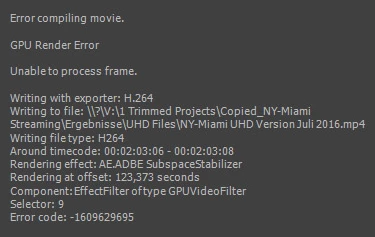
 

Deactivating GPU Support yields excellent results in terribly long time. I am surprised that the error doesn' occur at the  appearance of the first Warp effect but some Warps later.

I found several complaints with respect to "compiling movie error" but none with direct relation to Warp.

Can you help me?

This topic has been closed for replies.
Correct answer Ingkris

Das Problem ist - zumindest für meine Projekte - jetzt gelöst. Seit dem neuesten Update von Premiere CC und Media Encoder tritt der Fehler nicht mehr auf.

58 replies

prockenzie
New Participant
May 30, 2017

Hi guys, had the same error. I fixed it by replacing oversized .PNG files  (6K .PNG in 2K Comp) with same files, but 50% smaller. Works perfectly. I hope this will help, or at least lead you somewhere towards the solution. Good luck!

New Participant
November 30, 2017

THANK YOU SO MUCH! You have fixed my problem! I kept receiving this error:

Error compiling movie.

Accelerated Renderer Error

Unable to produce frame.

Error code: -1609629695

I had this massive .png file (8334x8334) at the beginning of my video. I changed the size of that .png and it automatically started working!

I can't thank you enough man!

-Josh

FocusPulling.com
Known Participant
November 30, 2017

jdmathews17  wrote

THANK YOU SO MUCH! You have fixed my problem! I kept receiving this error:

Error compiling movie.

Accelerated Renderer Error

Unable to produce frame.

Error code: -1609629695

I had this massive .png file (8334x8334) at the beginning of my video. I changed the size of that .png and it automatically started working!

I can't thank you enough man!

-Josh

Glad you got things working after that, but the repeating theme in this thread is that Premiere's behavior is arbitrary, unpredictable, and simply broken.  It makes no sense at all that large still pictures can make a sequence crash during export, but not during playback from the timeline even at the Full resolution playback setting!  Adobe has no excuses for this but also clearly doesn't care after years and years of this being a severe product bug.

New Participant
May 22, 2017

Same error code here. Except trying to render an After Effects project in Media Encoder (same error if rendering within Ae too).

Running Late 2013 27" iMac i5

24GB RAM

GT 755M 1024MB

1TB standard HDD

New Participant
April 5, 2017

I fixed this by deleting all occurrences of the lumetri color effect.  On my error, it was showing the time frame in the video where it was occurring.  It gets past some and not others.  Not sure what's happening.  If I ever need the Lumetri color effect, not sure what I'll do. 

New Participant
April 5, 2017

So, will anyone from Adobe answer that? Because right now I'm looking to switch to Final Cut or Vinci - Premiere is just broken, it won't render, so I can't use it. I have a project I was working for weeks for, and now for many days I'm trying to export it again and again - just to get an error after hours of waiting.

BTW, when previewing in Premiere, everything works fine. Is there any way to render to that "preview" format, so I could get this job done anyhow?

New Participant
April 4, 2017

Same problem here... rendering my very first video.  Such a bummer.

Inspiring
March 23, 2017

Generally I get this error when I have footage with a bunch of effects stacked on top of one another on a clip that is also using Warp Stabilizer. I'm not sure WHY it effects the render, because I can't recreate it from scratch, but I have a solution that MAY work.

Ideally this should only be done when you have picture lock, but if you aren't there yet with your edit then duplicate your sequence and keep one in a bin to revert to if need be.

Once you're ready, go to every clip you have War Stabilizer applied to. Right click on each individual clip and right click, select "Replace With After Effects Composition".

Once After Effects is launched, save the After Effects project as something you'll remember.

Once your clip is in After Effects, wait for Warp Stabilizer to process. After that, go back to Premiere and right-click on the dynamically linked clip, select "Render and Replace". Choose a place in your project folder to save renders to. Click "OK". This will render and flatten your clip to a native video clip.

Once you've done that to ALL of the clips in your sequence that have Warp Stabilizer, send your sequence to Media Encoder and render. Hopefully this will solve the issue, albeit in a very inelegant way.

Note: Once you've "Rendered and Replace" your clip, you will not be able to remove effects or extend the length of your clip. If you need to make changes, go back to your back-up sequence .

Known Participant
March 17, 2017

Same problem, rnadom fails with this error number at various points in the export.

Premiere is great when it works, btu it continues to crash out in numberous different ways, and is now probably the most frustrating program I've ever used.

As this is adobe's fault, and we're all paying for the problems caused by this, perhaps they could offer a work around, and render our projects in the cloud.

PoMaf
Known Participant
December 30, 2016

I wasn't getting this until updating to CC2017. Now I'm getting it on all my encodes, across multiple systems, with different setups that are otherwise reliable systems. So completely unreliable, with significant amount of lost time.

Adobe: you have the next 3-6 months to get your act together, otherwise make no mistake, I'm going to use your products less and less. Paying customers shouldn't have to make the decision to use older options or be your beta testers. This is completely unacceptable. I can hardly use Premiere Pro:

Opening projects is painful

For some reason, opening the "File" menu seems to be difficult for the program.

Using Lumetri fails to preview randomly

Using warp stabilizer fails to preview randomly.

Due to the above two failures of the program, my preview screen goes blank. Only restarting the program restores picture.

The updated old audio EQ and Dynamics (good), but forgot to set it so their edit boxes would display the full options (fail).

You doubled the amount of RAM for minimum and recommended. I'm assuming for VR and 360 footage? (Are these types of footage ready for primetime, and worth it? I don't know.)

Mind you, prior to CC2017, everything was running 100%, smooth, and at an acceptable speed for my setups. One is an i7 Surface Book with discrete GPU (that I now can't use because of the errors and failures of the latest version of Premiere Pro), the other an e5-1607 Xeon @ 3GHz w 16 GB ram and an NVIDIA Quadro 2000. BOTH FAILING WITH CC2017.

A slight apology for the rant. But I have plenty of time because I was waiting for an encode to finish using the Software Only renderer. Which also.Just.FAILED.

Shame Adobe. Shame.

Known Participant
March 15, 2017

did anyone manage to resolve this error with the latest release?

I'm still having the similar issue as the OP, and it only works if I turn GPU acceleration off. Was previously using 660Ti and later upgraded to GTX1060, but still the same problem.

Frustrating!

Export Error

Error compiling movie.

GPU Render Error

Unable to process frame.

Writing with exporter: H.264

Writing to file: \\?\E:\1all.mp4

Writing file type: H264

Around timecode: 00:00:03:01 - 00:00:03:09

Rendering effect: AE.ADBE Lumetri

Rendering at offset: 3.045 seconds

Component: EffectFilter of type GPUVideoFilter

Selector: 9

Error code: -1609629695

PoMaf
Known Participant
March 15, 2017

I think if you have the leeway to download the "latest greatest" driver from Nvidia it at least reduces the failure rate. But for me it still fails frequently more than infrequently. I'm not certain who is more at fault in this case (also I'm uncertain how new or old your graphic card is in the lineup, as mine isn't supported anymore, so that's another detail for me), but CC2017 continues to find new ways to fail on me. :\

terramotion
New Participant
December 14, 2016

I also get this error message!

i7 6850K

40gb RAM

GTX580

Windows 10 Pro 64bit

CUDA enabled or not makes no difference. A majority of time it stops when i use the dynamic link to AE. Mainly H.264 Codec.. but not only.

I will try it with an old Quadro Card, but i don't think this will help.

motlking
New Participant
December 6, 2016

Can anyone from Adobe please help us troubleshoot this? I am having the same error and need to get it fixed asap!