


jemaiy
Participant
June 24, 2016
Question

Error compiling movie - Import error - Importer returned bad result

  • June 24, 2016
  • 36 replies
  • 81564 views

I am trying to export a sequence (H.264 with youtube HD 1080 preset) where some of the clips have speed increase of 1200% applied to to them. I am trying to emulate a timelapse... I know there is something I am not considering here.

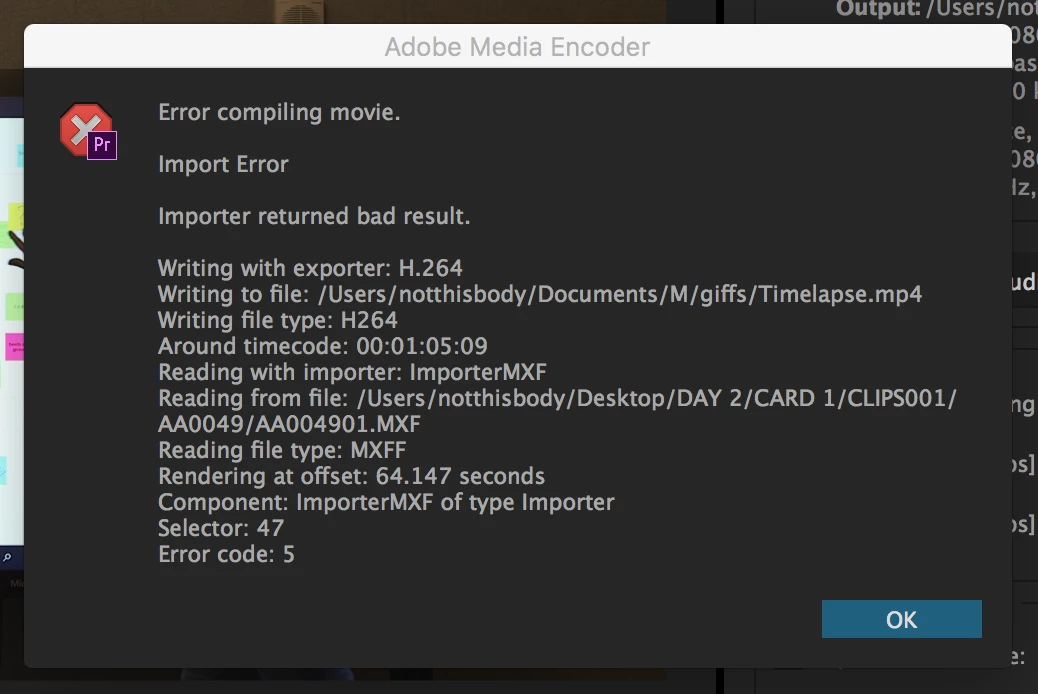
what i get as a message is : Error compiling movie - Import error - Importer returned bad result

see image bellow
36 replies

Participant
August 12, 2017

Hi,

I got the same error message when trying to render a stop motion I'm editing in premiere pro 2017. I ended up deleting the preview files as well as completely deleting all pictures associated with the error from the sequence and re-importing them and that has appeared to fix the problem.

Captain Dylan
Participant
June 26, 2017

I'm having the same exact problem as the OP.

I tried all the fixes above with no change. Now trying to shift over everything to a new sequence but the render is taking abnormally long as well. Fingers crossed.

Adobe when will this be fixed?

Captain Dylan
Participant
June 26, 2017

This did not work either. Here's a screenshot of the error.

Participating Frequently
June 20, 2017

Copying everything to a new timeline worked for me.  I also changed my sequence setting to ARRI from custom.  It was originally on ARRI then I changed it to custom in order to render the previews to Cineform.  From that point on I could not render to I-frame mpeg.  Creating a new timeline solved the issue.

ozcino
Participant
June 13, 2017

I had this error today. Took me two hours to figure out! After not being able to solve the issue with any of the tips above I tried to reder out (Not even export), and it would crash with importer error.

For me, fixing it consisted of removing all the previous previews and rendering up to the issue. I could then follow the timeline until it wasn't rendered anymore, that clip had the issue.

I removed an adjustment layer on that clip that I had tried to COPY from another adjustment layer, and that was the issue, apparently. Don't do that.

After that it worked again. But this was a hassle. And the error was so disconnected from the actually issue. Glad its working now.

Participant
May 14, 2017

Hey, I had the same problem but the fix was relatively easy just make a new sequence DSLR sequence worked for me, and copy all of your work into a new sequence that should work and the second solution would be to try Media Encoder good luck.

Kevin-Monahan
Community Manager
Community Manager
March 27, 2017

Hi Marija,

Please try taking all punctuation out of your sequence or output naming schemes.

Thanks,
Kevin

Kevin Monahan - Sr. Community & Engagement Strategist – Pro Video and Audio
Participating Frequently
June 7, 2018

Premiere Pro is the most —


Mod note: unhelpful rant removed.

trashcaneron
Inspiring
June 7, 2018

I think what ended up working for me was transcoding the original files that had the import error - and then everything worked fine. hope that's helpful!!

adrianap33656101
Inspiring
January 31, 2017

Hello

I had the exact same problem. As you all I tried different things and didn't work but then instead of export it, I sent it to Media Composer and it worked!

matte32009715
Participant
March 27, 2017

I'm still getting this same error, on footage with no speed effects applied. I've been having this issue across multiple premiere versions.

ADOBE THIS IS UNACCEPTABLE!

Participant
January 6, 2017

Can someone from Adbobe find a solution? I have to export a 10 min video with 2 cam, there is no effect (even speed, scale etc...) and it always FAILS. It's not OK at all, I've never seen that in previous version... Sometime after rebooting the computer it works, but 90% of the time it fails. Even on an other computer... it sucks.

paulc72907979
Participant
November 9, 2016

Hi all,

         I have been having the same problem today and I think I may have found a workaround for my problem at-least. To be honest when anything with Premiere and deleting the render files doesn't work I always do the same thing; I create an FCP XML file and re-import the project. This has worked on both projects so far, but I hope that I don't have to do this for too many projects, or everytime I close the program.

I also want to take this chance to make a larger point. I have been an editor for 10 years now and most of that was spent on FCP. Now don't get me wrong FCP did have its faults (General Error being one of them) but for the most part it was solid, straight forward and worked. When Apple decided to screw over the video creatives that had made it a success and release FCPX, I, like most editors worried about what to change to. We seemed to split into two camps, those who choose AVID and those who choose Prem. AVID is good (although prone to problems too) but the bigger issue is, most companies don't want to pay for it.

Prem did a great job of saying to old FCP editors "come on in, look we are like FCP and hey you can even have the same keyboard setup!" but to me it was the same old buggy Premiere that I had first had to cut on in University. In that time, to me, nothing has really changed. Sure they bring out new features and flash ways of doing things, but the core issues still remains. Premiere is unstable and not dependable. Speaking to an editor friend of mine recently he said that he often figures in two days to solve Premiere based problems like massive crashes, in to any timeline he gives a client. And he is right.

Adobe, you make some great creative products. And when they work together we as a community can make some truly awesome things. But I spend so much of my time finding work arounds, hunting around forums for solutions and ultimately trashing the same darn render files. More time that as a consumer I should ever have to do. I never update the latest release of your apps, because they are usually rubbish on release and I wait for the 0.1 version instead.

So, for the next version of Premiere (2018?) please take the time to get it right. Forget any new features like using bluetooth you no longer had to use your hands to edit, and make the thing stable. Get rid of all of these stupid little errors, which make editors (usually already under a great amount of time pressure) tear their hair out in large chunks. I will even come along and happily moan to your engineers if you like? Because at the end of the day all I want is a software I can rely on.

I will get off my soap box now and back to my edits.

Kevin-Monahan
Community Manager
Community Manager
March 27, 2017

Hi,

  • I spend so much of my time finding work arounds, hunting around forums for solutions and ultimately trashing the same darn render files.
  • please take the time to get it right.
  • Forget any new features like using bluetooth you no longer had to use your hands to edit, and
  • make the thing stable.

File all bugs and feature requests here.

Thanks,
Kevin

Kevin Monahan - Sr. Community & Engagement Strategist – Pro Video and Audio
Helistockter
Participant
September 19, 2016

I worked on a project on another system and then later imported the sequence via the premiere project file into the master session. Upon attempting to Render from In to Out, I would get this error:

Export Error

Error compiling movie.

Import Error

Importer returned bad result.

I'm guessing that it was attempting to reference render files from the second computer, which were no longer available. Here's what solved it for me:

I discarded all render files for the sequence using the Delete Render Files In to Out option. Then, when I would Render from In to Out, the successfully rendered clips would display a green bar above them, whereas the un-rendered clips displayed a yellow bar. I had one particular clip that caused the crash every time. I deleted this clip from the timeline, rendered from In to Out successfully (with a gap in my timeline). Then I replaced the clip and rendered once again.

Not an ideal workflow and I lost 15 minutes to this issue, but it was at least solvable for me in this case. I hope this helps someone!