

shooternz
Legend
April 20, 2017
Answered

Essential Graphics - Snap Graphic icon.

  • April 20, 2017
  • 2 replies
  • 3728 views

What does the Snap Graphics Icon for the Program Window do?

I am hoping its some kind of function option  that allows one to choose when to apply a Graphics Clip to the Sequence instead of it instantly / automatically doing so on the uppermost layer. (Which I dont like!!!)

FWIW -  Have only spent a short time with this new ESG and need to do a concentrated session with it.  After 25 years of the other way...this is kind of interesting.

Hope it develops somewhat. eg Rulers and moveable guide lines would have been good. (and obvious)

Feels like I am ducking and diving to find tools now as they are spread out in the panels . eg Centering functions

Is there a way to change the rotation point of a text or object.  Pin point seems to be fixed.
    This topic has been closed for replies.
    Correct answer Meg The Dog

    shooternz  wrote

    What does the Snap Graphics Icon for the Program Window do?

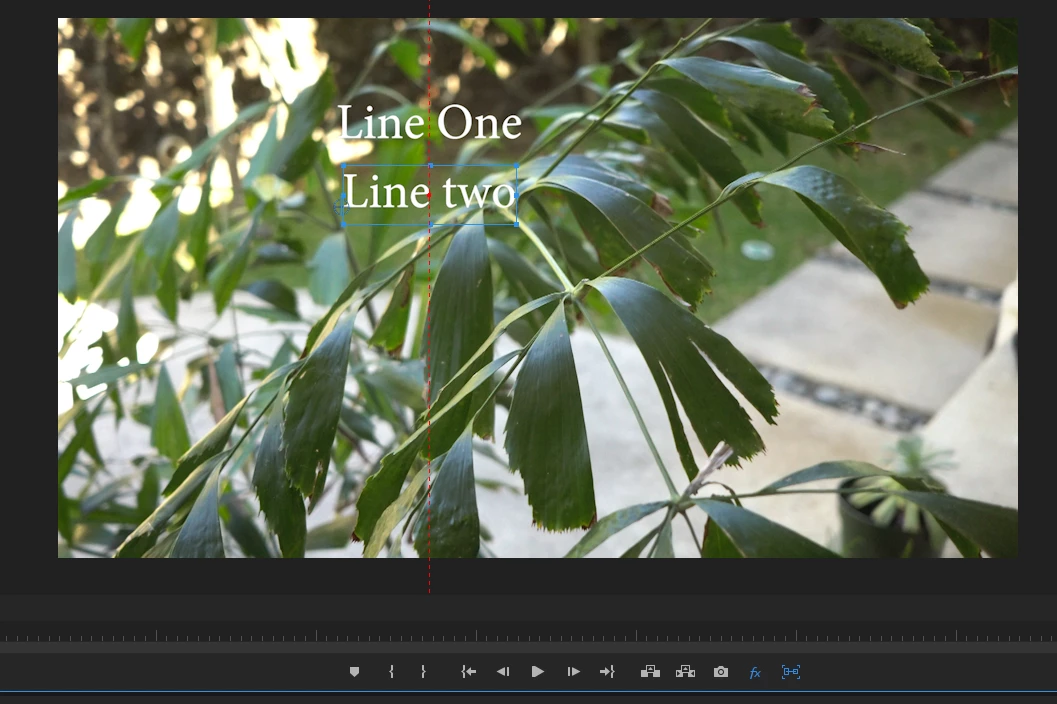
    It gives a snapping function to aligning or moving independent graphic elements   - in this case indicating and snapping when the second unit of type is center aligned with the first:

    MtD

    2 replies

    FocusPulling.com
    Known Participant
    October 18, 2017

    Really disappointing that this feature doesn't do what it would be the most useful for:  snapping assets to the exact edges of the frame.  That still is one of the slowest and most frequent things in my workflow, such as scaling pictures to fit precisely, etc.  No excuse not to expand the feature to that...

    jstrawn
    Legend
    October 19, 2017

    FocusPulling.com  wrote

    Really disappointing that this feature doesn't do what it would be the most useful for:  snapping assets to the exact edges of the frame.  That still is one of the slowest and most frequent things in my workflow, such as scaling pictures to fit precisely, etc.  No excuse not to expand the feature to that...

    It does do that.

    1. Turn on snapping.
    2. Click and drag a text, shape or clip layer in a Graphic.
    3. Look for the little red box on your layer.

    That red box is the snappee. It indicates which corner or center point will be snapping. The snappee shows up at whichever corner or center point was closest to the mouse when you clicked. Now drag that over to an edge of the frame. Once you get close enough, it will snappee the edge of the layer(s) tot he edge of your frame.

    See:

    Granted the red box is really small, and pretty hard to see in this view because it is over the snap line at this point. But you should be able to see it easily when you start dragging it. Unless you have a rect selected of the same exact color, then it's still kind of hard.

    You can also snappee the anchor point to points within its own or other layers. That was new for 11.1.2 but none of this is new for 12.0.

    Meg The DogCorrect answer
    Inspiring
    April 20, 2017

    shooternz  wrote

    What does the Snap Graphics Icon for the Program Window do?

    It gives a snapping function to aligning or moving independent graphic elements   - in this case indicating and snapping when the second unit of type is center aligned with the first:

    MtD

    shooternz
    shooternzAuthor
    Legend
    April 20, 2017

    Thanx Meg

    and...Thats an example of how the Tools are spread all over the interface!

    Inspiring
    April 20, 2017