


Participant
October 14, 2020
Answered

Export 2.0 and 5.1 audio in the same file

  • October 14, 2020
  • 2 replies
  • 3539 views

I need to export a ProRes 422 HQ containing both 2.0 and 5.1 audio within the same video file.

Does anyone know if this is possible as I can only seem to export one or the other via File>Export>Media>Audio>Audio Channel Configuration?
 

This topic has been closed for replies.
Correct answer Richard M Knight

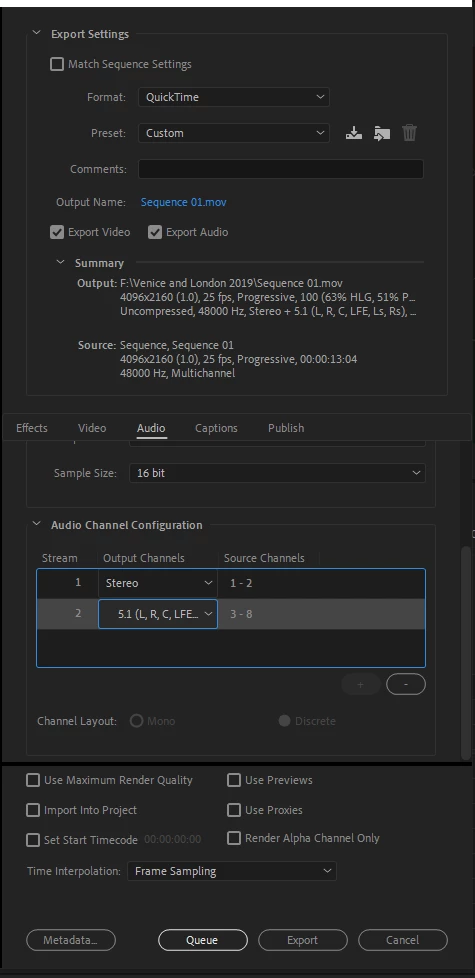
If you set up a sequence as an 8 channel multitrack with your stereo mix on tracks 1 and 2 and the surround on 3 to 8 then use these export settings:


I've never done this but it is a good place to start.


2 replies

Richard M KnightCommunity ExpertCorrect answer
Community Expert
October 14, 2020

If you set up a sequence as an 8 channel multitrack with your stereo mix on tracks 1 and 2 and the surround on 3 to 8 then use these export settings:


I've never done this but it is a good place to start.


Participating Frequently
December 9, 2023

audio channel configuration is nowhere to be found in adobe premiere pro 2023! What I can do? Where can I find it? because I need to export a music video with two audios (stereo and 5.1 dts-hd) please... someone help me! Thank you very much in advance!!!

Participating Frequently
December 11, 2023

First of all I want to thank you for the response and taking the time to explain to us because that is how you learn! Little by little I am understanding how the matter is to export it (although with several tests that I did for the issue of the audios, what seems too much to me is the issue of the weight of the final file) Therefore, returning to the topic of the matter to continue all the corresponding steps and that this project really turns out the way I want it to, my questions are the following:

Question 1: how can I start by correctly configuring the sequence in the TRACKS section (remembering that the video in MP4 format already comes with the audio track included in Stereo 2.0 and that on the other hand I have the audio of the same song in AC3 format in 5.1 DTS) since the idea is that it only has two tracks (Track 1 and Track 2) in order to be able to select them separately when playing!


If I'm going well until there...


Question 2: how is it configured here?


*I imagine that we must proceed to assign the track channel(s) to Audio 2 (5.1), remembering as I said before that I have the audio in a single file with AC3 format! (They are not several mono files) but a single file!!!

R Neil Haugen
Legend
October 14, 2020

Yea, like in Europe they at times have to export with say 5.1, stereo, and maybe five different talking tracks in different languages.


You need to set your sequence up for all of that first.


Neil

Everyone's mileage always varies ...
Participant
October 14, 2020

Thanks Neil.


So you're aware I have a 2.0 wav file and second wav file that's 5.1 (both supplied by the projects Sound Designer). I have set-up a new sequence with one video track (final video) and two audios tracks (1 x 5.1 and 1 x 2.0). But when I attempt to export the file via File>Export>Media>Audio>Audio Channel Configuration I cannot export both 2.0 and 5.1 within the same ProRes file.


Can you give any guidance in terms of getting past this so both 2.0 and 5.1 can be exported and included within the same ProRes 422 HQ file?