This topic has been closed for replies.
Correct answer R Neil Haugen

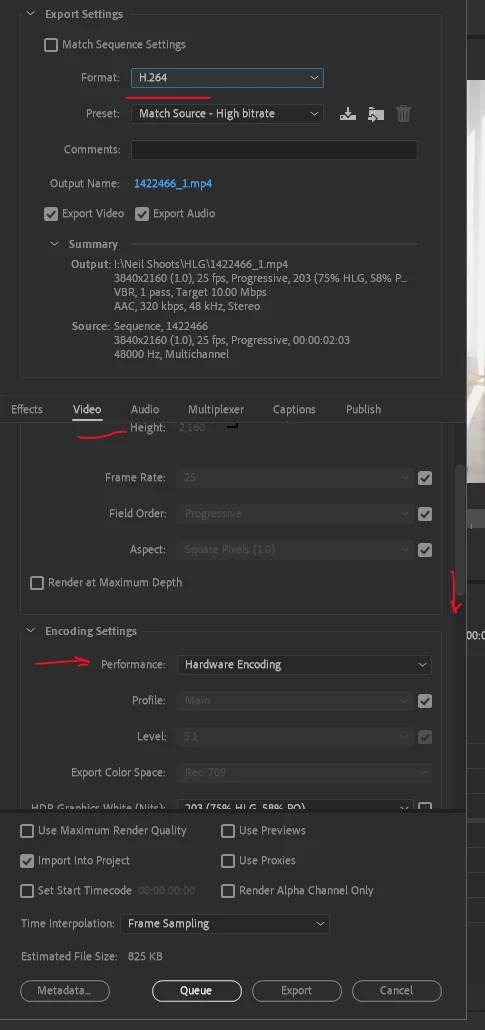
For H.264 exports, you go down to the Video tab, scroll down a bit until you get the option "Encoding Settings" ... see where mine shows "Hardware Encoding"?


Just use that drop-down to change to Software Only.


You can also go into the Preferences for Premiere and Media tab of the Preferences dialog, un-check hardware encoding for H.264/HEVC files.


Neil

2 replies

R Neil Haugen
R Neil HaugenCorrect answer
Legend
December 20, 2021

For H.264 exports, you go down to the Video tab, scroll down a bit until you get the option "Encoding Settings" ... see where mine shows "Hardware Encoding"?


Just use that drop-down to change to Software Only.


You can also go into the Preferences for Premiere and Media tab of the Preferences dialog, un-check hardware encoding for H.264/HEVC files.


Neil

Everyone's mileage always varies ...
MahaB82A
MahaB82AAuthor
Legend
December 20, 2021

Thanks.

Kevin-Monahan
Community Manager
Community Manager
December 20, 2021

Hi Maha,

Where it says "Hardware Encoding," choose Software Encoding instead. Let us know if that works.


Thanks,
Kevin

Kevin Monahan - Sr. Community & Engagement Strategist – Pro Video and Audio
MahaB82A
MahaB82AAuthor
Legend
December 20, 2021

Thanks, it works.