


Copy link to clipboard
Copied
Hello.
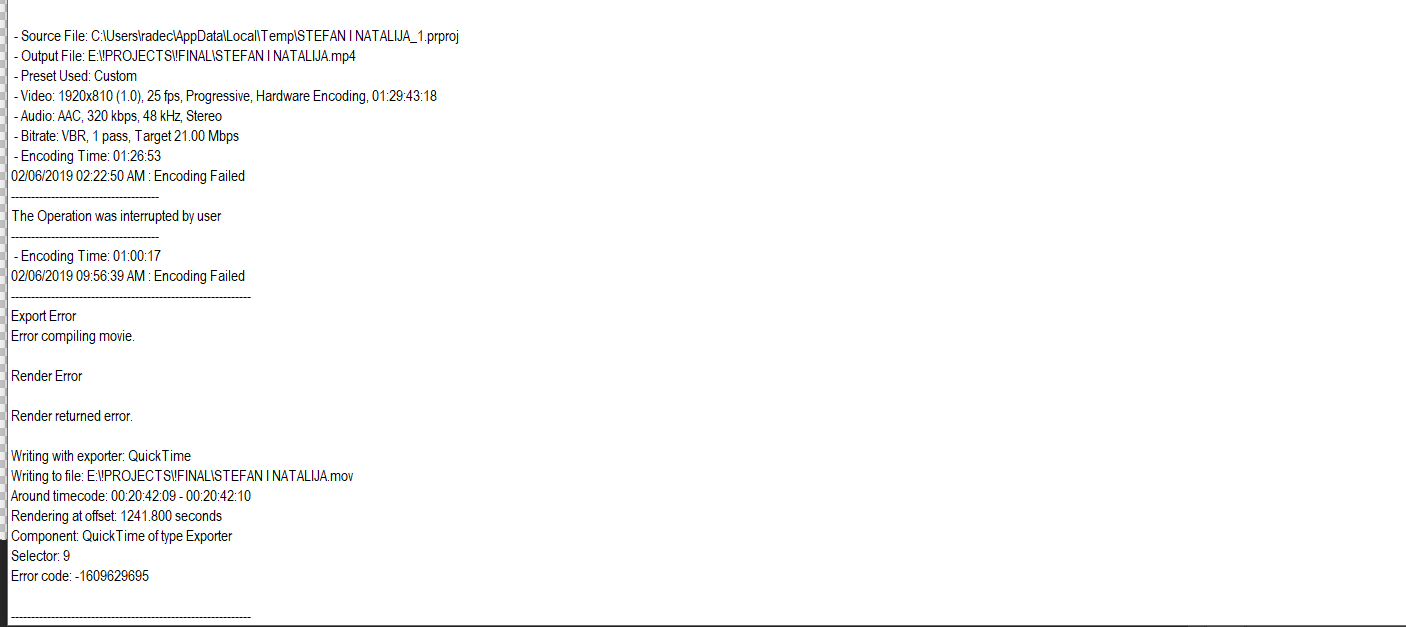
I cant export wedding for the first time ever. I try thru Premiere and AME, but I always get his message:
Does anyone know where is the problem ?
Thanks,
Rade


 1 Correct answer
I reinstal OS (Win 10) and than instal fresh version of Adobe Premiere.
Than I choose Mercury Playback Engine Software Only and It was sucessful.
Thanks

 6
Replies
6
6
Replies
6



Copy link to clipboard
Copied
It's an unusual pixel size, is it correct?
Copy link to clipboard
Copied
1920x810.
Its 21x9 picture format. But I think its not cause a problem

Copy link to clipboard
Copied
You need to fix whatever is on the timeline at the given time in the error message.
Can be anything: faulty clip, effect, audio, transition, color, you name it........
What i usually do is do remake that section and export to Cineform and put that on the timeline and export the entire timeline again.


Copy link to clipboard
Copied
Hi radec80212459,
Sorry to hear that you are facing this issue. Please try to switch the Renderer to Mercury Playback Engine Software Only (FAQ: How to change the Video Renderer in Premiere Pro?) and then check if it's exporting properly. Let us know if it helps.
Thanks,
Sumeet
Copy link to clipboard
Copied
I reinstal OS (Win 10) and than instal fresh version of Adobe Premiere.
Than I choose Mercury Playback Engine Software Only and It was sucessful.
Thanks
Copy link to clipboard
Copied
Again, I have the same problem.
I dont know what to do. I try with reinstaling OS and Adobe suite.


Get ready! An upgraded Adobe Community experience is coming in January.
Learn more
 AdChoices