I know that ppi is pixels-per-inch. I guess the answer from all of you should have been either:
a) you do not know if a frame can be exported at any higher than a monitor's resolution; or
b) no, one cannot get any higher resolution
I will continue to search the web. Thanks,
Gustavo
Gustavo,
Let's go about this a different way. You are using words and we are using words and I don't think they mean the same thing to you as they do to us. We are talking about the number of pixels available, and I have a feeling you are looking to create more pixels for what you would call a higher resolution. Stick with me for a moment and I think I can clear this up.
You have a video from a DVD. You brought it into Premiere Pro. Let's assume for the moment that it is a standard definition DVD, so you either imported it as 720X480 or you imported it as 640X480. You didn't say, so those numbers could be wrong. But let's use 640X480 as an example since it uses square pixels and therefore easier to do the math.
Export the 640X480 image by clicking on the Export Frame button (the little camera) and then open that file in Photoshop. Under Image / Image Size you will see a window that looks like this:
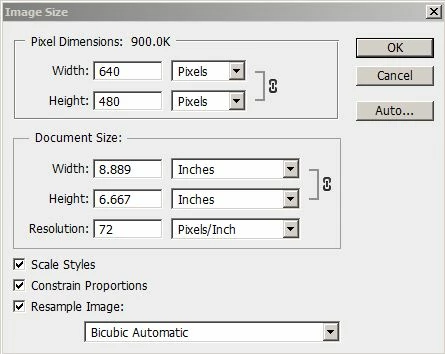
To a video person, the important part of the window shown is the Pixel Dimensions. We don't care about anything else. The resolution of 72 pixels per inch is incidental to us.
However, if I wanted to print the image, things get interesting. As you can see in the window, if I print at 72 pixels per inch, I get a picture that is over 8X6 inches. The problem is that nobody prints at 72 ppi. We print at 300 ppi or more.
So what happens. Instead of a nice large print, we get something much smaller as shown below.
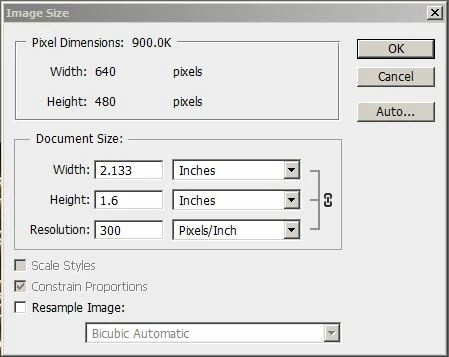
We basically get a large postage stamp.
What you might be asking, however, is how to get a picture that is 640X480 pixels enlarged to a size that would print that image, using 300 ppi, at the 8X6 size. The word for that is not resolution exactly. Not to us. The word for that is upscale. Make it bigger. More pixels. Pull pixels out of the thin air and assign them to places in the image.
The answer to your question is probably quite simple. No, you can't get a higher resolution unless you upscale it in Premiere Pro, and that is not the right program for the task.
Upscale it in Photoshop. Or, purchase a third party application designed to upscale frame grabs into something you can print at a decent size.



 AdChoices