

just edit
Known Participant
February 25, 2023
Question

Export ProRes and H264 create and audio track not refleting the original timeline (unsyncs)

  • February 25, 2023
  • 1 reply
  • 393 views

Hello,

Another day in the wonderful world of Premiere Pro bugs (23.2, Windows 11 Pro.

  • 10 mins timeline (2160x1920@25fps) with mixed R3D, H264, WAV and MP3 footages.
  • Some AEP simple titles in the timeline (not rendered)
  • Some AEP renders in ProRes 422HQ or 4444
  • Some shots are "pluginized" with Univers VHS.
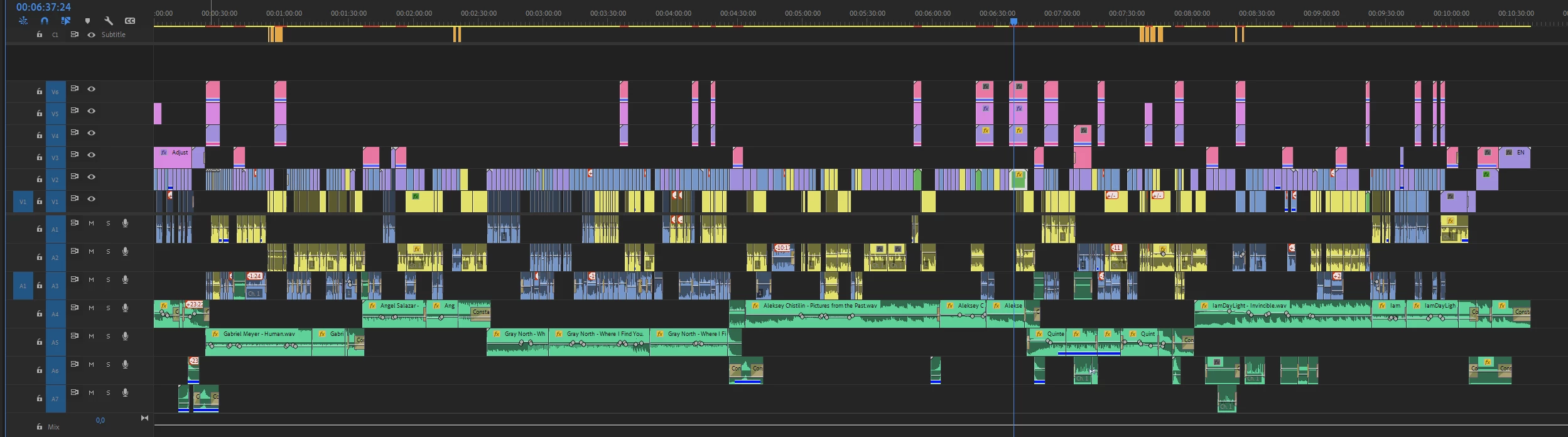
I did an export of a this timeline in ProRes 422HQ (same res). The sound track of my export has some weird unsync (generally during crossfade). The sound gets unsync then go back in syn few secondes after.

I tied to export the exactly same timeline as a WAV only file and put toghether in sync the ProRes and the WAV in a timeline. Here is a example of the sync bug :

In blue : ProRes export
in green : WAV only export
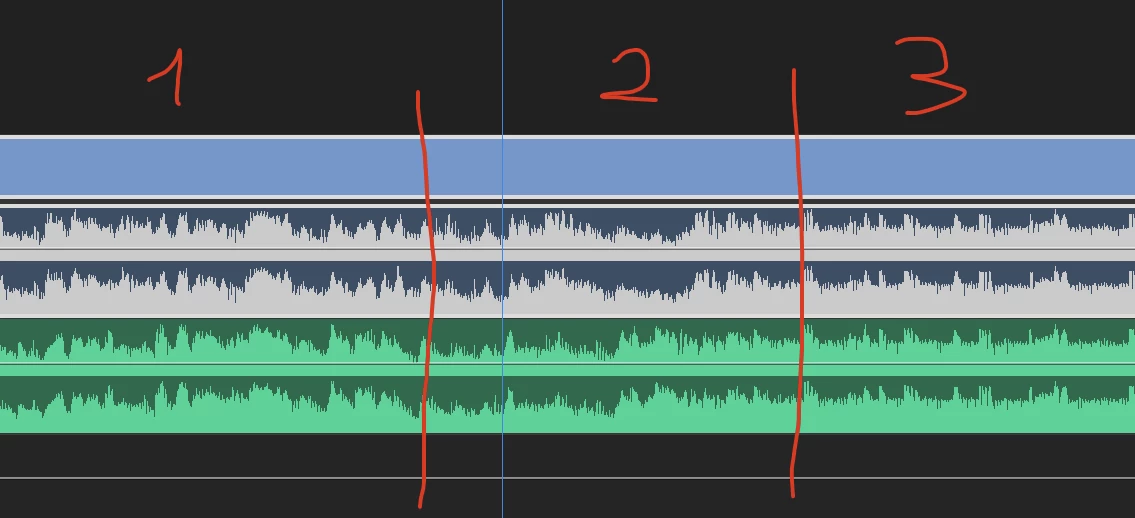
1 & 3 section : in sycn

2 section : unsync

This happen nearly 10 times in my 10 mins timeline.

FYI, here is the original portion of this timeline :
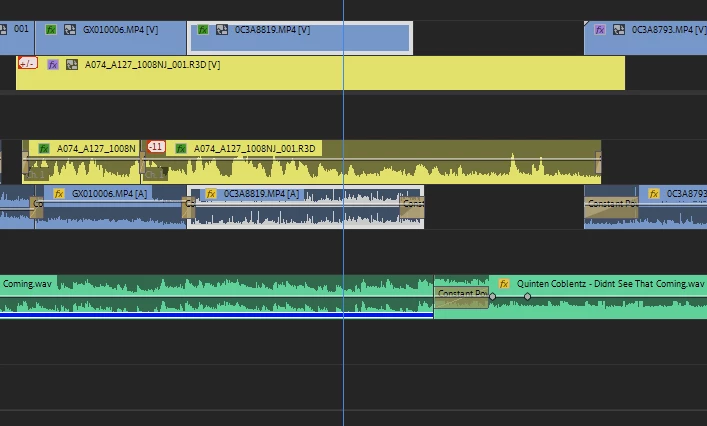
Very few shots : H264 from Canon R5, R3D from RED Komodo, 3 audio tracks (2 from cams, 1 music in WAV). The only FX used is a simple Lumetri Color.

Any suggestion ?

noar


This topic has been closed for replies.

1 reply

Kevin-Monahan
Community Manager
Community Manager
April 26, 2024

Hello @just edit,

Thanks for the message. It’s been a long time since you filed this bug, and I apologize for the lack of a response. Are you still having this issue? If so, the team will need more information from you to reproduce the bug. Can you provide the information required here? How do I write a bug report?


I'll move your post to the Discussions board while we await your information.


Thanks,


Kevin

Kevin Monahan - Sr. Community and Engagement Strategist – Adobe Pro Video and Audio
just edit
just editAuthor
Known Participant
April 26, 2024

Hello Kevin,

Thank you for taking the time to answer, even more than a year late. I admit that I no longer encounter this bug since I have permanently switched to DaVinci Resolve.
The latest (pseudo) developments in Premiere and the recurring stability and performance problems encountered with each new version have taken their toll on my patience. To be more specific, my decision was made during the editing of a documentary series of around twenty minutes, in 2 episodes (same cameras: RED, Canon R5 Mavic Pro, GoPro, same editing computer and same output card and harware) .

I edited the first episode on Premiere Pro and the second on DaVinci Resolve. I was therefore able to make a direct comparison in terms of reliability and performance between the two software programs. The verdict is final. At the end of the editing of the first episode, I had to restart Premiere around 10 times a day to be able to continue working correctly (GPU memory saturation, slowdowns, and many other things).
On DaVinci Resolve (2nd episode), I had no problems during ALL the editing process and I was finally able to concentrate on my job again: EDITING.
To be clear : I have no shares in Blackmagic company. I'm just a freelance editor for more than 25 years.

I must admit that paying monthly for more than 10 years for a software that is not evolving in the right direction for professionals like me is starting to irritate me to the highest degree. For all these reasons, I am now considering taking a further step and canceling my Adobe subscription.

I don't think I'm the only one who thinks all this and I feel a growing discontent as well as a certain disinterest in Premiere in the post-production world for several years. I also unfortunately think that Adobe hardly cares about its customers since the subscription system introduced a few years ago allows a regular and certain inflow of money without the need to significantly evolve the software or at least to stabilize it.

I realize that you have nothing to do with this and that you basically just wanted to help me. I sincerely thank you for your approach and wish you the best. Really.

Sincerely,
noar

#justedit

Kevin-Monahan
Community Manager
Community Manager
April 26, 2024

Hello @just edit,

Thanks for the response.

quote

Thank you for taking the time to answer, even more than a year late. I admit that I no longer encounter this bug since I have permanently switched to DaVinci Resolve.


Cool, thanks; I am sweeping these forums to see if there are still issues anyone has trouble with. Let me know if you ever need assistance with Adobe digital video and audio issues. I don't have such problems, but I may have a different workflow than others. I tend to transcode everything to a mezzanine codec and edit that way.

Are you sure Resolve was not creating similar files or proxies on ingest? Some editing platforms do that automatically. You can transcode on ingest in Premiere Pro, making the operation seamless. This works great for me.

quote

the recurring stability and performance problems encountered with each new version...


I realize that you have nothing to do with this and that you basically just wanted to help me. I sincerely thank you for your approach and wish you the best


Thanks for expressing your opinion. Let me know if you need any help developing a better workflow for your Adobe software.


Thanks,
Kevin

Kevin Monahan - Sr. Community and Engagement Strategist – Adobe Pro Video and Audio