Known Participant
July 4, 2010
Answered

export to m4a or other iphone ready file formats

  • July 4, 2010
  • 1 reply
  • 37112 views

currently, I output to flash, then use a video converter to put it into m4a, which is annoying, time consuming, and annoying - did I mention annoying?

How do we use CS4 premiere to export directly to an iphone ready format? I can't figure it out.

Thanks!


Mark
    This topic has been closed for replies.
    Correct answer Ann Bens

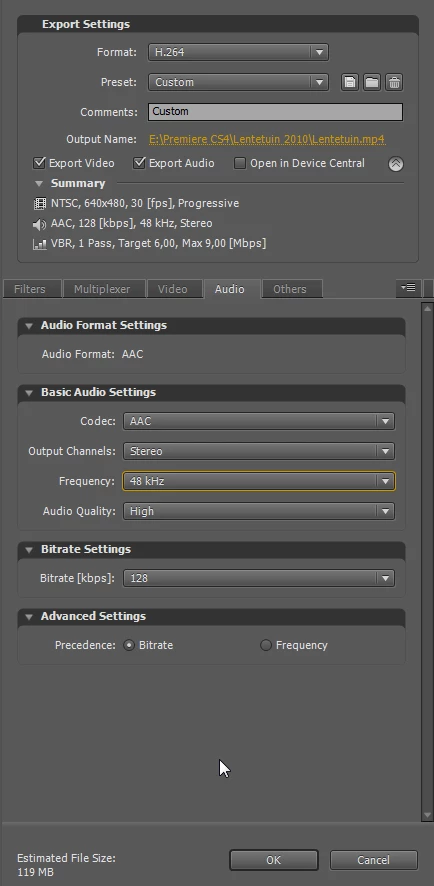
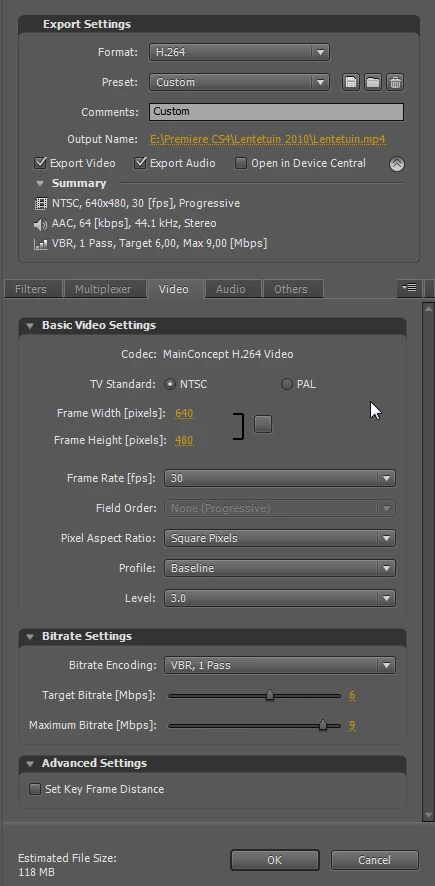
    Try this. Preset YouTube and tweeked with preset iPhone settings from CS5.

    Did an export from CS5 and it worked perfectly, expect CS4 will be the same.

    And yes the extention is mp4.

    For good quality turn on Max Render Quality

    1 reply

    Ann Bens
    Community Expert
    Ann BensCommunity ExpertCorrect answer
    Community Expert
    July 4, 2010

    Try this. Preset YouTube and tweeked with preset iPhone settings from CS5.

    Did an export from CS5 and it worked perfectly, expect CS4 will be the same.

    And yes the extention is mp4.

    For good quality turn on Max Render Quality

    Known Participant
    July 4, 2010

    thank you - the settings are under h.264.

    What is "max render quality"- where do I set that setting! PLEASE! :-)

    Interesting. as I tweak settings, only some of them create videos that my iphone will accept.

    640x480 is the largest size

    Interestingly, I don't see any difference between the stock settings for
    "apple ipod video large", with video bit rates of "target = 1" "max = 1.4" and

    same settings but "target = 10" "max = 10"

    the file size is 3 times larger, but the quality is indistinguishable when I put it full screen - is that normal?

    Felix L Radinger
    Participating Frequently
    December 4, 2010

    What is the largest Frame Size that the iPhone accepts?

    I know that earlier iPod Video units would only accept some pretty small Frame Sizes.

    Good luck,

    Hunt


    iphone 4:

    • Video formats supported: H.264 video up to 720p, 30 frames per  second, Main Profile level 3.1 with AAC-LC audio up to 160 Kbps, 48kHz,  stereo audio in .m4v, .mp4, and .mov file formats;
    • MPEG-4 video, up to  2.5 Mbps, 640 by 480 pixels, 30 frames per second, Simple Profile with  AAC-LC audio up to 160 Kbps per channel, 48kHz, stereo audio in .m4v,  .mp4, and .mov file formats;
    • Motion JPEG (M-JPEG) up to 35 Mbps, 1280 by  720 pixels, 30 frames per second, audio in ulaw, PCM stereo audio in  .avi file format

    • Support for 1024 by 768 pixels with Dock Connector to VGA  Adapter; 576p and 480p with Apple Component AV Cable; 576i and 480i with  Apple Composite AV Cable

    iphone 3g/s:

    • Video formats supported: H.264 video, up to 1.5 Mbps, 640 by 480  pixels, 30 frames per second, Low-Complexity version of the H.264  Baseline Profile with AAC-LC audio up to 160 Kbps, 48kHz, stereo audio  in .m4v, .mp4, and .mov file formats;
    • H.264 video, up to 2.5 Mbps, 640  by 480 pixels, 30 frames per second, Baseline Profile up to Level 3.0  with AAC-LC audio up to 160 Kbps per channel, 48kHz, stereo audio in  .m4v, .mp4, and .mov file formats;
    • MPEG-4 video, up to 2.5 Mbps, 640 by  480 pixels, 30 frames per second, Simple Profile with AAC-LC audio up to  160 Kbps, 48kHz, stereo audio in .m4v, .mp4, and .mov file formats
    • Support for 576p and 480p with Apple Component AV Cable; 576i and 480i with Apple Composite AV Cable
    ...and keep smiling.