


Participating Frequently
October 26, 2023
Question

Exported audio quality after export

  • October 26, 2023
  • 6 replies
  • 9167 views

Hey everyone,


I've been doing some work as a podcast editor, which just involves adding an intro/ outro to an interview, and exporting it, one video version, one audio version (sometimes I run it through Adobe Podcasts too).


My problem is that the intro sounds much worse after exporting it. When I listen to it inside Premiere Pro it sounds awesome, but after export it sounds much lower quality. The actual interview part doesn't seem to be effected as much. All I'm doing to the intro is adding a fade in/out. Listening to it on the default windows media player, using noise cancelling headphones.
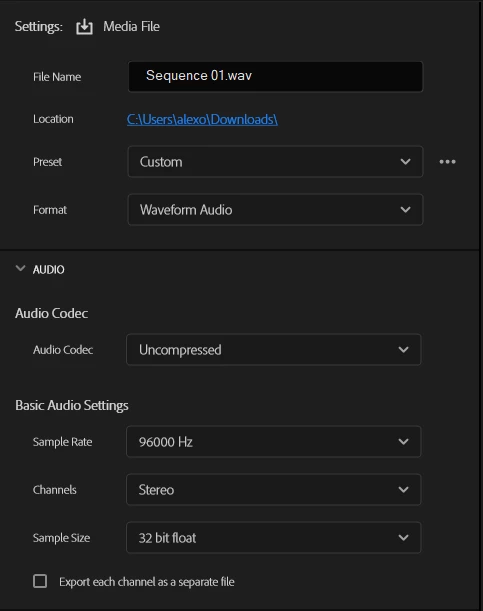


These are my export settings. Sidenote: I'm not very knowledgeable about this sort of stuff, I just selected the highest options! Any advice is appreciated 🙂

This topic has been closed for replies.

6 replies

MyerPj
Community Expert
October 30, 2023

The best way to test, to eliminate stuff like Potplayer or VLC, (which was a good thing to note, TekT) is to import it back into PP. I've downloaded everything you put on here. This latest bit, I download into and the prproj, and I exported the first 10 seconds with into and couldn't hear a difference between Potplayer, Vlc or PP. I imported the 10 second sequence and I put a few cuts in so the timeline looks like this, and I couldn't hear any difference between Into and the sequence mp4.


New Participant
October 30, 2023

I was having a similar issue.  I figured out that it was PotPlayer that was making it sound like it was being played through crappy speakers.  I opened the file in VLC and it sounded like it did on the timeline.  I haven't figured out what setting is causing this in PotPlayer.  Hope this helps.

R Neil Haugen
Brainiac
October 28, 2023

What I'd suggest is take the original file into Audition ... convert the 41kHz to 48kHz ... then use that as the audio in Premiere, so that it is front-to-back 48kHz sound.


Everyone's mileage always varies ...
Christian.Z
Community Expert
October 28, 2023

noise cancelling heaphones... 

I don't believe you will get accuracy with that. Try listening to it with the noise canceling turned off

Participating Frequently
October 28, 2023

Same problem no matter what speakers, noise-cancelling, media player, etc I use.

MyerPj
Community Expert
October 28, 2023

Why don't you just try the default settings.


Averdahl
Community Expert
October 26, 2023
quote

...I just selected the highest options! Any advice is appreciated 🙂


By @Alex322816676rxe


That may be the issue. Watch out for Sample Rate and Sample Size.


Premiere Pro is a video editor and works best with 48000 Hz sample rate and 16-bit sample size, in and out to from the app. So if you for example deviate from that and import 44100 Hz audio and then force Premiere Pro to upsample the audio to a whopping 96000 Hz upon export one can expect issues. Or, importing 96000 Hz audio and trying to export it to 48000 Hz can be troublesome as well. Mixing different Sample sizes in one project can be an issue as well. Premiere Pro as a video editor is not so good at those things compared to let´s say Adobe Audition that is a audio editor. 


In your case now, lower the Sample Rate at export so it better matches the audio you have in the project. (start with 48000 Hz) Maxing everything out is never a magic recepie for best results.


The same goes for the Sequence Settings, maxing out the Sample Rate just for the sake of it is risky as well.

Participating Frequently
October 28, 2023

Thanks for your reply, I checked the codecs of the intro with VLC player and it said this: 

So I changed the export settings to this:


I still have the same problem, it sounds much better before I put it through Premiere Pro. I've attached some small samples for you to have a listen to yourself. One .wav and one .mp3.


Appreciate all your help 🙂


Averdahl
Community Expert
October 28, 2023

You're right, when I export them in a new project without any editing it sounds much better. It must be something I've done inside Premiere Pro. The strange thing is that it sounds fine on the Premiere Pro timeline, and only sounds bad after I export it.


The pause at the beginning is on purpose, we want a bit of a gap before the start of the podcast. 


I tried deleting the clip entirely, and reimporting it, but it still sounds horrible. The only thing I have added is an exponential fade on both sides... I tried it without the fades, still no difference.


I'm running the latest version of Windows 10, and Premiere Pro 24.0. 


quote

I tried deleting the clip entirely, and reimporting it, but it still sounds horrible. The only thing I have added is an exponential fade on both sides... I tried it without the fades, still no difference.


By @Alex322816676rxe


I would have done:

In Windows Explorer, copy and then rename the copy "fotn intro before export.mp3" to someting else, such as test.mp3, and import that file and use that file instaed of "fotn intro before export.mp3". Or, since Premiere Pro sometimes have issues with .mp3 files i would have opened it in Adobe Audition and then go to File > Save As and then change the Format to Wave PCM. Click OK to save it and use that file in Premiere Pro.


Regarding .mp3:
You provided the file named "fotn intro after export.mp3" and i assume that Premiere Pro created it. When i try to import it i get an error; "We were unable to open the file on disk.". So .mp3´s can be problematic.