


New Participant
October 21, 2023
Answered

Exporting to Encoding

  • October 21, 2023
  • 1 reply
  • 554 views

Is there a way in Premiere Pro 24.0 to go from Edit directly into Media Encoder and skip the Export page?


I press Ctrl+M and it takes me to the Premiere Pro Export screen, I want to press Ctrl+M and go straight to Media Encoder.

This topic has been closed for replies.
Correct answer Averdahl
quote

Is there a way in Premiere Pro 24.0 to go from Edit directly into Media Encoder and skip the Export page?


By @lloydf20073000


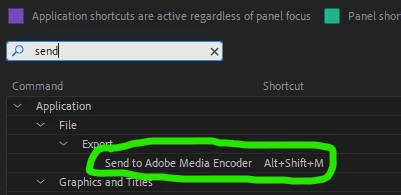
Yes, use Alt+Shift+M to trigger the Send to Adobe Media Encoder command. 


To map it to Ctrl+M, press Ctrl+Alt+K to launch the Keyboard Shotcuts dialog and type send and remap or add Ctrl+M.


1 reply

Averdahl
AverdahlCorrect answer
Community Expert
October 21, 2023
quote

Is there a way in Premiere Pro 24.0 to go from Edit directly into Media Encoder and skip the Export page?


By @lloydf20073000


Yes, use Alt+Shift+M to trigger the Send to Adobe Media Encoder command. 


To map it to Ctrl+M, press Ctrl+Alt+K to launch the Keyboard Shotcuts dialog and type send and remap or add Ctrl+M.


New Participant
October 23, 2023

Thank you, I changed the shortcut and it did excatly what I wanted it to do.