


Inspiring
September 11, 2017
Answered

Exposure changes in export but OK in Program Monitor; CUDA/max quality off

  • September 11, 2017
  • 1 reply
  • 5004 views

I have a serious problem with Premiere Pro CC 2017.1.2 where my entire video is perfect in the Program Monitor but the exported video has sections (particularly in mostly-black cuts) where the exposure of the entire video changes and may do so several times even in a single 8-second cut with no effects at all. I have found complaints of "flickering" and other export issues but they do not seem to cover my issue at all.

To eliminate possible solution suggestions, here is what I have tried so far with zero success:

  • Switch Mercury Playback Engine to Software Only
  • Disable maximum render quality
  • Disable render at maximum bit depth
  • Disable compositing in linear color
  • Use AME to encode instead of Premiere, both with CUDA and Software Only
  • Encode to (AVI) Ut Video Rec709 422/420/RGB; H.264; and (AVI) Uncompressed UYVY
  • Played export files in MPC-HC and Windows Media Player

In every single case, my export's exposure always changes during playback for no apparent reason. If you have a player that can handle Ut Video Rec.709 4:2:2 you can watch this render which exhibits the symptoms. The candles do not flicker in the original footage and should be the same level of brightness throughout the entire pan. I can provide an MP4 encode if preferred. There are other parts of this project that have this issue if more footage is needed.

Once again, I must stress that the Program Monitor ALWAYS shows the video correctly; the bad output is exclusive to when I export and is consistently reproducible.
This topic has been closed for replies.
Correct answer jodyb78477667

i believe there's an opengl video plugin for mpc-hc.


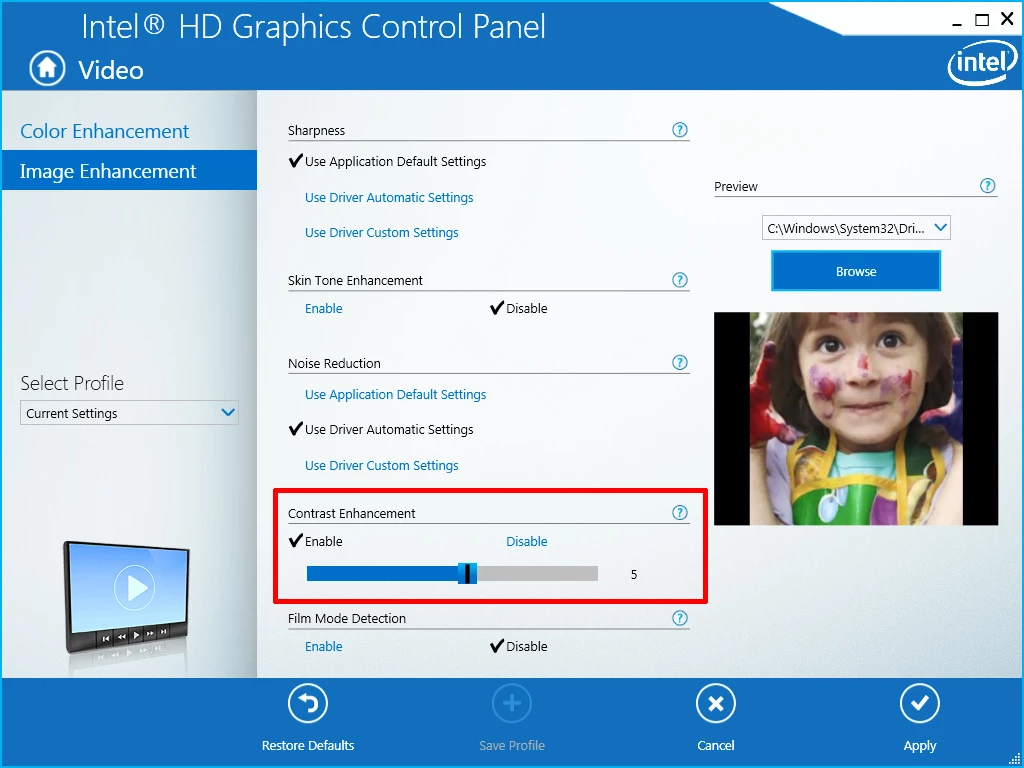
Finally (!!!) found the culprit. The problematic setting is outlined in red and needs to be disabled. Exact path to get here was right-click on desktop -> Intel Graphics Settings -> Video -> Image Enhancement. I hope this info helps someone else who runs into this same ridiculous problem. This also explains why it was only happening during playback and happened in two totally different players.

1 reply

R Neil Haugen
Legend
September 11, 2017

What's the media involved? Are you using any AE comps? Is Lumetri or other PrPro effect used on the sequence?

A bit of info of your hardware might be useful ...

Neil

Everyone's mileage always varies ...
Inspiring
September 12, 2017

If you look at the link in the first post, it is a 9-second clip of affected exported footage. In the sequence, that clip has cross-dissolves in/out but otherwise has zero effects involved, not even Lumetri Color. No AE at all. The exposure problem happens outside of the cross-dissolve intervals so I doubt they have anything to do with it. My hardware should theoretically be irrelevant since the issue is happening even with everything set to Software Only, but I'm on an Asus GL502VT laptop with a Core i7-6700HQ, a hybrid graphics GeForce GTX 970M and Intel HD Graphics 530.

R Neil Haugen
Legend
September 12, 2017

I looked at the link, and ... I'm having trouble seeing the issue. The candles jump in location over the first few seconds, but steady down as the guy comes into the background. I watched quite a number of times, but ... I could only see a problem with jumping candles, not with flickering or exposure issues. Was watching both highlights and shadow areas.

Neil

Everyone's mileage always varies ...