
Participating Frequently
January 9, 2025
Question

Fehler Audio Export in H.264

  • January 9, 2025
  • 7 replies
  • 636 views

Premiere Pro 25.0.0 | MacBook Pro M1 | macOS 14.1.2


Seit kurzem werden meine Videos immer mit Audiofehlern exportiert. Mitten im Video fehlen plötzlich 3 Minuten Audio. Bei erneutem Exportieren fehlt ein Stück Audio an einer anderen Stelle. Ich habe schon im Forum geschrieben und scheinbar liegt es am H.264 Codec und VBR. Allerdings schneide und exportiere ich genau die Projekte, bei denen jetzt aus dem Nichts Felher auftreten, schon seit Jahren ohne Probleme. Wie lässt sich dieses Problem fixen?


Das Ausgangsmaterial ist immer unterschiedlich: Von Zoom-Videos (one Take, 1 Tonspur) bis hin zu Online Seminarvideos mit 1-2 Tonspuren, Video Podcasts. Hauptsächlich tritt das Problem bisher bei Langformat-Videos auf.  Bisher lässt sich kein gemeinsamer Nenner finden, worauf das Problem zurückzuführen ist. Weder liegt es an der Ausgangs Bitrate, noch an dem Material... Und wie gesagt: ich schneide seit Jahren Videos wie diese, immer ohne Probleme. Plötzlich kann ich mich nicht mehr auf den Export verlassen.

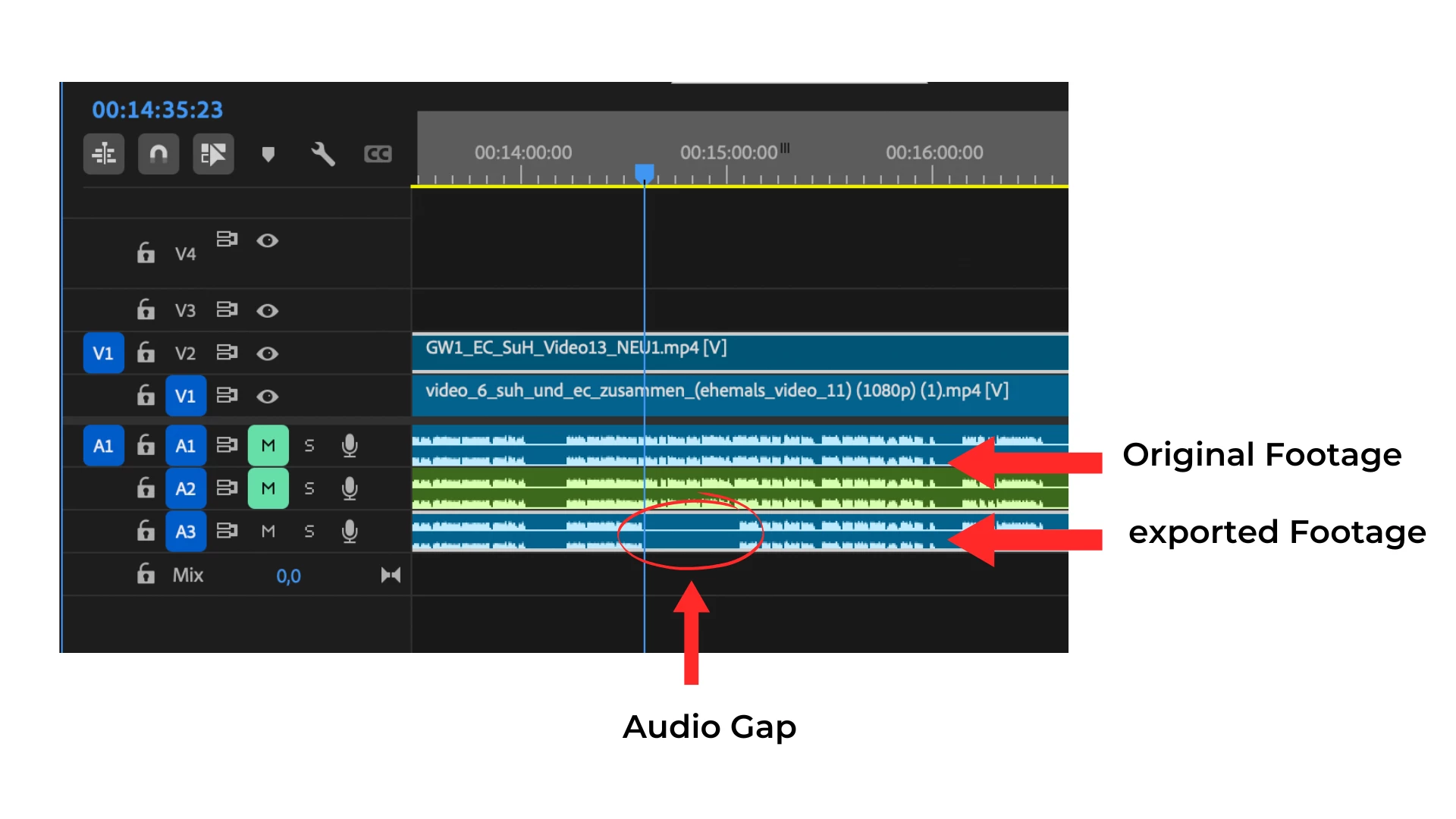
Ich habe auch schon nur Audio exportiert und diese dann erneut mit dem Video exportiert, auch das hilft nicht (Beispiel in meinem Screenshot - deswegen 2 obere Audiotimeslines). Auch bei älteren Premiere Pro Versionen tritt der Fehler auf.


Ein Workaround via Handbrake wurde mir auch schon empfohlen, aber das kann nicht die Lösung sein! Das nimmt zu viel Zeit und Aufwand in Anspruch. Und wenn ich mit einer professionellen Videoschnittsoftware arbeite, erwarte ich auch, dass sie technisch funktionert und nicht dass sie meinen Arbeitsprozess einschränkt. 


Ich hoffe auf eine Lösung und danke im Voraus für den Support.


Best,

Anne 
 

7 replies

MyerPj
Community Expert
Community Expert
January 21, 2025

Just a quick note, I haven't heard of a problem with VBR variable bit rate. But there are issues with VFR variable frame rate, which I believe is what zoom produces, and most screen capture software.


So, the option to use something like Shutter Encoder to get rid of the Variable frame rate files, which are what typically causes problems. Use Convert the files (before editing) to constant frame rate. Maybe try ProRes LT or even ProRes PROXY format within Shutter Encoder for easy to edit formats with 'better' files size.
https://www.shutterencoder.com/en/


anneb0607Author
Participating Frequently
January 13, 2025

Hi @jamieclarke - I'm exporting always to my external storage - in most cases to my Lacie. I tried 3 exports to another external storage, which is also an EXFat. It worked out 3 times without issues. So maybe my Lacie is the problem. I'll keep an eye on that the next days with upcoming exports and get back to you. Thank you!

anneb0607Author
Participating Frequently
January 21, 2025

Hi @jamieclarke 


Unfortunately, after exporting a few videos, I can't give any positive feedback. The export error still exists. I have tried the following variants:
- Export to another external hard disk (SanDisk) - works in 3 out of 5 cases
- Export to the desktop - also works in 3 out of 5 cases

So it can't be the hard disk - the export location. Here too, the audio export errors occur randomly with different sources.

What now?

jamieclarke
Community Manager
Community Manager
January 21, 2025

Hi @anneb0607 - Can you try moving all of your media to a drive that is not formatted as ExFat.

jamieclarke
Community Manager
Community Manager
January 13, 2025

Hi @anneb0607 - I wonder if it's your EXFat drive.  Exfat is a terrible format to edit with, there are a lot of corruptions that can happen.  Are you exporting to your Lacie or your internal hard drive?

anneb0607Author
Participating Frequently
January 13, 2025

Hey @jamieclarke - thank you for your support. I do not have added any keyframes to the audio. Furthermore it's absolutly randomly - one time it's 1 Minute in the middel of the video - at the next export it's somewhere in the end of the footage. So it seems like it's not really related to something, it's absolutly random and always a different audiopart that's missing. And in 1 out of 10 exports it works correctly. And it occurs with different footage. So the trouble is with nearly every Premiere Pro Project with videoexports more than 15-20 minutes. With Short videos I haven't had this issue so far - and I hope it wont occur!

jamieclarke
Community Manager
Community Manager
January 10, 2025

Hi @anneb0607 - Do you have any keyframes in your audio mix track?  You can check by opening your audio track mixer and scrubbing around the timecode if the bars are moving then keyframes are being generated, Or are you saying you import your media clip > right click select new sequence from clip > and then export?

anneb0607Author
Participating Frequently
January 10, 2025

Hi Jamie, thanks for your reply.


further information for the bug report:
Adobe Premiere Pro version number: Premiere Pro 25.0.0 (build 61)
Operating system: macOS Sonoma 14.1.2
System Info: 
MacBook Pro M1 2020, 16 GB memory
I'm mostly editing my videos from my hard drive Lacie 5TB ExFAT


I am not using any effects in this example. The green audio is the exported audio of the original material. I read that as a solution to the problem, but it didn't work. So this is the same audio track as the original material as an export.

The problem does not occur with a specific project, but with several different video projects. I usually export my footage with the following settings:


High Quality 1080p HD 


jamieclarke
Community Manager
Community Manager
January 9, 2025

Hi @anneb0607 -  Thanks for submitting your bug report. We need a few more details to try to help with the issue.
Please see, How do I write a bug report?


Are you using any effects?  Can you post a screenshot of your export settings?

I see an arrow pointing to the original footage, but no arrow to the green footage.  What is your green audio?
Sorry for the frustration.